

10-Bay USB 3.2 Gen 2 SATA Docking Station - High-Capacity DAS
10-Bay USB 3.2 Gen 2 SATA Docking Station - High-Capacity DAS
Price subject to change. Tap below for current.
Couldn't load pickup availability
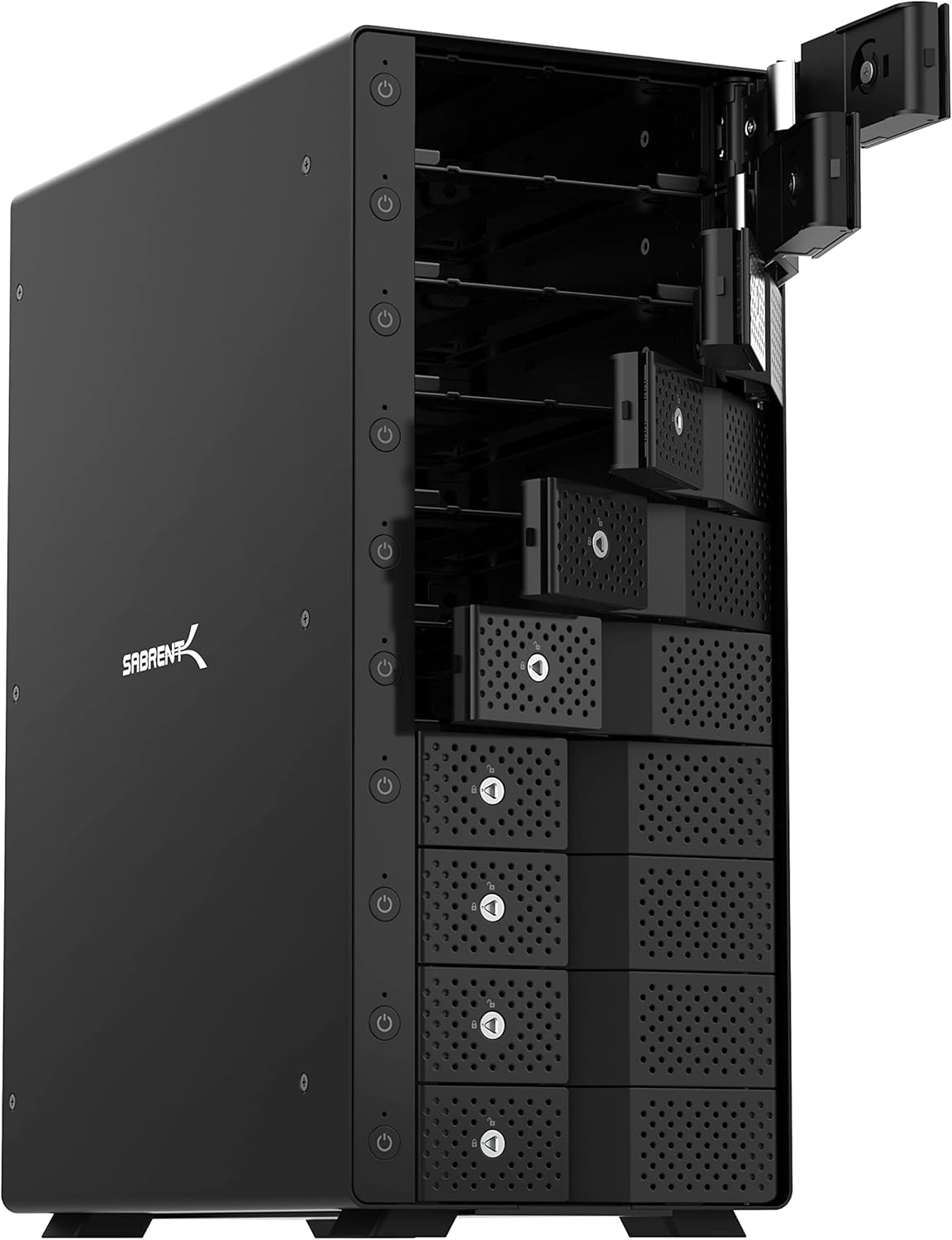
In this review the focus is on a practical, high-capacity direct-attached storage dock designed for people who need to manage many 3.5 in drives without complicated RAID. The unit's main appeal is its ability to connect up to ten individual SATA drives via a single USB-C port with full USB 3.2 Gen 2 throughput, which makes it ideal for video editors, backup technicians, and anyone who frequently swaps large-capacity drives. The review covers real-world usability, cooling and noise considerations, and why the tray-less, tool-free design changes how bulk drive maintenance is handled.
Key Features
- 10-Bay Direct-Attached Storage: Connect up to ten 3.5 in SATA HDDs or SSDs to a single USB-C port so each drive appears independently for flexible workflows.
- USB 3.2 Gen 2 Speed: Up to 10 Gbps transfer rates provide fast file moves and large payload handling, which helps content creators move media quickly between drives.
- Individual Power Control: Each bay has its own on/off switch and LED indicator so the user can power only the drives needed to save energy and reduce wear.
- Tray-Less Hot-Swap Design: Tool-free drive insertion and locking mechanisms let technicians swap drives quickly without trays or screws for faster service cycles.
- Aluminum Enclosure with Dual Fans: A robust metal frame plus two 120 mm fans improves heat dissipation and keeps drives cooler during sustained transfers.
- Backward Compatibility: Works with older USB 3.0 and 2.0 hosts for broad compatibility with existing systems and cables.
Who It's For
The docking station is best for video editors, system administrators, and backup operators who need to access many full-size drives one at a time and value fast single-drive throughput rather than an integrated RAID array. Its tray-less layout and per-bay switches speed up large-scale drive handling and make it useful in workflows that rotate media daily or weekly.
It is less suitable for users who need hardware RAID, a completely silent desktop presence, or those with predominantly 2.5 in drives-this device is optimized for 3.5 in SATA media and trades some noise for active cooling and high density.
Pros & Cons
Pros
- High-density 10-bay design allows many drives to be attached and accessed individually without RAID complexity.
- Fast USB 3.2 Gen 2 performance makes large transfers more efficient for professional file workflows.
- Tool-free, tray-less bays with locking mechanisms make swapping drives quick and secure.
- Durable aluminum build and active cooling support sustained use under load.
Cons
- Active dual 120 mm fans can be noticeable; customer reports on noise range from quiet to loud depending on environment.
- No RAID support built in, so users needing redundancy must use external software or separate RAID hardware.
Specifications
| Product type | 10-bay USB-C SATA docking station |
| Drive support | Up to ten 3.5 in SATA HDD/SSD |
| Interface | USB 3.2 Gen 2 (10 Gbps), backward compatible |
| Cooling | Dual 120 mm fans in aluminum enclosure |
| Hot-swap | Tray-less, tool-free hot-swap with locking mechanisms |
| Power control | Individual on/off switch and LED per bay |
Our Verdict
The docking station is a sensible, cost-effective choice for professionals who need to work with many full-size SATA drives quickly and without RAID complexity; its high transfer speeds, per-bay control, and rugged aluminum build deliver strong value. Buyers who require silent operation or built-in RAID should consider other solutions, but for bulk drive handling and fast single-drive access this unit is hard to beat for the price.
Frequently Asked Questions
Does this unit provide RAID?
No, the device presents each drive individually and does not include hardware RAID; use external software or a dedicated RAID enclosure if you need redundancy.
Can I hot-swap drives safely?
Yes, the tray-less design supports tool-free hot-swap and includes locking mechanisms, but follow your operating system guidelines for unmounting before removal.
Is it noisy during use?
Noise varies by environment; dual 120 mm fans keep drives cool under load but some users report noticeable fan noise while others find it quiet depending on acoustics and fan settings.
Editor's Take
A practical high-density DAS for professionals who need fast, individual access to many 3.5 in drives; strong value for bulk drive handling though not suitable for users needing silent operation or built-in RAID.

Recently viewed
Recently viewed products will appear here as customers browse the store.