

2.5Gb 5 Port Switch - Fast Unmanaged Ethernet for Gaming
2.5Gb 5 Port Switch - Fast Unmanaged Ethernet for Gaming
Price subject to change. Tap below for current.
Couldn't load pickup availability
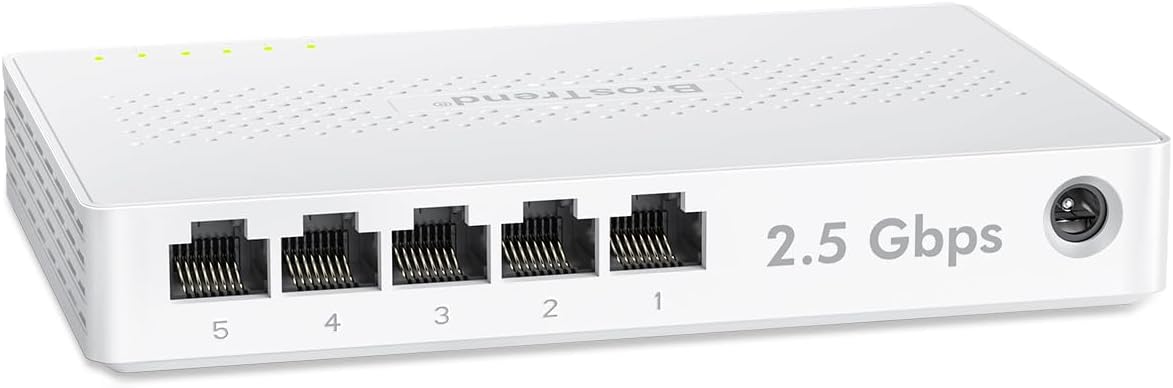
In this review of the 2.5Gb 5 Port Switch, the reviewer finds a straightforward way to bring multi-gig speeds to a small home network without fuss. The biggest reason to buy is the practical upgrade from gigabit: every port supports 2.5 Gbps, so gaming PCs, consoles, NAS boxes and WiFi access points can see a meaningful boost with a simple plug-and-play setup. The unit is fanless and compact, so it fits on a desk or can be wall mounted while remaining whisper-quiet during heavy use.
Key Features
- 2.5 Gbps per port: Every one of the five RJ45 ports delivers up to 2.5 Gbps, which is roughly 2.5X faster than a standard gigabit switch and helps reduce local transfer times.
- 25 Gbps switching capacity: The combined switching capacity handles simultaneous traffic from multiple devices, keeping transfers smooth during LAN parties or backups to a NAS.
- Five-port layout: With five dedicated ports you can wire several devices directly-PCs, consoles, smart TVs and WiFi access points-without relying on SFP optics.
- Plug and play: The unmanaged design requires no software or configuration; plug it into your router and connected devices start using multi-gig speeds immediately.
- Fanless, silent operation: A fanless enclosure keeps noise at zero, making it suitable for living rooms and bedrooms where quiet operation matters.
Who It's For
This switch is aimed at home users and small office owners who want a simple, cost-effective path to multi-gigabit wired networking without installing SFP modules or changing routers. Gamers, streamers and anyone moving large files to a local NAS will see the most obvious benefits.
Those who need managed features like VLANs, QoS controls, or optical fiber connectivity should look elsewhere; this unmanaged switch is focused on raw wired speed and ease of use rather than advanced network management.
Pros & Cons
Pros
- Delivers consistent 2.5 Gbps speeds on all five ports for faster local transfers.
- Simple plug-and-play setup with no software required makes installation painless.
- Fanless design ensures silent operation in desktop or living-room setups.
- Five RJ45 ports provide practical connectivity without needing SFP transceivers.
Cons
- Unmanaged design means no VLAN, QoS or advanced configuration options for complex networks.
- Durability was noted as a concern by some users, so treat it as a budget-friendly component rather than enterprise-grade hardware.
Specifications
| Brand | BrosTrend |
| Ports | 5 x RJ45 2.5 Gbps |
| Peak switching capacity | Up to 25 Gbps |
| Operation | Unmanaged, plug and play |
| Cooling | Fanless silent design |
| Mounting | Desktop or wall mount |
| Warranty | Lifetime protection |
Our Verdict
The 2.5Gb 5 Port Switch is a sensible value buy for home users who want an easy multi-gig wired upgrade. It brings real-world benefits to gaming rigs, NAS backups and WiFi access point backhaul without complexity, and the fanless design keeps it unobtrusive. For small offices or advanced networks that require managed features, a different model is a better fit, but for straightforward speed and connectivity this switch represents solid value.
Frequently Asked Questions
Do I need special cables for 2.5 Gbps?
No; Cat5e, Cat6 or Cat8 cables can work at 2.5 Gbps, though higher-quality cables like Cat6/8 are recommended for best stability.
Will this work with my existing gigabit router?
Yes; plug this unmanaged switch into a router port and devices connected to the switch can use up to 2.5 Gbps if the endpoint and cable support it.
Is any setup or software required?
No setup is required: the switch is plug and play, so devices begin negotiating multi-gig speeds as soon as they are connected.
Editor's Take
A practical, cost-effective multi-gig upgrade for homes and small offices, offering five 2.5 Gbps RJ45 ports, silent fanless operation and plug-and-play simplicity; best for users who do not need managed features.

Recently viewed
Recently viewed products will appear here as customers browse the store.