

3.5in Touch Screen HDMI Monitor for Raspberry Pi - Portable HDMI
3.5in Touch Screen HDMI Monitor for Raspberry Pi - Portable HDMI
Price subject to change. Tap below for current.
Couldn't load pickup availability
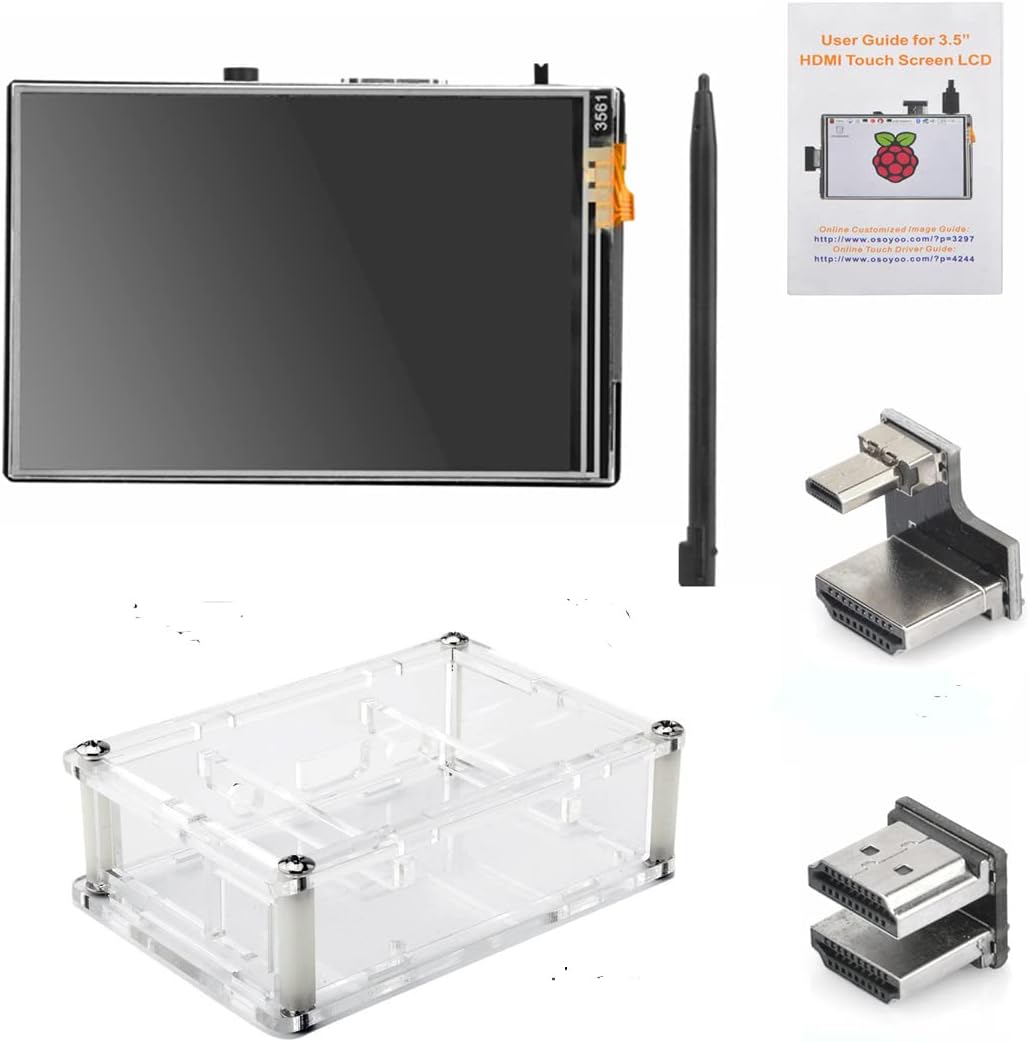
In this review of the 3.5in Touch Screen HDMI Monitor for Raspberry Pi, the bottom line is simple: this tiny kit is for makers and tinkerers who need a compact, portable display that plugs into an HDMI source and can act as a touchscreen when paired with Raspberry Pi and the supplied drivers. It stands out because it combines a 480 x 320 resistive touch panel, an acrylic protective case sized for Raspberry Pi mainboards, and a mini stylus into a single, lightweight package that can serve as a display for projects, gaming emulation, or desktop previewing.
Key Features
- Compact 3.5in display: The small physical size makes it easy to mount on a project enclosure or carry between workspaces without taking much room.
- Touch function support: When paired with Raspbian and the provided driver, the resistive touch enables basic stylus or finger input for Pi projects and simple control panels.
- HDMI input compatibility: The screen accepts HDMI resolutions from 480x320 up to 1920x1280 and will downscale to the native 480 x 320 for use with other controllers or computers.
- Protective acrylic case: The included case is tailored to fit Raspberry Pi 4 B and 3 B/B+ boards together with the screen, providing a neat enclosed solution for portable builds.
- Audio jack and brightness control: A 3.5mm audio/headphone jack and an onboard button for brightness adjustment add useful connectivity and quick screen tuning.
- Portable kit extras: A mini stylus and lightweight construction make the screen convenient for field use and handheld testing.
Who It's For
This kit is best for Raspberry Pi hobbyists, retro gaming fans using RetroPie, and developers who need a compact HDMI display for demos or portable projects. The touchscreen is especially useful for custom control panels and kiosks when running Raspbian with the required driver installed.
It is not aimed at users who need high-resolution desktop productivity or a multi-touch capacitive display; the screen is resistive and fixed at a native 480 x 320 resolution, so those wanting full-size monitors or true HD touch usability should look at larger panels.
Pros & Cons
Pros
- Compact form factor that fits into small projects and sits neatly on a desk.
- Touch capability with Raspbian when the driver is installed, enabling interactive Pi projects.
- Works as a plain HDMI monitor with other controllers or PCs, making it versatile beyond Pi use.
- Includes a protective acrylic case and stylus, which makes setup cleaner and more portable.
Cons
- Native 480 x 320 resolution is low and higher HDMI inputs are downscaled, which can change display ratio.
- Touch requires manual driver installation; not plug-and-play for all operating systems.
Specifications
| Brand | OSOYOO |
| Screen size | 3.5in |
| Native resolution | 480 x 320 pixels |
| HDMI input support | 480x320 up to 1920x1280 (downscaled) |
| Touch type | Resistive touch (driver required for touch on Raspbian) |
| Audio | 3.5mm audio/headphone jack |
| Included accessories | Protective acrylic case, stylus |
Our Verdict
The 3.5in Touch Screen HDMI Monitor is a practical, low-cost option for Raspberry Pi builders who need a compact display and occasional touch input. It offers good portability, case integration, and HDMI versatility, making it a smart value for hobby projects and RetroPie rigs, provided buyers accept the native 480 x 320 limitation and the need to install drivers for touch support.
Frequently Asked Questions
Does the screen work as a monitor without touch?
The screen functions as an HDMI monitor with other controllers or PCs without touch, but the image will be downscaled to the native 480 x 320.
Which Raspberry Pi models fit the case?
The acrylic case is designed to fit Raspberry Pi 4 B and Raspberry Pi 3 B/B+ mainboards alongside the 3.5in screen.
Is touch plug-and-play?
Touch requires downloading and installing the driver for Raspbian as described in the product instructions, so it is not automatic on all systems.
Editor's Take
A practical compact display for Raspberry Pi hobbyists, offering touch with Raspbian after driver install, an included acrylic case and stylus, and versatile HDMI use despite a low native 480 x 320 resolution.

Recently viewed
Recently viewed products will appear here as customers browse the store.