

8K@60Hz Displayport KVM Switch 2 Monitors 2 Computers - Dual Monitor
8K@60Hz Displayport KVM Switch 2 Monitors 2 Computers - Dual Monitor
Price subject to change. Tap below for current.
Couldn't load pickup availability
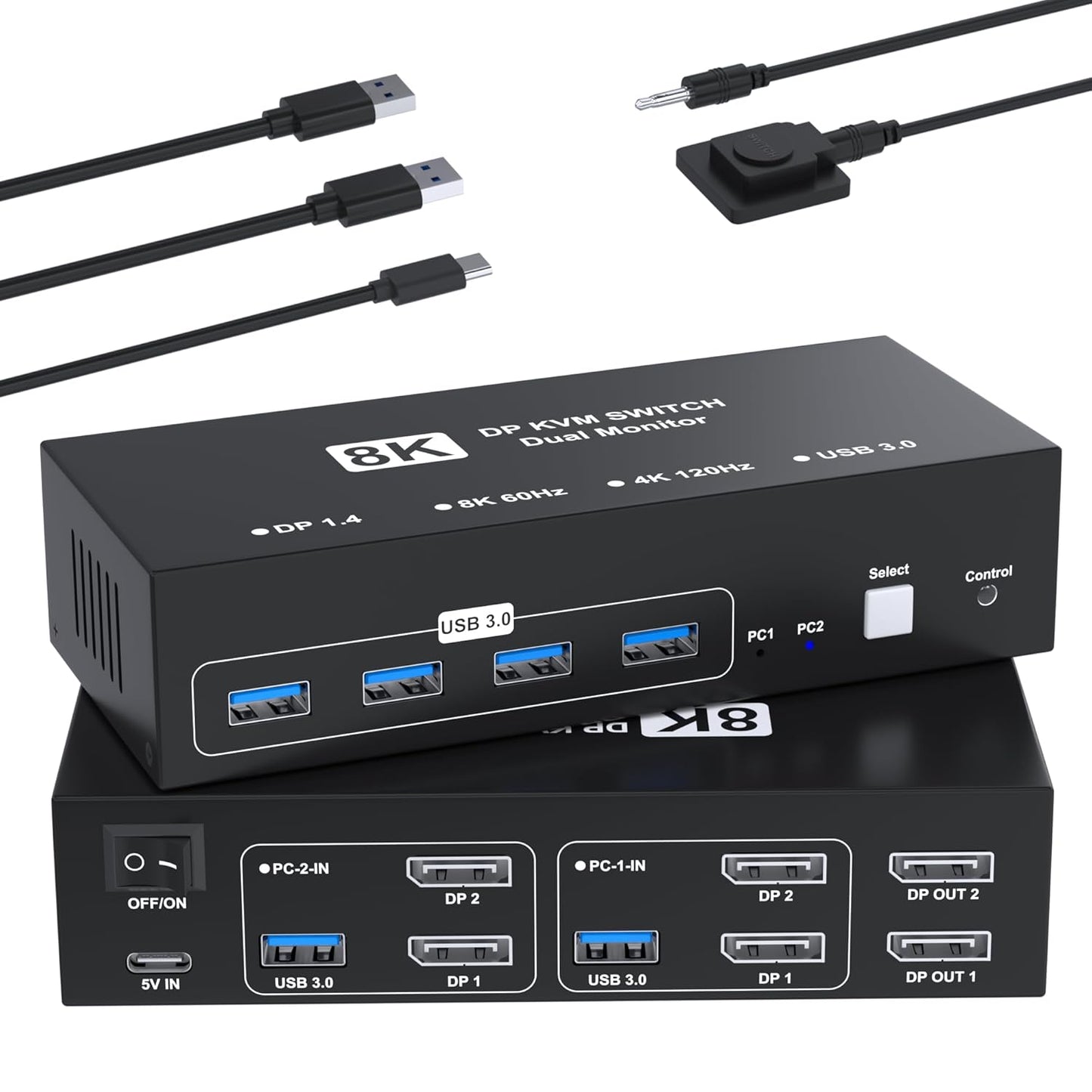
In this review of the Aoyvsktv Displayport KVM switch, the bottom line is clear: it is built for users who need to share two DisplayPort monitors and multiple USB peripherals between two computers without compromising high resolution or refresh rates. The unit delivers true dual-monitor switching with support up to 8K@60Hz and 4K@120Hz when the source, monitor, and cables all support those modes, and it works without drivers via simple plug and play. It is best for desktops or laptops with native DisplayPort outputs and a workspace that values pixel fidelity and fast USB 3.0 transfers.
Key Features
- Dual DisplayPort switching: Lets two computers share two DisplayPort monitors with a single switch to toggle active PC without signal loss.
- High resolution support: Supports up to 8K@60Hz and 4K@120Hz and is backward compatible with lower refresh and resolution modes for futureproofing.
- USB 3.0 peripheral sharing: Four high-speed USB 3.0 ports provide up to 5 Gbps each so keyboards, mice, storage, and scanners can be shared.
- Two switching options: Hardware button on the main unit and an included desktop controller make switching quick and convenient.
- Metal casing and thermal design: A high-dissipation metal housing helps stable operation at elevated temperatures for continuous use.
- Plug and play: No driver installation required, so setup is straightforward when compatible cables and ports are present.
Who It's For
This KVM is ideal for creative professionals, engineers, or power users who run two computers and need full dual-monitor output at high resolution from each machine. It is also useful in offices where shared peripherals and fast USB transfers are required without complex software or network KVM setups.
It is not a fit for users who rely on HDMI-only equipment, docking stations, or adapter-dependent workflows, since each computer must provide two native DisplayPort outputs and a USB-A port to enable dual-screen functionality.
Pros & Cons
Pros
- Supports high-end displays including 8K@60Hz for crisp dual-monitor setups.
- Four simultaneous USB 3.0 ports deliver fast peripheral and storage access across two PCs.
- Easy switching with both a front button and a desktop controller; LED indicators show the active computer.
Cons
- Does not support HDMI or docking stations and requires two DP cables plus one USB cable per computer, which adds cabling complexity.
Specifications
| Product type | Dual-monitor DisplayPort KVM switch |
| Maximum video | 8K@60Hz; supports 4K@120Hz and lower modes |
| Monitors supported | 2 DisplayPort monitors (shared between 2 computers) |
| USB ports | 4 x USB 3.0 ports (up to 5 Gbps) |
| Switching methods | Physical button on unit and included desktop controller |
| Compatibility | Windows, macOS, Linux (DisplayPort source required) |
| Package includes | KVM switch, 2 x USB3.0 cables, 1 x USB power cable, desktop controller, user manual (DP cables not included) |
Our Verdict
The Aoyvsktv 8K@60Hz DisplayPort KVM is a solid choice for users who need reliable dual-monitor switching with high-resolution support and fast USB 3.0 peripheral sharing. It offers strong value when both computers and monitors natively support DisplayPort and you can accommodate the required cabling; those relying on HDMI or docking stations should look elsewhere.
Frequently Asked Questions
Can I use HDMI monitors with this KVM?
No. The unit requires native DisplayPort connections and does not support HDMI or adapter-dependent setups.
Do I need special cables to reach 8K@60Hz?
Yes. To achieve the highest resolution you must ensure the source, monitor, and DisplayPort cables all support 8K@60Hz.
Are docking stations supported?
No. Docking stations and additional adapters are not supported; each PC needs 2 DP ports plus 1 USB-A connection.
Editor's Take
The Aoyvsktv 8K@60Hz DisplayPort KVM is ideal for users who need reliable dual-monitor switching with high-resolution support and fast USB 3.0 peripheral sharing, provided both PCs and monitors have native DisplayPort outputs.

Recently viewed
Recently viewed products will appear here as customers browse the store.