

Acer Docking Station 14-in-1 Triple Display USB C Dock - 60W Charge
Acer Docking Station 14-in-1 Triple Display USB C Dock - 60W Charge
Price subject to change. Tap below for current.
Couldn't load pickup availability
In this review of the Acer Docking Station users get a practical look at a 14-in-1 USB C hub aimed at productivity rather than gaming. The bottom line: it is best for laptop users who need one-box connectivity for multiple peripherals and up to three monitors on Windows, with the chief reason to buy being the breadth of ports and reliable 60W laptop charging from a 110W adapter. Setup is straightforward for supported systems, but expect mixed video reliability and occasional lag reported by some buyers.
Key Features
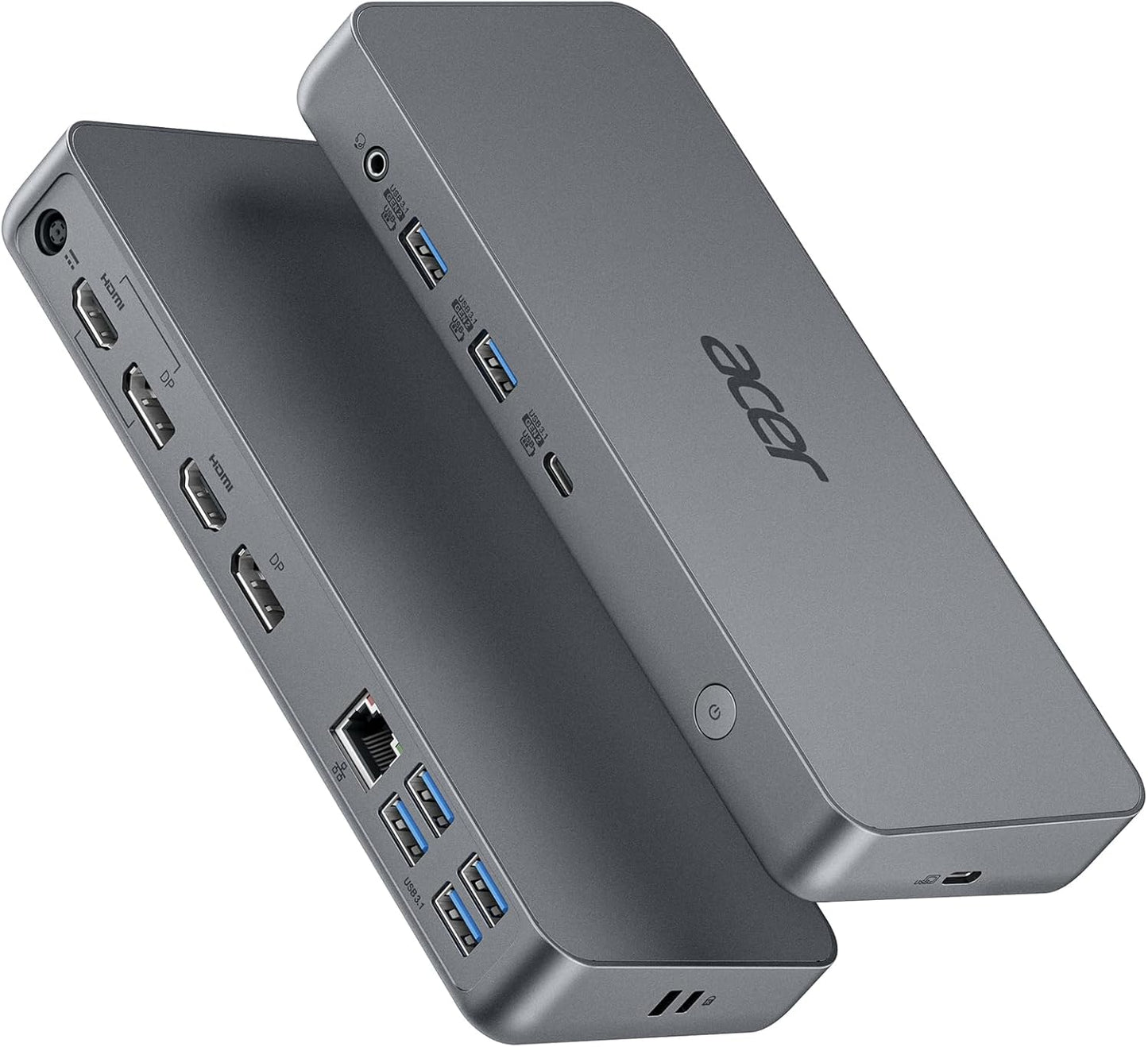
- 14-in-1 integration: Combines USB-C 3.1 Gen2, multiple USB-A ports, dual HDMI and DP, Gigabit Ethernet and audio to replace several adapters in one unit.
- Triple display support: Offers MST and SST mirror and extend modes on Windows so a multi-monitor workstation can be configured for increased productivity.
- High resolution options: Single-monitor output can reach 4K@60Hz via HDMI or DP, while dual displays support up to 2K@60Hz for crisp office visuals.
- Fast data transfer: USB-C 3.1 Gen2 and USB-A Gen2 ports deliver up to 10Gbps for large file moves and quick backups.
- Wired network and audio: Built-in 1000Mbps Ethernet and a 3.5mm audio/microphone jack ensure stable connectivity for conferencing and media.
- Power distribution: The 110W DC adapter provides 60W to charge a laptop and an additional 50W via the dock's USB-C for other devices.
Who It's For
This dock suits office professionals, remote workers, and content creators who need to connect multiple USB drives, wired network, audio accessories and two or three external displays on Windows laptops using USB-C DP Alt Mode. It is especially useful where a single docking unit is preferred to streamline a desk setup.
It is not for gamers who need full gaming features or G-Sync support, and Mac users with M1/M2/M3 systems should look elsewhere if they require simultaneous three-monitor output since macOS and Apple Silicon limitations prevent three-screen operation here.
Pros & Cons
Pros
- Wide port selection lets users consolidate adapters and connect many devices at once.
- Supports MST/SST triple-display configurations on Windows for flexible multi-monitor layouts.
- Robust wired networking and audio connections provide stable conferencing and streaming.
- Fast USB 3.1 Gen2 ports speed up large file transfers between drives and peripherals.
Cons
- Video performance can be inconsistent for some users, with reports of lag and the need for driver/software adjustments.
- Three-monitor support is limited on Apple Silicon Macs and the dock is explicitly not recommended for gaming or G-Sync setups.
Specifications
| Brand | acer |
| Ports | USB-C 3.1 Gen2 x1, USB-A 3.1 Gen2 x2, USB-A 3.1 Gen1 x4, HDMI 2.0 x2, DP1.4 x2, Ethernet, 3.5mm audio |
| Display modes | MST and SST (Windows only); mirror, extend, single |
| Max video | 4K@60Hz single display; dual displays up to 2K@60Hz; triple up to 1080P@60Hz |
| Ethernet | Gigabit Ethernet (1000Mbps) |
| Power | 110W DC adapter supplies 60W to laptop and 50W via dock USB-C |
| Extras | Power button, Kensington lock hole, DC-in jack |
Our Verdict
The Acer 14-in-1 docking station is a solid value for Windows users who need extensive wired and display connectivity with a single charging-capable hub; it replaces multiple adapters and offers fast USB transfers and 4K output for single-monitor use. Buyers should accept that video behavior can vary by system and that Macs with Apple Silicon can not drive three screens through this dock.
Frequently Asked Questions
Will this dock drive three monitors on M1 or M2 Macs?
No. The dock does not support simultaneous three-monitor output on M1, M2 or M3 Macs.
What resolution can I expect when using three displays?
When using three screens the dock limits one output to about 1080P@60Hz, while single and dual configurations support higher resolutions.
Do I need special drivers to use video features?
Some systems may require drivers or software adjustments to enable stable video; users have reported mixed results and occasional need for additional software.
Editor's Take
The Acer 14-in-1 docking station is a practical choice for Windows users who need many ports, triple-display options and 60W charging; it offers strong value for productivity desks but can show inconsistent video behavior on some systems.

Recently viewed
Recently viewed products will appear here as customers browse the store.