

AULA 99 Keys Gaming Keyboard - Tri-Mode Creamy RGB with Number Pad
AULA 99 Keys Gaming Keyboard - Tri-Mode Creamy RGB with Number Pad
Price subject to change. Tap below for current.
Couldn't load pickup availability
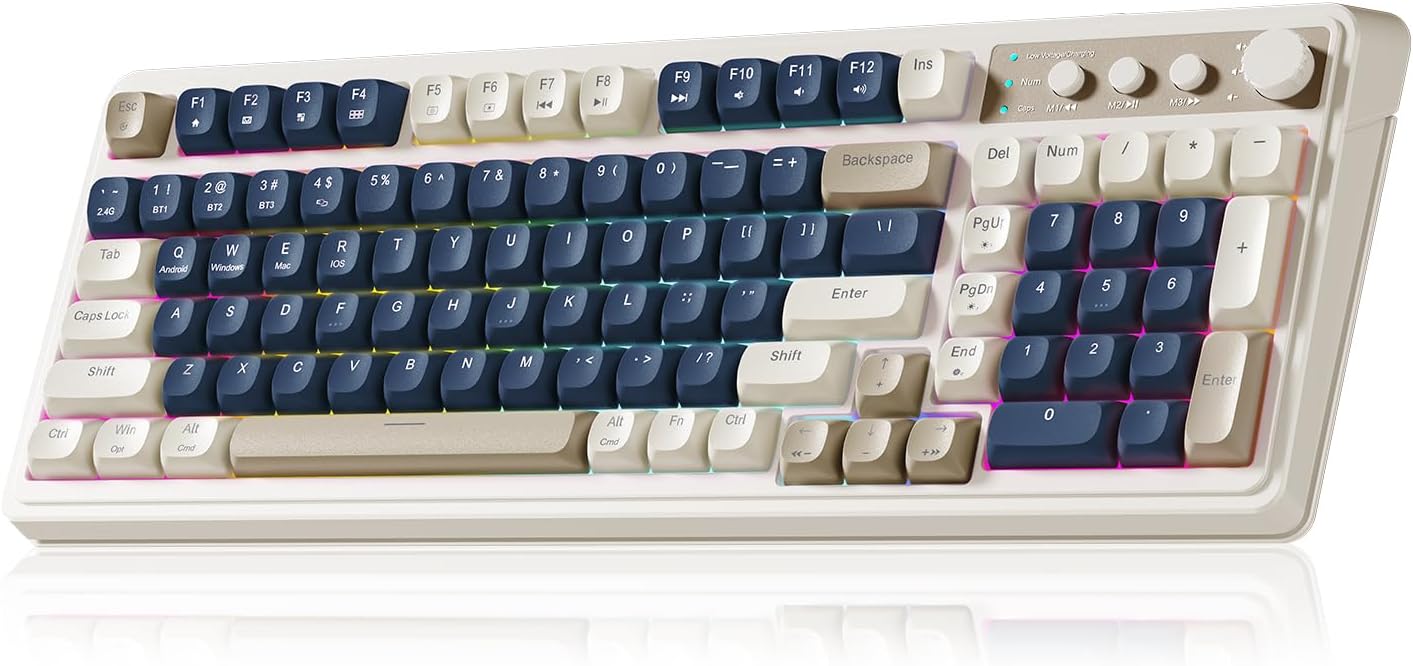
In this review the AULA 99 Keys Gaming Keyboard is presented as a compact full-size option for gamers and multitaskers who want a stylish, tactile typing surface without the loud clack of a mechanical switch. The biggest reason to buy is its flexible tri-mode connectivity and roomy 96% layout that includes a dedicated numeric keypad, making it a solid pick for someone who moves between a MacBook, a gaming PC and a living-room console while wanting customizable lighting and macros. The review balances real-world typing impressions with practical use cases.
Key Features
- Tri-mode connectivity: Bluetooth 5.0, 2.4GHz wireless and USB-C wired modes let the keyboard switch between up to five paired devices for fast transitions across systems.
- RGB backlighting with knob: A dual-mode rotary knob adjusts brightness, speed and volume so lighting and audio are changed without leaving the keyboard.
- Full numeric keypad: The 96% layout keeps a number pad and compact footprint, making data entry and gaming number-row commands easier than on a tenkeyless board.
- Macro customization: Every key supports macro programming so complex in-game actions or workflow shortcuts can be recorded and assigned to single keys.
- Comfort features: A two-stage foldable kickstand provides adjustable tilt for better typing posture during long sessions.
- Retro creamy styling: Three-color keycap accents give a warm, nostalgic look while delivering a quiet, velvety typing feel favored by users who dislike loud mechanical switches.
Who It's For
The AULA 99 Keys is best for users who need a bridge between productivity and casual gaming: people who switch among a Mac, PC and a console or tablet and want one keyboard that pairs with multiple devices. It also suits typists who prefer a quieter, softer key feel rather than clicky mechanical switches and who appreciate visual flair from adjustable RGB lighting.
It is less appropriate for competitive esports players who demand true mechanical switches with ultra-low actuation and audible feedback, or for those who require a fully programmable driver suite beyond the keyboard's onboard macro functions.
Pros & Cons
Pros
- Multi-device pairing and quick FN switching make moving between systems fast and seamless.
- Customizable RGB and a physical knob let users tweak lighting and volume without software.
- Full-size 96% layout keeps a number pad while saving desk space compared with a traditional full-size keyboard.
- Quiet, comfortable keycaps deliver a smooth, velvety typing experience praised by reviewers.
Cons
- Membrane switches are not true mechanicals, so those wanting mechanical tactility or audible feedback may prefer a different model.
- Advanced customization relies on onboard macro recording, which may feel limited compared with dedicated software suites.
Specifications
| Brand | AULA |
| Layout | 96% full-size with number pad |
| Connectivity | Bluetooth 5.0 / 2.4GHz wireless / USB-C wired |
| Lighting | RGB backlit with adjustable brightness and speed |
| Special controls | Dual-mode rotary knob for volume and lighting |
| Customization | Onboard macro recording for all keys |
| Compatibility | Windows, Mac, Android, iOS, Xbox (USB/Bluetooth dependent) |
Our Verdict
The AULA 99 Keys Gaming Keyboard is a strong value for users who want a quiet, attractive keyboard that moves easily between devices and offers meaningful customization without bulky software. Its tri-mode connectivity, numeric keypad and tactile yet muted keycaps make it an excellent choice for multitasking home offices and casual gamers who prioritize comfort and style over mechanical switch feel.
Frequently Asked Questions
Can this keyboard connect to more than one device at once?
Yes, it can pair with up to five devices and you can switch among them using the FN+ key combinations.
Does it work with Mac systems?
Yes, the keyboard is compatible with Mac and other platforms listed and offers key remapping via onboard M1/M2/M3 buttons.
Is the RGB lighting adjustable without software?
Yes, brightness and speed can be adjusted using the rotary knob or FN+ key combinations, and macros can be recorded onboard for lighting profiles.
Editor's Take
AULA 99 Keys is a versatile, value-oriented keyboard that combines tri-mode connectivity, a 96% layout with number pad, and quiet, pleasant keycaps-ideal for multitaskers and casual gamers who want style and comfort without mechanical switches.

Recently viewed
Recently viewed products will appear here as customers browse the store.