

Wireless Keyboard and Mouse Combo - Ergonomic Full-Sized Set
Wireless Keyboard and Mouse Combo - Ergonomic Full-Sized Set
Price subject to change. Tap below for current.
Couldn't load pickup availability
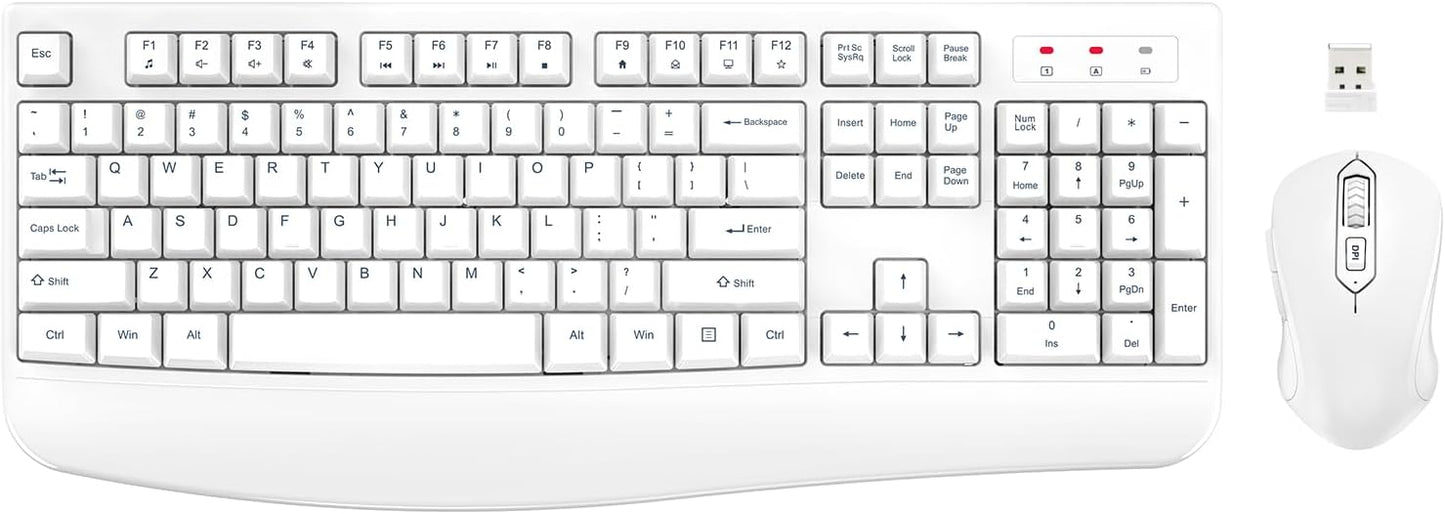
In this review of the Wireless Keyboard and Mouse Combo, the bottom line is simple: this is a practical, budget-friendly set for everyday computer users who want a comfortable typing experience and reliable wireless convenience. The kit pairs a full-sized keyboard with an integrated palm rest and a 3-level DPI optical mouse, and its biggest selling point is the ergonomic keyboard design that helps reduce wrist strain during long typing sessions. Setup is plug-and-play via a single 2.4 GHz USB receiver, so it suits anyone who wants a no-fuss pairing for a laptop or desktop.
Key Features
- Ergonomic palm rest: The integrated wrist rest and folding feet keep the keyboard at a more comfortable slope to help reduce wrist fatigue during extended typing sessions.
- 2.4 GHz wireless: A single USB receiver connects both devices and delivers a stable connection up to about 33 ft so users can work without cable clutter.
- Plug & Play: No software is required; the receiver is recognized by Windows and Mac OS for quick setup and immediate use.
- Adjustable mouse DPI: The optical mouse offers three DPI levels (800/1200/1600) for flexible cursor speed on different tasks and surfaces.
- Power saving: Both keyboard and mouse enter automatic sleep modes after idle periods to preserve battery life and reduce the need for frequent battery changes.
- Ambidextrous mouse design: The mouse shape suits both right- and left-handed users for general office or home use.
Who It's For
This combo is ideal for home office users, students, or anyone who types for long stretches and wants a comfortable, full-sized keyboard without a large investment. The integrated palm rest and anti-slip pads make it a good fit for people who value posture and stability while working on a desktop or laptop.
It is not aimed at gamers who require high-end gaming switches or very low-latency wireless tech, nor at professionals who need advanced programmable keys or multi-device Bluetooth pairing. Buyers who need rechargeable devices should look elsewhere, as this set uses replaceable AA batteries.
Pros & Cons
Pros
- Comfortable palm rest and stable keyboard footing reduce wrist strain during long typing sessions.
- Simple plug-and-play 2.4 GHz receiver that pairs keyboard and mouse quickly without software.
- Three-level DPI mouse gives usable precision options for both browsing and productivity work.
- Automatic power-saving mode helps extend battery life between replacements.
Cons
- Uses AA batteries rather than built-in rechargeable cells, so ongoing battery purchases are required.
- Some users report mixed reliability with functionality over time, so durability may vary between units.
Specifications
| Product type | Wireless keyboard and mouse combo |
| Keyboard layout | Full-sized with integrated palm rest |
| Wireless connection | 2.4 GHz USB receiver, single receiver for both devices |
| Mouse sensor | Optical with 3-level DPI (800/1200/1600) |
| Power | Keyboard: 1 x AA, Mouse: 1 x AA (batteries not included) |
| Range | Up to 33 ft (10 m) typical |
| Compatibility | Windows and Mac OS, desktops, laptops and PCs |
Our Verdict
The Wireless Keyboard and Mouse Combo is a sensible choice for value-minded users who prioritize comfort and simple setup. With an ergonomic palm rest, reliable 2.4 GHz connection, and an adjustable DPI mouse, it covers the essentials for daily productivity at a low price. Buyers who need rechargeable batteries or specialized gaming features should consider alternatives, but for general home and office use this set represents good value.
Frequently Asked Questions
How do I pair the keyboard and mouse?
The set is plug-and-play using the included 2.4 GHz USB receiver; insert the receiver into a USB port and devices should connect automatically.
Where is the USB receiver stored?
The USB receiver is kept inside the mouse battery compartment; open the mouse cover to find it.
What batteries are required?
The keyboard needs 1 AA battery and the mouse needs 1 AA battery; batteries are not included and both devices have automatic sleep modes to save power.
Editor's Take
A practical, budget-friendly combo that delivers comfortable typing with an integrated palm rest, simple 2.4 GHz plug-and-play setup, and an adjustable DPI mouse-good value for everyday home and office use.

Recently viewed
Recently viewed products will appear here as customers browse the store.