

Baisla iPad 10th Generation Case with Keyboard 10.9 in - Backlit
Baisla iPad 10th Generation Case with Keyboard 10.9 in - Backlit
Price subject to change. Tap below for current.
Couldn't load pickup availability
Our review of the Baisla iPad keyboard case finds it best suited for someone who wants laptop-like typing and navigation on an iPad without carrying extra hardware. The case combines a slim hardshell with a full keyboard, a large multi-touch trackpad and 360 rotation, making it a sensible choice for frequent travelers, students and professionals who write, edit or present from an iPad. The single biggest reason to buy is the combination of a backlit keyboard and a usable trackpad that together deliver a near-laptop experience while keeping the iPad protected and portable.
Key Features
- Compatibility: Works with a wide range of 10.9 in and 11 in iPad models including 10th gen, 11th gen A16, Air 11 M3/M2 and multiple Pro 11 generations, so buyers can match their exact model.
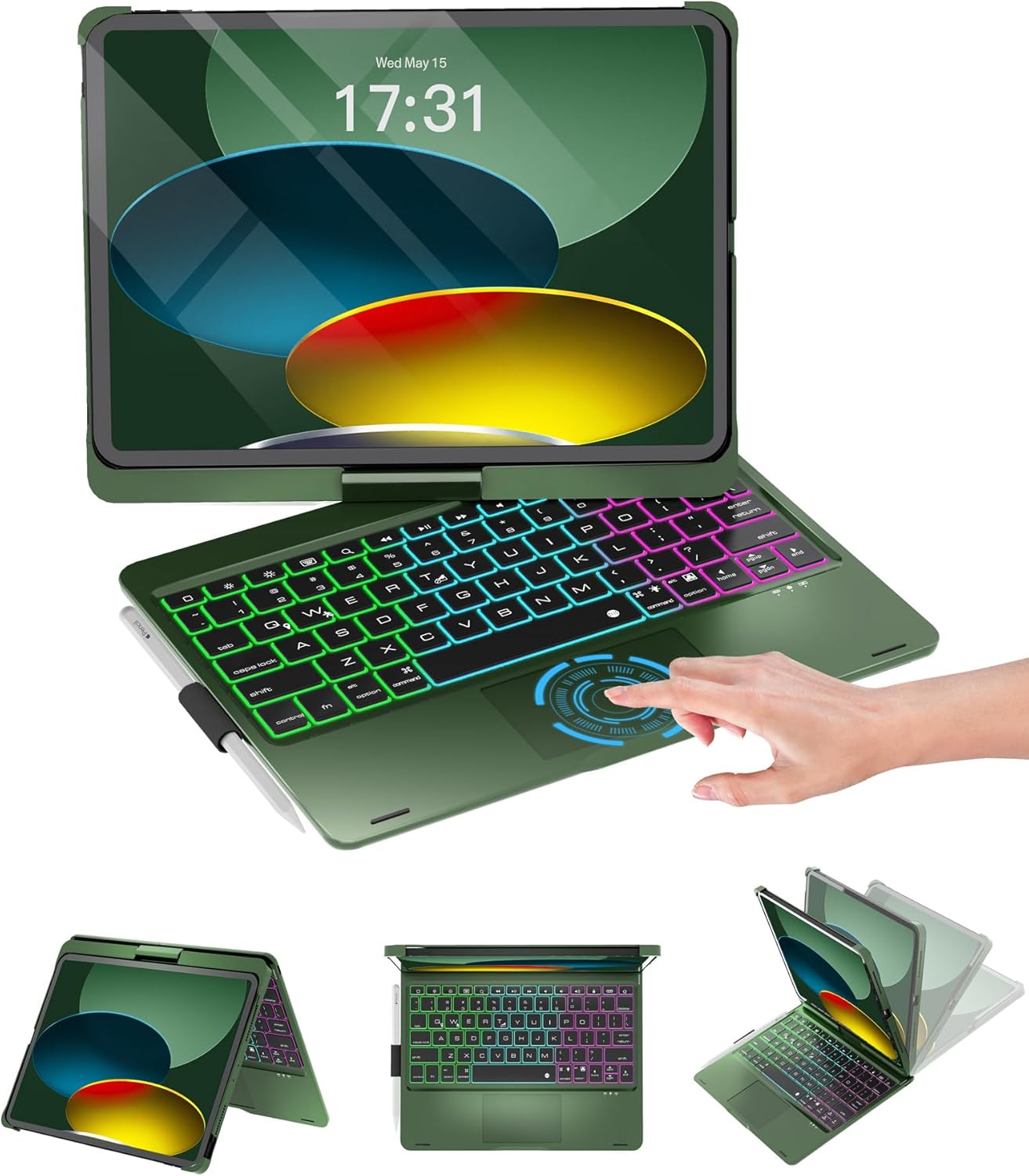
- Multi-Touch Trackpad: A large trackpad supports gestures and cursor control for comfortable browsing and editing, with a quick fn+T toggle to lock the trackpad while typing.
- Rainbow Backlit Keyboard: Adjustable backlight with three brightness levels and color options helps typing in low light and gives a laptop-like visual appeal.
- 360 Rotation and 0-180 Flip: The swivel hinge supports multiple viewing and typing angles for presentations, lap use or tablet mode adjustments.
- Battery and Charging: A built-in 500mAh battery and efficient chip aim to connect quickly and recharge in about three hours via the included Type-C cable.
- Protection and Port Access: The hardshell design guards against drops, scratches and dust while precision cutouts keep ports and the Apple Pencil holder accessible.
Who It's For
The case is aimed at students, remote workers and frequent travelers who want to convert an iPad into a practical typing device without buying a separate keyboard and trackpad. It is particularly useful when you need a compact setup that still offers multiple viewing angles and a backlit keyboard for low-light use.
Those wanting a permanently desktop-grade keyboard or users who need a mechanical key feel should look elsewhere, as this product focuses on portability, protection and integrated convenience rather than a standalone professional keyboard experience.
Pros & Cons
Pros
- Solid build quality and keyboard feel that customers describe as sturdy and easy to set up.
- Large multi-touch trackpad and backlit keys provide a laptop-like workflow and better navigation.
- Good battery life with quick Type-C charging and automatic power saving when closed.
- Versatile 360 swivel and multiple viewing angles plus a pencil holder for accessories.
Cons
- The keyboard case is slim but still adds bulk compared with a bare iPad, which may not suit users seeking the lightest possible carry solution.
Specifications
| Compatible iPad models | 10.9 in 10th gen, 11 in A16, Air 11 M3/M2, Pro 11 (1st-4th) |
| Keyboard backlight | Rainbow backlit with 3 brightness levels |
| Trackpad | Large multi-touch trackpad with fn+T lock toggle |
| Battery | Built-in 500mAh battery, Type-C charging, ~3 hours full charge |
| Hinge | 360 swivel and 0-180 flip |
| Included items | Keyboard case, Type-C charging cable, user manual |
| Protection | Premium hardshell design with precision cutouts and pencil holder |
Our Verdict
The Baisla iPad keyboard case is a strong value for iPad owners who want integrated typing, a responsive trackpad and backlit keys while preserving portability and protection. It is especially good for students and mobile professionals who need a compact, all-in-one solution that converts an iPad into a capable productivity device without extra accessories.
Frequently Asked Questions
Will this case fit my 11 in iPad Pro?
Check the listed model numbers - it supports several Pro 11 generations, including 1st through 4th gen; match your model code to ensure fit.
How long does the battery last and how is it charged?
The case uses a built-in 500mAh battery that charges via the included Type-C cable in about three hours and enters power-saving mode when closed.
Can I lock the trackpad while typing?
Yes, the trackpad can be locked and unlocked with the fn+T key to prevent accidental touches while typing.
Editor's Take
A practical, well-built keyboard case that adds a large multi-touch trackpad, rainbow backlight and 360 swivel to compatible 10.9 in and 11 in iPads, offering laptop-like productivity and good value for mobile users.

Recently viewed
Recently viewed products will appear here as customers browse the store.