

besky iPad mini 6 Case with Keyboard - 360 Rotatable Touchpad Case
besky iPad mini 6 Case with Keyboard - 360 Rotatable Touchpad Case
Price subject to change. Tap below for current.
Couldn't load pickup availability
In this review the besky iPad mini 6 Case with Keyboard is assessed for tablet users who want a compact typing solution that turns the iPad mini into a productivity tool. The single biggest reason to consider it is the integrated multi-touch trackpad and keyboard, which make the 8.3 in iPad mini feel more like a small laptop for email, note taking and light editing. The review looks at compatibility, daily use, and a few tradeoffs so you can decide if this keyboard case fits your routine.
Key Features
- iPad Mini 6 Compatibility: Built specifically for the 8.3 in iPad Mini 6th Gen models A2568 and A2569, ensuring cutouts and fit match that release.
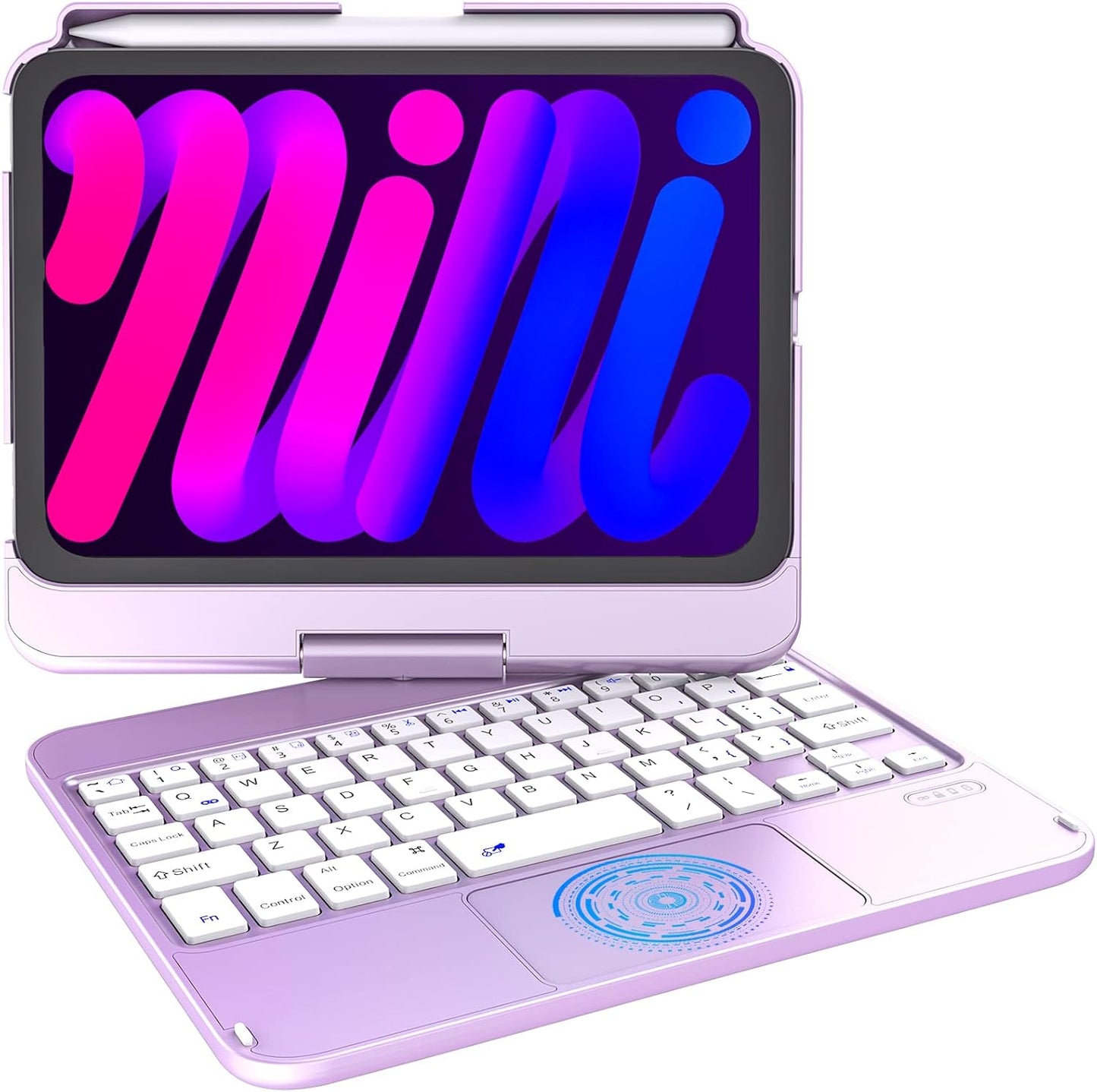
- Integrated Touchpad: The multi-touch trackpad supports common gestures so users can swipe, scroll and click without touching the screen, speeding up navigation.
- 360 Rotatable Design: The case rotates 360 degrees and flips 180 degrees, offering multiple viewing angles for presentations, media and typing positions.
- Apple Pencil Support: A built-in Apple Pencil holder plus magnetic attachment is provided so the 2nd Gen Pencil can charge and stay accessible while in the case.
- Auto Sleep/Wake: The cover supports automatic sleep and wake when opened or closed to save the iPad battery during daily use.
- Package and Support: Ships with a charging cable and service card, and the seller offers direct support with a 24 hour response promise.
Who It's For
This keyboard case is best for iPad Mini 6 owners who want an all-in-one protective shell and typing surface for on-the-go productivity, students who type notes, or casual users who prefer a physical keyboard and trackpad for email and web tasks. The flip and swivel design also suits anyone who switches frequently between watching content and typing.
It is not for people with earlier or other iPad models since it is made only for the 2021 8.3 in Mini, nor is it ideal if ultra-lightweight carry is the top priority, as some users note the combined weight can feel heavier than a naked tablet and mixed reports mention Bluetooth pairing can be finicky on first setup.
Pros & Cons
Pros
- Keyboard and trackpad deliver a familiar laptop-like input and improve productivity for typing and navigation.
- Secure Pencil holder and support for 2nd Gen Apple Pencil magnetic charging keeps accessories together.
- Versatile 360 swivel and 180 flip give multiple viewing angles for work or media.
- Auto sleep/wake saves battery and keeps the device ready to use.
Cons
- Some customers report Bluetooth connectivity issues during pairing, requiring the Fn+Q key sequence to reconnect.
- The case adds bulk and has mixed feedback on stability when used on laps or soft surfaces.
Specifications
| Compatibility | iPad Mini 6th Gen (8.3 in) Model A2568, A2569 |
| Keyboard | Integrated touch keyboard with multi-touch trackpad |
| Rotation | 360 swivel and 180 flip case |
| Apple Pencil | Built-in holder; supports 2nd Gen magnetic attachment and charging |
| Auto Sleep/Wake | Yes |
| Package Includes | Touch keyboard case, charging cable, service card |
Our Verdict
The besky iPad mini 6 keyboard case is a practical value choice for owners of the 2021 8.3 in iPad Mini who want a built-in keyboard and trackpad with flexible viewing positions and Pencil storage. It is especially useful for students and commuters seeking a laptop-like experience without buying extra peripherals, though buyers should be prepared for a bit more weight and to follow the Fn+Q pairing step if Bluetooth does not connect immediately.
Frequently Asked Questions
Will this fit other iPad models?
This case is made only for the iPad Mini 6th Gen 8.3 in models A2568 and A2569 and will not fit other iPad models.
Does the Apple Pencil charge while in the holder?
Yes, the case supports magnetic attachment and wireless charging for the 2nd Gen Apple Pencil without removing the case.
How do you connect the Bluetooth keyboard?
Press Fn+Q to enter pairing mode and then connect from the iPad Bluetooth settings; some users reported needing this sequence to solve initial pairing issues.
Editor's Take
The besky iPad mini 6 keyboard case offers a laptop-like typing experience with a multi-touch trackpad, Pencil storage and 360 swivel for A2568/A2569 iPad Mini 6 owners; good value for students and commuters though pairing can require the Fn+Q step and the case adds some weight.

Recently viewed
Recently viewed products will appear here as customers browse the store.