

Cable Matters 14-in-1 Thunderbolt Dock - Dual 4K 60Hz Support
Cable Matters 14-in-1 Thunderbolt Dock - Dual 4K 60Hz Support
Price subject to change. Tap below for current.
Couldn't load pickup availability
In this review of the Cable Matters 14-in-1 Thunderbolt Dock, the bottom line is simple: it is built for users who need to turn a single USB-C or Thunderbolt port into a full desktop hub with reliable display and network support. The reviewer found the dock especially compelling for laptop users who require dual 4K 60Hz monitors, stable wired Ethernet, and a mix of high-speed USB ports while keeping a laptop charged. For anyone who wants to simplify a laptop workstation without multiple adapters, this dock delivers the core features most professionals expect.
Key Features
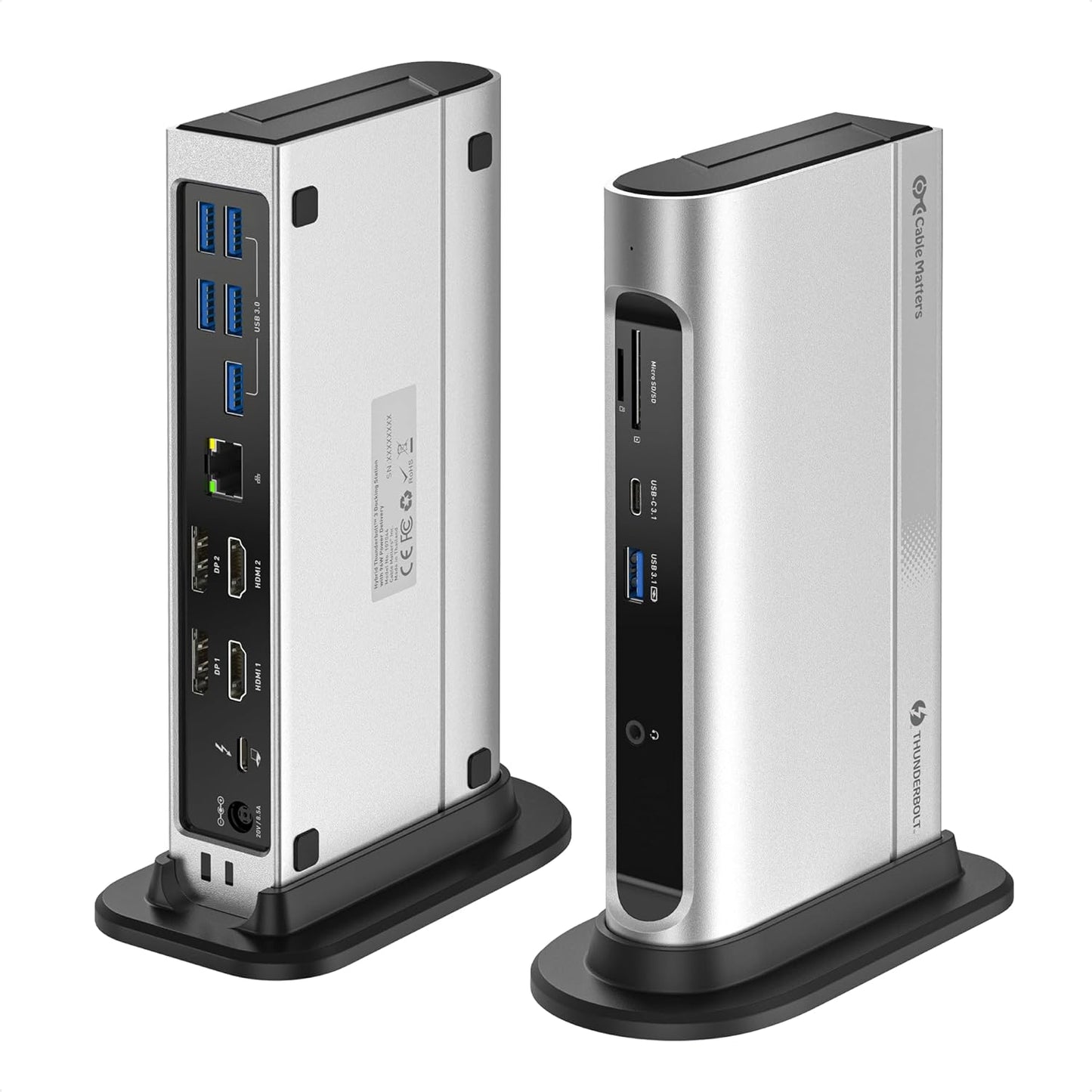
- Dual 4K 60Hz output: Drives two 4K 60Hz displays using either dual DisplayPort, dual HDMI, or one of each for flexible multi-monitor setups.
- Full Thunderbolt bandwidth: Uses 40 Gbps Thunderbolt capability to support high-resolution monitors and fast peripherals simultaneously.
- 100 W charging: Keeps compatible laptops charged while powering connected devices, reducing the need for the laptop power brick.
- High-speed USB ports: Offers USB-C and multiple USB-A ports with up to 10 Gbps support for fast external drives and accessories.
- Wired networking: Built-in Gigabit Ethernet provides reliable 1 Gbps wired connectivity for low-latency networking and file transfers.
- Card and audio support: Includes SD and microSD slots for quick media transfers and a 3.5 mm TRRS jack for headsets or speakers.
Who It's For
The Cable Matters 14-in-1 dock is aimed at MacBook Pro and Windows laptop users who want to replace multiple adapters with a single hub that supports dual 4K 60Hz displays and wired Ethernet. It is a good match for content creators, remote workers, and professionals who attach USB 3.1 Gen 2 peripherals and external storage while needing consistent power delivery.
Users who only need a single monitor, minimal ports, or ultra-compact travel solutions should look elsewhere for a smaller, lighter dongle. Also, those expecting Thunderbolt speeds on non-Thunderbolt USB-C ports should note that hybrid support runs at lower speeds on non-Thunderbolt hosts.
Pros & Cons
Pros
- Excellent connectivity with dual 4K 60Hz monitor support for flexible display setups.
- Robust port selection including 10 Gbps USB-C and USB-A ports for fast peripherals.
- Solid metal build and dependable 100 W charging make it practical for daily desk use.
- Integrated Gigabit Ethernet and SD/microSD slots add convenience for media and networking.
Cons
- Hybrid support means non-Thunderbolt USB-C ports operate at reduced speeds compared with full Thunderbolt hosts.
- Advanced features such as HDR and surround sound depend on host and display support and may require specific connections.
Specifications
| Product type | 14-in-1 Thunderbolt / USB-C Dock |
| Maximum bandwidth | 40 Gbps Thunderbolt 3 |
| Display support | Dual 4K 60Hz via DisplayPort and/or HDMI |
| Power delivery | Up to 100 W charging |
| Network | Gigabit Ethernet (1 Gbps) |
| USB ports | Multiple USB-A and USB-C ports including 10 Gbps ports |
| Media & audio | SD and microSD slots, 3.5 mm TRRS audio jack |
Our Verdict
The Cable Matters 14-in-1 Thunderbolt Dock is a practical, well-built hub for people who need dual 4K 60Hz displays, gigabit networking, and a broad mix of high-speed USB ports while maintaining laptop charging. It offers strong value for desk-based professionals and creators who want to consolidate connections and reduce clutter, provided the host laptop supports Thunderbolt or accepts the hybrid performance trade-offs.
Frequently Asked Questions
Will this dock drive two 4K 60Hz monitors?
Yes, it supports dual 4K 60Hz displays using DisplayPort, HDMI, or a combination when connected to a compatible Thunderbolt or USB-C host with DSC support.
Does it charge the laptop while connected?
Yes, the dock provides up to 100 W power delivery to charge compatible laptops while powering peripherals.
Will all USB-C ports run at Thunderbolt speeds?
No, hybrid support allows non-Thunderbolt USB-C hosts to connect but at lower speeds than full Thunderbolt hosts; full 40 Gbps capability requires Thunderbolt.
Editor's Take
The Cable Matters 14-in-1 Thunderbolt Dock is a sturdy, well-equipped hub for desk users who need dual 4K 60Hz displays, gigabit Ethernet, and multiple high-speed USB ports while maintaining laptop charging; hybrid support means non-Thunderbolt hosts run at reduced speeds.

Recently viewed
Recently viewed products will appear here as customers browse the store.