

Docking Station Dual Monitor HDMI USB C Hub - 14-in-1 Multiport Dock
Docking Station Dual Monitor HDMI USB C Hub - 14-in-1 Multiport Dock
Price subject to change. Tap below for current.
Couldn't load pickup availability
In this review the Docking Station Dual Monitor HDMI USB C Hub is evaluated as a versatile, budget-friendly option for Windows laptop users who need to expand display and I/O options from a single USB-C or Thunderbolt port. The single biggest reason to consider this dock is its combination of dual 4K-capable video outputs plus a wide array of ports in one compact dongle, making it useful for users who want extra monitors, wired Ethernet and multiple USB ports without a full docking cradle. It is a straightforward plug-and-play adapter for many modern Dell, Lenovo and HP laptops, though compatibility varies by device.
Key Features
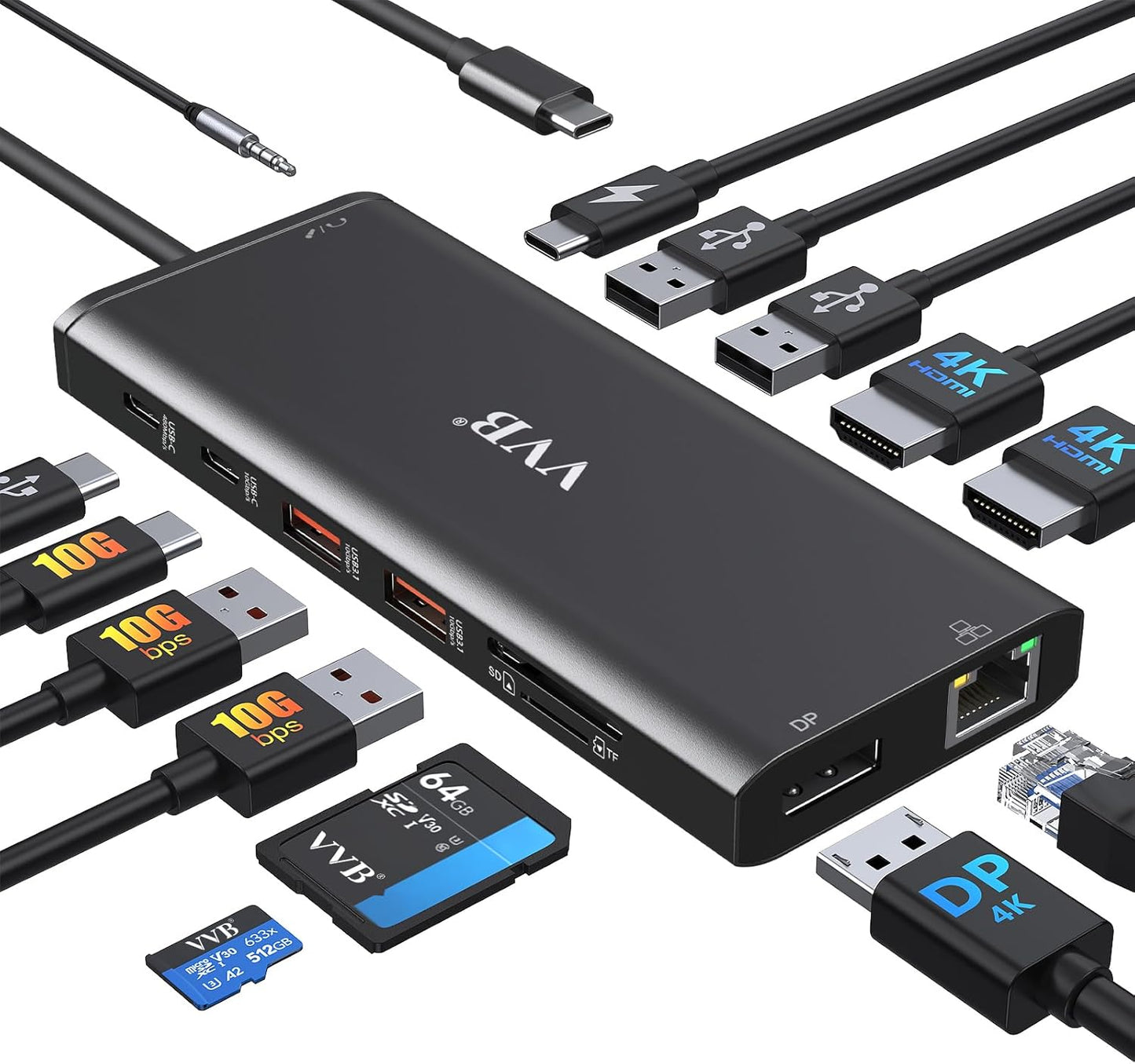
- 14-in-1 expansion: Converts one USB-C/Thunderbolt port into two HDMI, one DisplayPort, multiple USB ports, card readers and audio to cover most peripheral needs.
- Dual and triple display support: Handles dual monitor setups for Windows and can drive triple displays at lower resolutions where the laptop GPU and port generation allow.
- 4K video support: Single HDMI or DisplayPort use can reach up to 4K@60Hz for crisp external displays when the host port supports it.
- 100W Power Delivery: Pass-through charging accepts up to 100W input and supplies safe charging to laptops (output limited to 87W) while powering connected devices.
- Fast data transfer: Includes USB-C and USB-A ports supporting up to 10Gbps and 5Gbps for rapid file transfer to drives and card readers.
- Wired network and audio: Built-in Gigabit Ethernet and a 3.5mm headphone/mic jack add stable wired networking and headset support for work setups.
Who It's For
This dock is best suited to Windows laptop users who need a compact way to add two external monitors, wired Ethernet and multiple USB ports without a full-size dock. It works well for professionals who move between desks, remote workers using hotel or home setups, and students who want to connect storage, SD cards and peripherals quickly.
Users who rely on Mac OS for extended multi-monitor configurations should look elsewhere or confirm macOS limitations first, since external monitor behavior is constrained by the operating system. Also, owners of laptops whose USB-C port lacks video output or early DP1.2 ports expecting full 4K dual outputs may see reduced resolutions and should verify device compatibility before purchase.
Pros & Cons
Pros
- Comprehensive port selection that replaces multiple adapters with a single dongle.
- Supports 4K@60Hz on compatible single DisplayPort or HDMI1 connections for high quality video.
- Includes Gigabit Ethernet and SD/Micro SD card reader for photographers and wired networking needs.
- Good value for the number of ports and functionality provided compared with single-purpose adapters.
Cons
- Not all USB-C laptops are compatible with the dock's HDMI or DP video outputs, so functionality can vary by model.
- Dual and triple display resolutions are limited by the host port generation (DP1.2 vs DP1.4), which can reduce one monitor below 1080P in some setups.
Specifications
| Ports | 2x HDMI, 1x DisplayPort, 2x USB-C, 2x USB 3.0, 2x USB 2.0, SD/TF reader, 3.5mm audio, Gigabit Ethernet |
| Video Support | Single HDMI/DP up to 4K@60Hz, HDMI2 up to 4K@30Hz; dual/triple displays for Windows |
| Power Delivery | 100W input supported, safe charging output up to 87W (charging cable not included) |
| Data Transfer | USB-C/USB-A up to 10Gbps and 5Gbps; USB 2.0 up to 480Mbps; SD/TF reader up to 104MBs |
| Ethernet | 10/100/1000BASE-T Gigabit LAN |
| Compatibility | Works with many Thunderbolt 3/4 and USB-C laptops with video output; check device for video and PD support |
Our Verdict
The dock is a practical, cost-effective multiport adapter for users who need extra displays, wired network access and a variety of USB connections from a single USB-C port. It offers strong value when the host laptop supports video over USB-C or Thunderbolt, though buyers should confirm compatibility and expected multi-monitor resolutions. For Windows users seeking a portable 14-in-1 hub, it delivers most required features without a large price premium.
Frequently Asked Questions
Will this dock charge my laptop?
Yes, it supports up to 100W input and provides charging to laptops with PD support, but actual safe output is limited to about 87W; you must use a separate PD charger and cable.
Can I use dual 4K monitors at 60Hz?
Dual 4K@60Hz is generally not supported; single DP or HDMI1 can reach 4K@60Hz, while dual monitors will typically be limited to 4K@30Hz and 1080P depending on the host port generation.
Is it plug and play?
Yes, for most Windows laptops it is plug-and-play for USB, Ethernet and most displays, but some USB-C devices without video output will not support HDMI or DP from the dock.
Editor's Take
This 14-in-1 USB C docking station is a cost-effective way to add dual monitors, Gigabit Ethernet and multiple USB ports for Windows laptops that support video over USB-C; verify compatibility for full 4K and multi-monitor resolutions.

Recently viewed
Recently viewed products will appear here as customers browse the store.