

Docking Station for Steam Deck ROG Ally with Dual Cooling Fans
Docking Station for Steam Deck ROG Ally with Dual Cooling Fans
Price subject to change. Tap below for current.
Couldn't load pickup availability
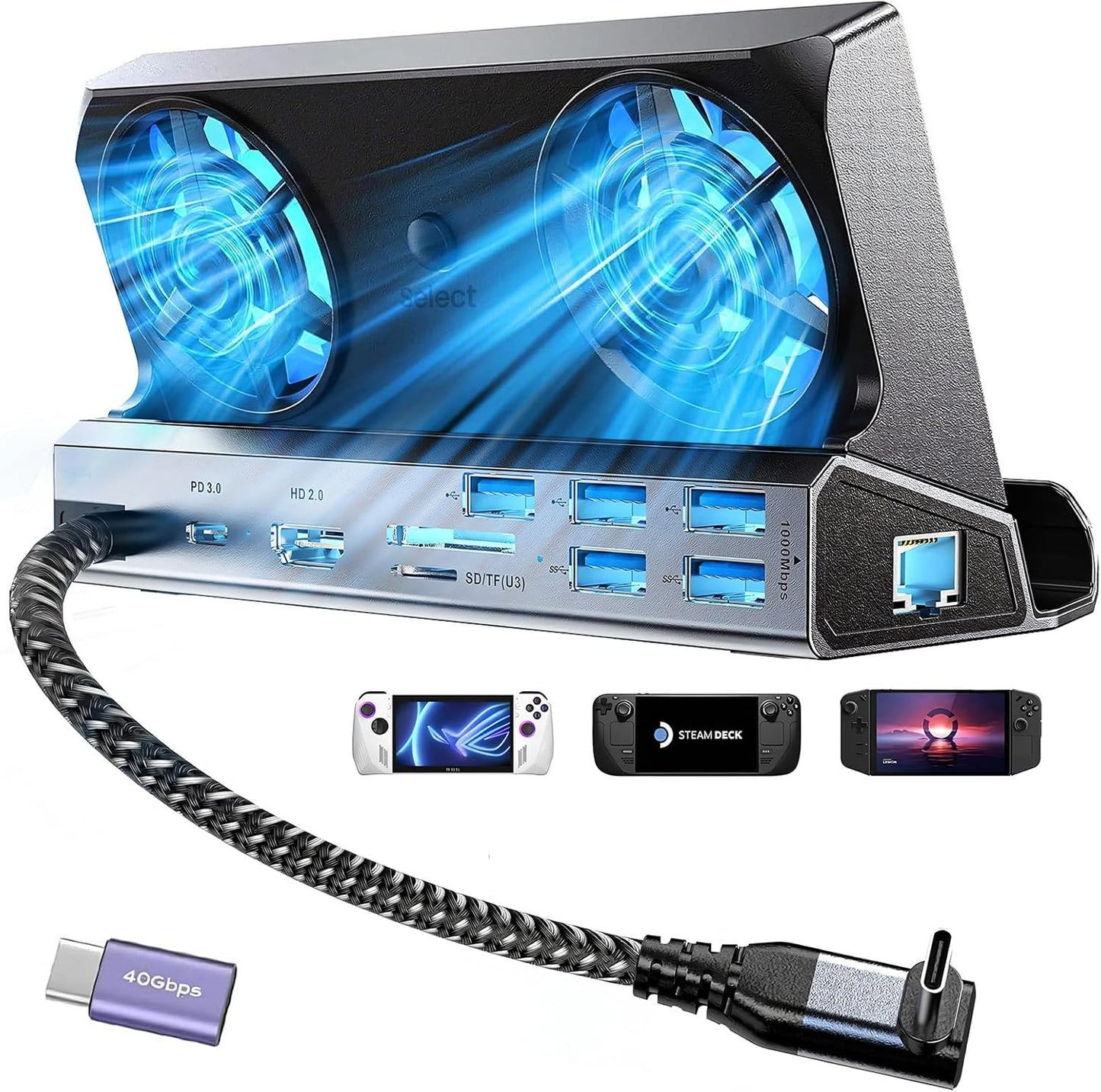
Our review of this 10-in-1 docking station finds it best suited for handheld PC gamers who want a single hub that adds display, wired networking, fast charging and extra USB ports while actively cooling their device. The dock converts a Steam Deck OLED, ROG Ally or Legion Go USB Type-C port into multiple outputs and includes dual RGB cooling fans to reduce thermal throttling. For anyone who docks regularly to a monitor, LAN and full-size peripherals, the biggest reason to buy is the combination of 4K@60Hz output, gigabit Ethernet and dedicated cooling in one compact package.
Key Features
- 10-in-1 expansion: Transforms a single USB Type-C into HDMI 4K@60Hz, DP1.2, VGA, Ethernet, multiple USB ports and PD charging so one dongle replaces many adapters.
- Dual cooling RGB fans: Active cooling improves airflow into the handheld to help reduce thermal throttling and extend battery lifespan during long sessions.
- 4K@60Hz output: When used with HDMI 2.0 or higher cables and compatible monitors, the dock delivers sharper, smoother visuals for desktop or TV play.
- 1000Mbps Gigabit Ethernet: Wired LAN support reduces latency and stabilizes online multiplayer compared with Wi-Fi alone.
- 100W PD 3.0 charging: The USB-C power delivery port supports up to 100W input so it can power the dock and supply maximum device charging rates supported by each handheld.
- Fast data ports: Three USB 3.0 ports at up to 5Gbps and three USB 2.0 ports let players connect controllers, keyboards, mice and external drives without swapping cables.
Who It's For
This dock is ideal for Steam Deck OLED, ROG Ally and Legion Go owners who regularly switch between handheld and docked play, stream to a larger screen, or rely on a wired connection for competitive online gaming. It fits users who need a tidy single hub for charging, peripherals and network access while also wanting better thermal management.
It is less necessary for casual players who rarely connect to external displays or wired networks, or for those who already have a dedicated docking solution. Users expecting features beyond the listed ports, or who require multi-monitor DisplayPort chains beyond DP1.2, should verify compatibility before purchase.
Pros & Cons
Pros
- Combines 4K@60Hz video, gigabit Ethernet and multiple USB ports in one compact dock.
- Active dual fans provide noticeable cooling that helps reduce frame drops from overheating.
- Includes a 40Gbps extension adapter and supports PD 3.0 up to 100W for flexible power delivery.
Cons
- Maximum device charging is limited by the handhelds' accepted rates (Steam Deck max 45W, ROG Ally up to 65W), so the dock's 100W PD is more headroom than guaranteed full-speed charging for every device.
Specifications
| Product type | 10-in-1 handheld console dock |
| Video output | 4K@60Hz via HDMI, DP1.2, VGA |
| Ethernet | Gigabit 10/100/1000BASE-T |
| USB ports | 3 x USB 3.0 (5Gbps) and 3 x USB 2.0 |
| Power delivery | USB-C PD 3.0 up to 100W |
| Cooling | Dual RGB fans for active dissipation |
| Included accessory | 40Gbps extension adapter |
Our Verdict
The dock is a strong value for handheld PC gamers who want a single, versatile hub that adds 4K output, wired networking, multiple USB ports and active cooling. It is especially useful for users who dock frequently, stream to a monitor or need stable LAN connections. While device charging speeds depend on the handheld, the broad port selection and thermal management make this a practical upgrade for most Steam Deck OLED and ROG Ally owners.
Frequently Asked Questions
Does it support ROG Ally Turbo 30W mode?
Yes, the dock supports Turbo 30W operation when used with a 65W or higher charger and the ROG Ally BIOS is updated as recommended.
Why might Ethernet not appear right away?
After operating system updates, switch to desktop mode and disable Wi-Fi or set wired priority to ensure the docked Ethernet connection is used.
How do I access storage devices connected to the dock?
Change from game mode to desktop mode and check the system tray for newly inserted drives to use external storage functions.
Editor's Take
This 10-in-1 dock is a good value for Steam Deck OLED and ROG Ally owners who need 4K output, gigabit Ethernet, multiple USB ports and active cooling; charging is device-limited but the hub delivers versatile connectivity and better thermal performance.

Recently viewed
Recently viewed products will appear here as customers browse the store.