

Docking Station USB C to Dual HDMI Adapter - Dual 4K 60Hz Hub
Docking Station USB C to Dual HDMI Adapter - Dual 4K 60Hz Hub
Price subject to change. Tap below for current.
Couldn't load pickup availability
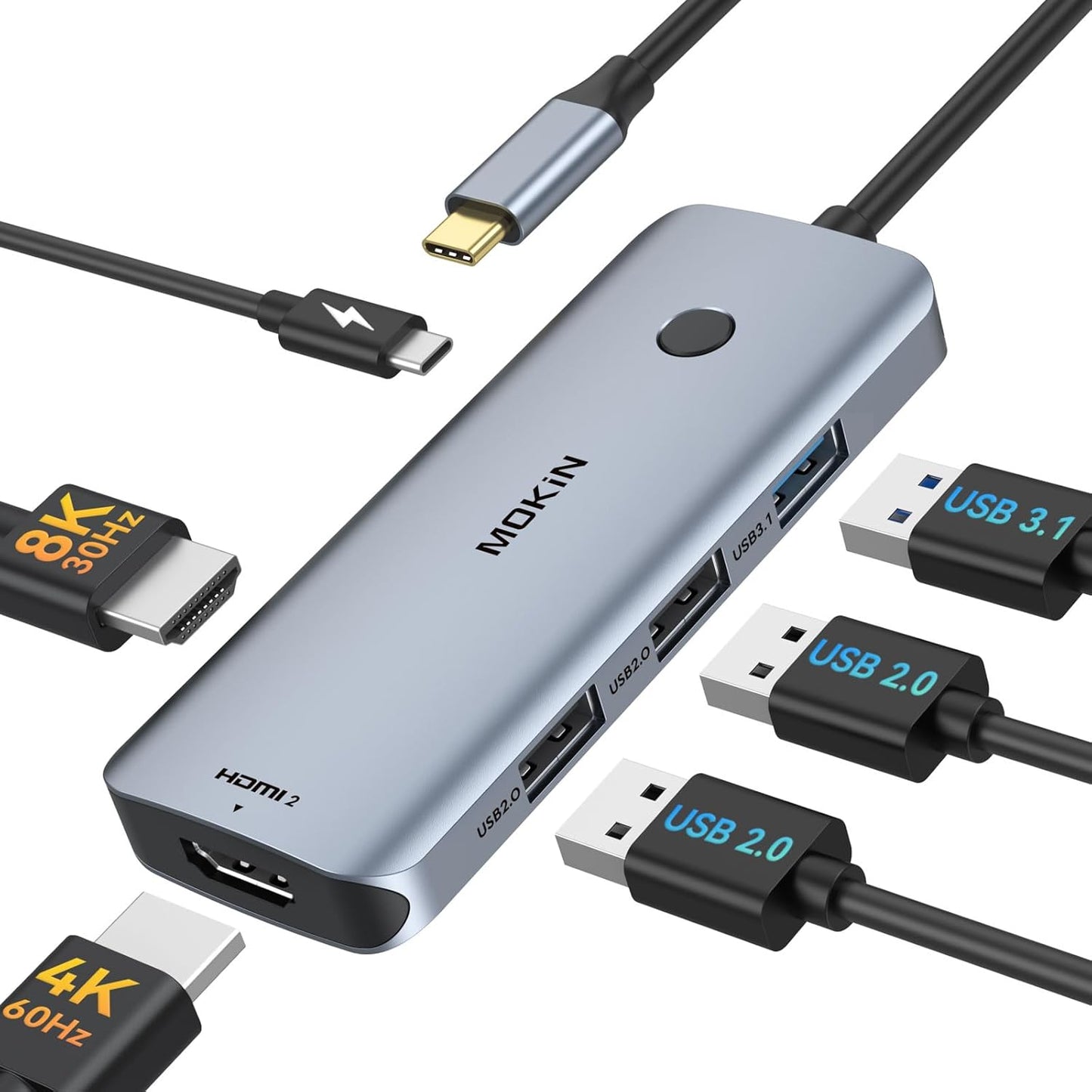
In this review of the Docking Station USB C to Dual HDMI Adapter the bottom line is simple: this hub is built for Windows laptop users who need reliable multi-display output and extra ports without installing drivers. The single biggest reason to buy is its ability to convert one USB-C port into two 4K@60Hz HDMI outputs while also providing USB 3.1 and USB 2.0 ports plus PD passthrough, which makes it a practical, space-saving tool for a home office or on-the-go workstation.
Key Features
- Dual 4K@60Hz HDMI: Sends crisp 4K Ultra HD video to two external displays simultaneously for extended or mirrored desktop setups.
- Triple display support on Windows: Supports SST and MST modes so compatible Windows laptops can run up to three displays for multitasking.
- Varied USB ports: Includes one USB 3.1 port for fast file transfers and two USB 2.0 ports for keyboards and mice, reducing peripheral lag.
- 100W Power Delivery: Passes through power to keep a connected laptop charged while using multiple displays and accessories.
- Plug and play: Works without drivers or software, making setup quick and straightforward for most users.
Who It's For
This adapter is best for Windows laptop owners using systems like Dell XPS or Lenovo Yoga who need multiple external displays and a few extra USB ports for daily productivity. It is especially useful for home office users, remote workers, and anyone who wants to reduce cable clutter while keeping a charging feed using PD.
It is less suited to MacBook users who need independent triple display support because on macOS the adapter only supports mirror mode for multiple HDMI outputs. Users with specific Lenovo models that were reported incompatible by some customers should verify compatibility before relying on this as a single docking solution.
Pros & Cons
Pros
- Delivers two simultaneous HDMI outputs at up to 4K@60Hz for sharp external displays.
- Provides a mix of USB 3.1 and USB 2.0 ports for both fast transfers and low-latency peripherals.
- Plug-and-play design with PD passthrough simplifies charging and connectivity without extra drivers.
Cons
- Not all laptops behave identically; a few customers reported intermittent failures or compatibility issues with certain Lenovo models.
- On Mac systems the HDMI outputs are limited to mirror mode and will not provide extended triple display.
Specifications
| Ports | 2x HDMI, 1x USB 3.1, 2x USB 2.0, 1x USB-C PD passthrough |
| Video output | Up to 4K Ultra HD @ 60Hz or 1080p @ 60Hz |
| Display modes | Supports SST and MST; triple display on compatible Windows laptops |
| Power Delivery | 100W PD compatible |
| Driver requirement | Plug and play, no drivers required |
| Compatibility | Windows laptops (Dell XPS 13/15, Lenovo Yoga, Surface Book 2/Go, Surface Laptop 3) |
Our Verdict
The Docking Station USB C to Dual HDMI Adapter is a solid value for Windows users who need dual 4K displays, a fast USB 3.1 port and PD charging in a compact hub. It handles everyday productivity and multi-monitor setups well, though buyers relying on specific Lenovo models or full macOS multi-display extension should verify compatibility first. Overall it offers a useful combination of ports and performance for the price.
Frequently Asked Questions
Will this hub charge my laptop while in use?
Yes, it supports 100W Power Delivery passthrough so it can charge a connected laptop while powering displays and peripherals.
Can I use three external monitors with a MacBook?
No, on Mac systems the adapter supports mirror mode for multiple HDMI outputs and does not provide extended triple display like on compatible Windows laptops.
Do I need drivers to use this dock?
No, the unit is plug and play and does not require any drivers or additional software for standard operation.
Editor's Take
A solid, practical hub for Windows laptops that need dual 4K@60Hz displays, extra USB ports and PD charging; verify compatibility for some Lenovo models and macOS multi-display limits.

Recently viewed
Recently viewed products will appear here as customers browse the store.