

Doohoeek Surface Pro 13 in Keyboard with Touch Pad & Backlight
Doohoeek Surface Pro 13 in Keyboard with Touch Pad & Backlight
Price subject to change. Tap below for current.
Couldn't load pickup availability
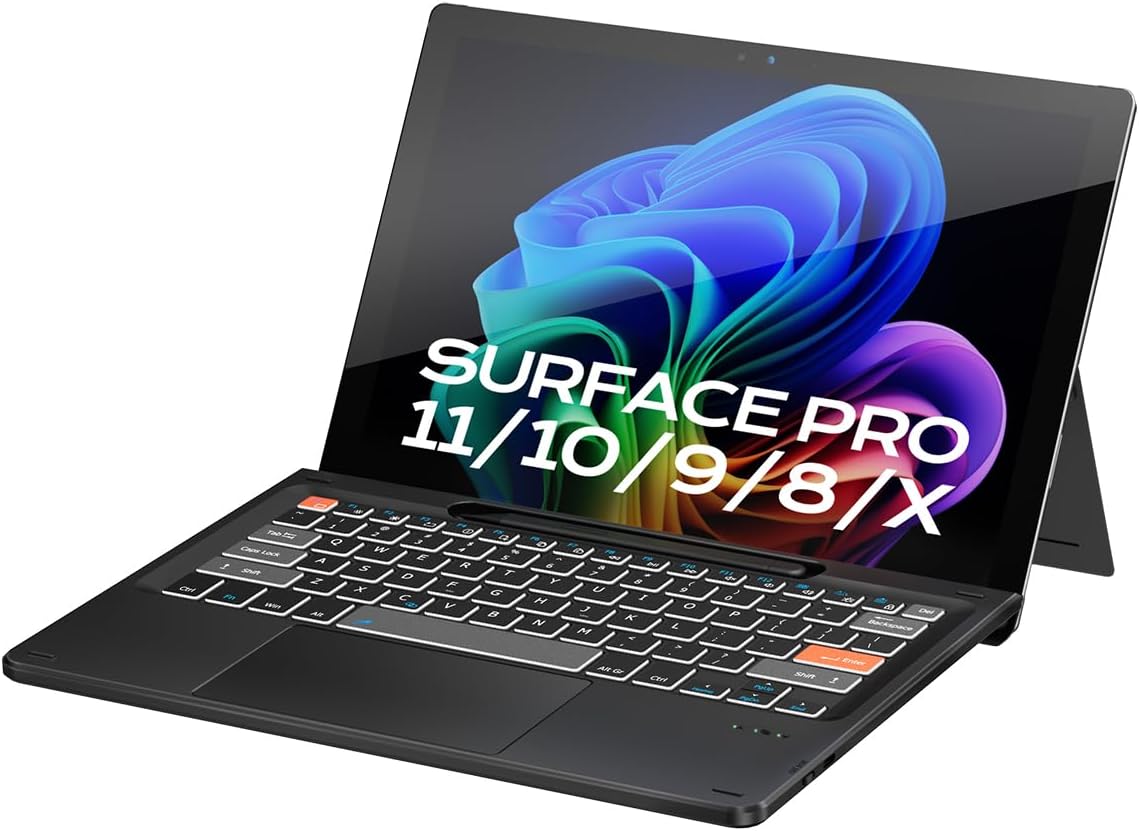
In this review the Doohoeek Surface Pro 13 in keyboard is assessed as a travel-friendly, Windows 11-ready alternative for users who need a compact typing solution for a 13 in Surface Pro device. The single biggest reason to consider it is its Surface Pro exclusive magnetic alignment that snaps to the tablet edge and delivers a stable typing platform with a full smart trackpad and adjustable backlighting. It is important to note up front that this keyboard only works with 13 in Surface Pro models and charges by USB-C rather than using the tablet's smart charging.
Key Features
- Surface Pro Exclusive Precision: Magnetic alignment snaps to the 13 in Pro 11 / Pro 10 / Pro 9 / Pro X edges for a secure, case-free attachment and instant typing readiness.
- Stable Bluetooth Connection: Built-in advanced chip with Bluetooth 5.3 keeps the keyboard responsive and reduces latency in busy Wi-Fi and device environments.
- Win 11-Ready Smart Touch Pad: A full trackpad supports Windows 11 gestures and detects accidental touches so the cursor stays steady while typing.
- Lighting Keys for Low Light: Adjustable backlit keys make late-night typing easier and improve visibility without being distracting.
- USB-C Rechargeable: The keyboard recharges via a USB-C cable for convenient top-up power, though it does not support charging the tablet or pens.
Who It's For
This keyboard is best for Surface Pro 13 in owners who want a thin, magnetic keyboard that removes the need for a bulky case and offers a dependable Bluetooth connection for on-the-go productivity. It suits remote workers, students, and frequent travelers who value a full smart trackpad and Windows 11 gesture support.
Users who need multi-device pairing beyond a Surface Pro 13 in, or who expect a keyboard to charge their tablet or pen from its battery, should look elsewhere. Also, owners of non-13 in tablets or older non-compatible models should not expect this to fit or function.
Pros & Cons
Pros
- Secure magnetic alignment designed specifically for 13 in Surface Pro models makes setup effortless.
- Responsive Bluetooth 5.3 connectivity that holds up in crowded environments.
- Smart touchpad supports full Windows 11 gestures and resists accidental touch interference.
- Adjustable backlighting helps with low-light typing without excessive bleed.
Cons
- Works only with 13 in Surface Pro devices and is not compatible with other tablet sizes.
- The keyboard charges via USB-C and does not support smart charging to the tablet or charging pens.
Specifications
| Compatibility | Surface Pro 13 in (Pro 11 / Pro 10 / Pro 9 / Pro X) |
| Connection | Bluetooth 5.3 |
| Charging | USB-C cable (rechargeable) |
| Trackpad | Smart touch pad with Windows 11 gesture support |
| Backlight | Adjustable lighting keys |
| Attachment | Magnetic alignment to tablet edge |
Our Verdict
The Doohoeek Surface Pro 13 in keyboard is a sensible, value-oriented accessory for anyone who owns a 13 in Surface Pro and needs a slim, capable keyboard with an excellent trackpad and backlighting. Its focused compatibility and USB-C charging are reasonable trade-offs for a tidy magnetic design and dependable Bluetooth 5.3 performance, making it a good buy for commuters and students who want a lightweight typing solution.
Frequently Asked Questions
Will this keyboard work with other tablet sizes?
No. This keyboard is designed exclusively for 13 in Surface Pro models and will not fit or align properly with different sized tablets.
Can the keyboard charge my Surface Pen or tablet?
No. The keyboard charges by USB-C and does not support smart charging to the tablet or charging pens.
Does the trackpad support Windows 11 gestures?
Yes. The smart touch pad supports Windows 11 gestures and includes accidental touch detection for stable cursor control.
Editor's Take
The Doohoeek Surface Pro 13 in keyboard is a compact, magnetic keyboard for 13 in Surface Pro owners, offering Bluetooth 5.3 connectivity, a Windows 11 smart touch pad, and adjustable backlighting; it is good value for commuters and students who need a slim typing solution.

Recently viewed
Recently viewed products will appear here as customers browse the store.