

Dual Monitor HDMI Displayport KVM Switch 2 Monitors 2 Computers - 4K
Dual Monitor HDMI Displayport KVM Switch 2 Monitors 2 Computers - 4K
Price subject to change. Tap below for current.
Couldn't load pickup availability
In this review the Dual Monitor HDMI Displayport KVM Switch is judged on versatility and practicality for users who need to run two computers from the same desk with dual displays. The bottom line: it is best for professionals and power users who require two independent monitors and fast peripheral sharing, because its dual HDMI and DisplayPort I/O plus USB 3.0 ports enable a clean, flexible multi-computer setup that supports up to 4K 60Hz output without extra adapters. The plug-and-play design keeps setup straightforward while the wired remote button simplifies switching between systems.
Key Features
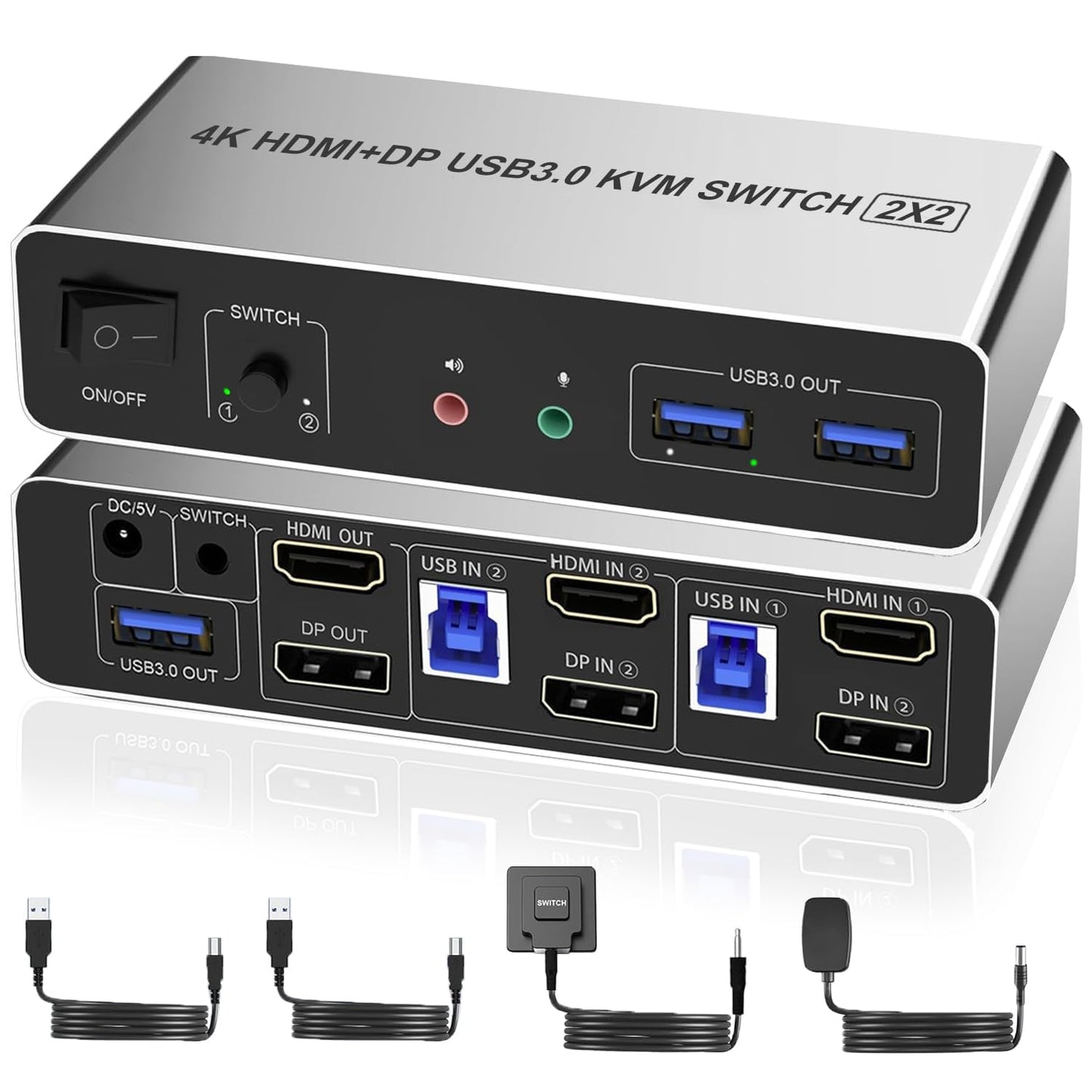
- Dual video inputs and outputs: Supports both HDMI and DisplayPort so the unit can work with a wide range of monitors and graphics cards without needing converters.
- 4K 60Hz support: Preserves high-resolution output across two displays for work or media that requires crisp details and smooth motion.
- Three USB 3.0 ports: Fast 5 Gbps sharing lets users move data and share printers, storage, or cameras between two computers quickly.
- Wired remote and front button: Two switching methods provide convenience whether the controller is kept on the desk or tucked away for a cleaner workspace.
- Plug-and-play operation: No drivers are required, making it suitable for mixed environments like offices, classrooms, or labs with minimal setup time.
- Audio and mic pass-through: Shared audio output and microphone support simplify switching multimedia setups without additional cabling.
Who It's For
This KVM is aimed at users who run two desktop systems and need dual-monitor output with minimal fuss, such as content creators who keep a work and a test machine, IT admins managing two systems, and power users who alternate between work and gaming rigs. The combination of HDMI and DisplayPort I/O makes it especially useful where different graphics outputs must be accommodated.
Those who should look elsewhere include users who require hotkey switching or wireless switching options, and anyone whose monitors or video cards only use legacy connectors without available adapters. Also, single-monitor users will not benefit from the dual-display design and may prefer a simpler single-monitor KVM.
Pros & Cons
Pros
- Supports dual displays with both HDMI and DisplayPort for flexible compatibility.
- USB 3.0 ports provide much faster peripheral and file transfers than USB 2.0.
- Wired remote plus front button keeps desk tidy while offering easy switching.
- Plug-and-play means quick deployment in shared environments.
Cons
- Does not support hotkey switching, so users who prefer keyboard shortcuts will find it limiting.
- Requires matching cables and compatible monitor inputs to realize 4K 60Hz performance.
Specifications
| Product type | Dual-monitor HDMI/DisplayPort KVM switch |
| Video support | HDMI and DisplayPort inputs and outputs |
| Maximum resolution | 4K 60Hz |
| USB ports | 3 x USB 3.0 |
| Switching methods | Front one-touch button and wired remote controller |
| Audio | Shared audio output and microphone support |
Our Verdict
The Dual Monitor HDMI Displayport KVM Switch is a practical choice for users who must operate two computers with dual displays and want fast peripheral sharing. It balances flexible video I/O, USB 3.0 speed, and simple wired switching into a unit that saves desk space and reduces cable swaps, making it good value for professionals and labs that need reliable multi-computer control.
Frequently Asked Questions
Does this unit require drivers?
It is plug-and-play and does not require additional drivers for basic switching and USB peripheral sharing.
Can I use HDMI on one PC and DisplayPort on the other?
Yes, the device accepts both HDMI and DisplayPort on input and output, allowing mixed connections depending on your systems and monitors.
Is hotkey switching supported?
No, the switch supports a front one-touch button and a wired remote controller but does not support hotkey switching.
Editor's Take
This dual-monitor HDMI/DisplayPort KVM switch is ideal for users who run two computers and need flexible video I/O and fast USB 3.0 peripheral sharing; it offers solid value with plug-and-play setup but does not support hotkey switching.

Recently viewed
Recently viewed products will appear here as customers browse the store.