

USB to HDMI Adapter for 2 Monitors - Dual HDMI USB 3.0 Adapter
USB to HDMI Adapter for 2 Monitors - Dual HDMI USB 3.0 Adapter
Price subject to change. Tap below for current.
Couldn't load pickup availability
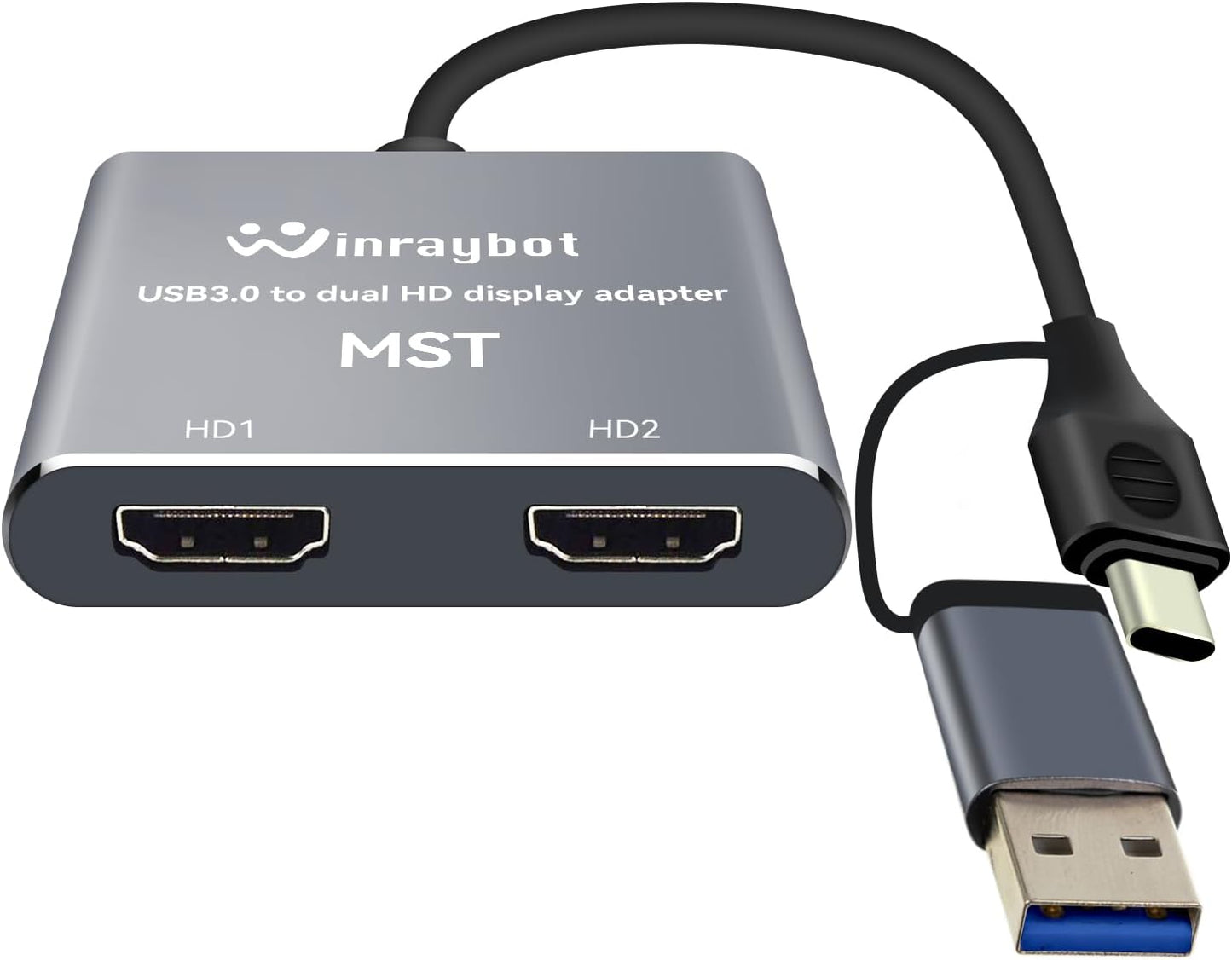
In this review the USB to HDMI Adapter for 2 Monitors is evaluated as a practical way to expand a laptop or desktop workspace without installing an internal video card. It is aimed at users who need two additional displays at Full HD 1080P@60Hz from a single USB 3.0 or USB-C port and are comfortable installing a small driver once. The single biggest reason to buy is straightforward: this adapter provides a cost-effective external graphics solution to run two HDMI monitors in extend or mirror mode, making it useful for productivity tasks and presentations.
Key Features
- Dual HDMI output: Lets a single USB A or USB-C port drive two HDMI displays for extended desktop or mirrored presentations.
- Full HD 1080P@60Hz: Delivers smooth 1080P video on each output when connected to a USB 3.0 or higher port for clear, flicker-free output.
- Built-in driver: Contains an installation driver so the adapter becomes plug-and-play after the initial driver setup and supports hot plug.
- Aluminum alloy case: Offers more durability and a more robust feel than plastic alternatives for everyday portable use.
- Wide Windows and Mac support: Works with Windows 7/10/11 and MacOS 10.15 or higher, covering most modern laptops and desktops listed by the manufacturer.
- Extend and Mirror modes: Supports multiple display layouts so you can expand desktop real estate or duplicate your screen for meetings and demos.
Who It's For
This adapter is well suited to professionals and students who need a simple, external way to add two HDMI monitors to a laptop or desktop without opening the case for an internal video card. It is particularly useful for owners of recent MacBook Pro, MacBook Air, Surface, ThinkPad, Yoga and other models with USB A 3.0 or USB-C 3.0 ports who want Full HD output for productivity, coding, spreadsheets, or multitasking.
It is not a fit for users who rely on ChromeOS, Android, iOS, Linux, or older USB 2.0 ports for primary video output, because those platforms and lower-speed ports are not supported for 1080P@60Hz and may only run at reduced resolution or not at all. Users who need native 4K or gaming-grade GPU features should look at other solutions.
Pros & Cons
Pros
- Enables two independent HDMI displays from one USB 3.0/USB-C port for expanded productivity.
- Supports Full HD 1080P@60Hz when connected to USB 3.0 or higher for clear video and smoother motion.
- Built-in driver makes the adapter plug-and-play after the initial installation and supports hot plug.
- Solid aluminum alloy housing improves durability compared with plastic adapters.
Cons
- Requires driver installation on first use, which adds a setup step that some users may find inconvenient.
- Only supports 1080P maximum; not suitable if you need 4K displays or support for other OS types like ChromeOS or Linux.
Specifications
| Interface | USB A 3.0 / USB C 3.0 |
| Video outputs | Dual HDMI |
| Maximum resolution | 1920x1080 @60Hz per output (USB 3.0/3.0+) |
| Compatibility | Windows 7/10/11 and MacOS 10.15 or higher |
| Case material | Aluminum alloy |
| Modes supported | Extend, Mirror |
| Driver | Built-in installation driver, initial install required |
Our Verdict
The USB to HDMI Adapter for 2 Monitors is a pragmatic, budget-friendly external graphics option for anyone needing two Full HD displays from a single USB A or USB-C port. It is best for productivity users who accept a one-time driver install and do not require 4K or non-supported OS compatibility. For those needs it represents good value by avoiding internal upgrades while delivering reliable 1080P displays and a durable aluminum build.
Frequently Asked Questions
Will this work with a USB 2.0 port?
It will connect but only achieve up to 720P and may show lag or flicker; USB 3.0 or higher is required for full 1080P@60Hz.
Do I need to install drivers?
Yes, the adapter has a built-in driver that must be installed once; after that it functions as plug-and-play and supports hot plug.
Which operating systems are supported?
Supported systems are Windows 7/10/11 and MacOS 10.15 or higher; ChromeOS, Android, iOS, Linux and Unix are not supported.
Editor's Take
A practical external graphics adapter for adding two 1080P HDMI displays from a USB 3.0 or USB-C port; good value for productivity users who can install the driver and do not need 4K or broader OS support.

Recently viewed
Recently viewed products will appear here as customers browse the store.