

Ergonomic Wireless Keyboard Mouse Combo - Split Wave Design
Ergonomic Wireless Keyboard Mouse Combo - Split Wave Design
Price subject to change. Tap below for current.
Couldn't load pickup availability
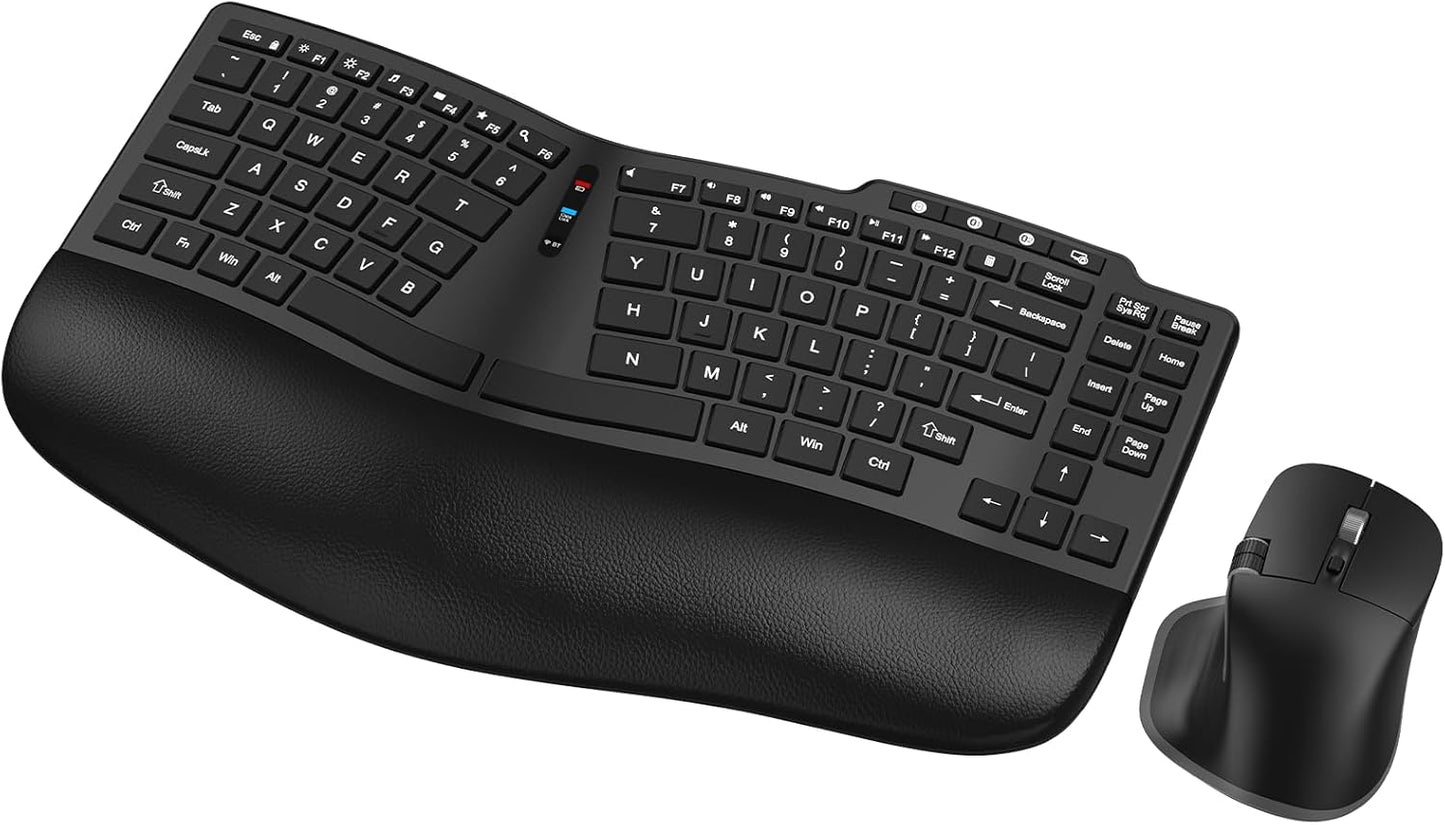
In this review of the Ergonomic Wireless Keyboard Mouse Combo the bottom line is simple: this set is aimed at people who type for long stretches and want to reduce wrist and forearm strain. The MK935's wavy, split-layout keyboard with a cushioned curved palm rest immediately changes hand position for more natural typing, and the matching ergonomic mouse adds thumb support plus a useful side roller. For anyone shifting between a laptop, desktop and phone during the day, the multi-device connectivity and long rechargeable battery life make it a practical, comfort-first upgrade.
Key Features
- Ergonomic Keyboard Design: The curved palm rest with soft foam and split wave layout keeps wrists and forearms in a relaxed, neutral position to reduce fatigue during long typing sessions.
- Multi-Device Connectivity: Supports Bluetooth and 2.4G USB so the keyboard and mouse can pair with up to three devices and switch easily between a PC, laptop or mobile phone.
- Rechargeable Type-C Battery: Both keyboard and mouse recharge over Type-C and include power-saving sleep modes plus on/off switches to extend time between charges.
- Ergonomic Mouse with Side Roller: The mouse provides palm and thumb rests, six DPI levels and a side scroll wheel for precise navigation and left-right page movement.
- Quiet Scissor Switches: SilentTouch scissor switches and scooped keys deliver responsive typing while reducing click noise for a calmer workspace.
Who It's For
The combo is best for office workers, writers, developers and anyone who experiences wrist discomfort from flat layouts; the cushioned palm rest and split key arrangement are designed to ease strain and keep hands comfortable through a full workday. It also fits multi-device users who need to move between a desktop, laptop and mobile device without reconnecting each time.
Those who need a very compact travel keyboard, mechanical key feel, or ultra-minimal desktop footprint might look elsewhere; the set prioritizes ergonomic comfort and full-size keys over extreme portability or a tactile mechanical experience.
Pros & Cons
Pros
- Comfortable wave split layout with soft foam palm rest reduces wrist ache reported by users.
- Flexible connectivity via Bluetooth and 2.4G with up to three-device pairing and a 10 m (33 ft) range.
- Mouse offers multiple DPI settings and a side roller for horizontal scrolling and precise work.
- Long battery life with Type-C fast charging and intelligent sleep to stretch time between charges.
Cons
- The combination leans toward ergonomics and quiet scissor switches, so users who prefer a mechanical key feel may find it too soft.
- Full-size ergonomic shape reduces portability compared with ultra-compact keyboards designed for travel.
Specifications
| Product | Ergonomic wireless keyboard and mouse combo |
| Layout | Split wavy layout with curved cushioned palm rest |
| Connectivity | Bluetooth and 2.4G USB (up to 3 devices) |
| Range | Up to 10 m (33 ft) |
| Battery | Rechargeable via Type-C; 2-3 months typical use with power-saving sleep |
| Mouse features | Palm and thumb rests, 6 DPI levels, side scroll wheel, forward/back buttons |
| Switch type | SilentTouch scissor switches |
Our Verdict
The MK935 ergonomic keyboard and mouse combo is a strong value for anyone prioritizing daily comfort and quiet typing. It pairs solid ergonomic design with practical multi-device wireless connectivity and long battery life, making it a sensible upgrade for desk-based workers and multi-device users who want to reduce wrist strain without sacrificing functionality.
Frequently Asked Questions
Can the keyboard and mouse connect to multiple devices?
Yes, both support Bluetooth and a 2.4G USB receiver and can be paired to up to three devices for easy switching.
How long does the battery last between charges?
Typical daily use yields about 2-3 months between charges thanks to Type-C charging and intelligent sleep modes, though actual time varies with usage.
Is the keyboard noisy?
No, the SilentTouch scissor switches and scooped keys reduce click noise significantly for quieter typing in shared spaces.
Editor's Take
The MK935 ergonomic keyboard and mouse combo delivers comfortable split-layout typing, multi-device wireless switching and long rechargeable battery life, making it a smart choice for desk workers who want to reduce wrist strain.

Recently viewed
Recently viewed products will appear here as customers browse the store.