

External GPU Dock Station Mini eGPU Enclosure - Portable Thunderbolt
External GPU Dock Station Mini eGPU Enclosure - Portable Thunderbolt
Price subject to change. Tap below for current.
Couldn't load pickup availability
In this review the ORARA External GPU Dock Station is evaluated for users who need a compact way to add a fullsize PCIe graphics card to a laptop, NUC or game handheld with a Thunderbolt 3/4 or USB4 port. The single biggest reason to buy is its combination of the JHL7440 controller and flexible power support, which lets many Thunderboltcapable systems run desktop GPUs and add peripherals with the dock acting as a small hub. It is not a plugandplay solution for every device, but for compatible Windows systems it unlocks much greater GPU performance than internal mobile graphics.
Key Features
- Thunderbolt/USB4 compatibility: Works with Thunderbolt 4, Thunderbolt 3 and USB4 hosts to deliver a highspeed external PCIe connection for GPUs and expansion cards.
- JHL7440 controller: Uses the certified JHL7440 module to overcome older controller limits and provide a stable, efficient PCIe x4 link for external graphics.
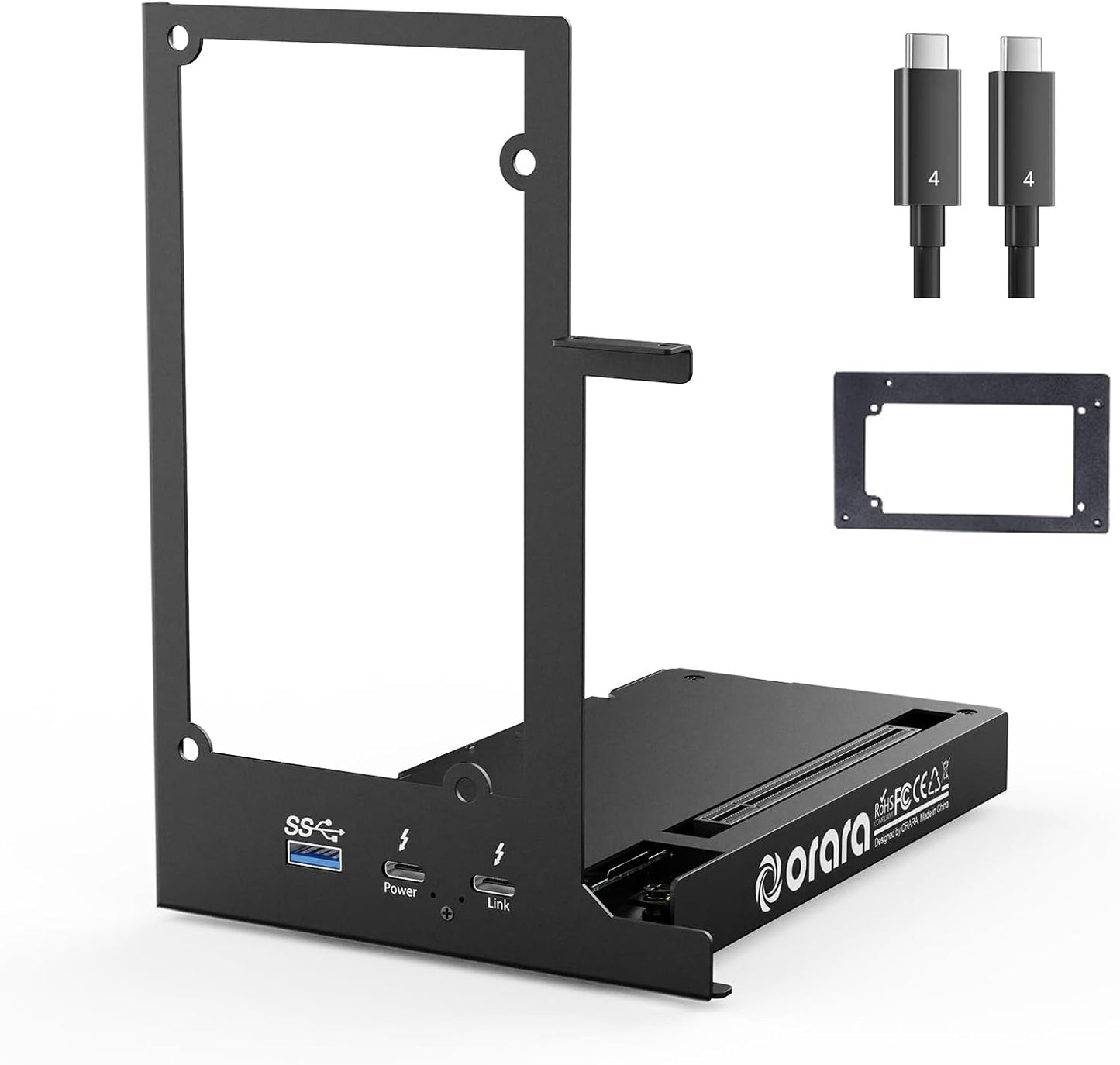
- Flexible power options: Accepts ATX, SFX, FLEX and DC 12V power supplies and supports PD charging up to 85W for laptops while powering the docked card.
- Daisy chain and hub ports: Includes a daisy chain port and a TB4 port plus a 10Gbps USBA port so the dock can also act as a compact peripheral hub.
- Wide OS notes: Works best on Windows 10 or later and has specific Mac limitations, making it suitable for Windows machines with Thunderbolt.
Who It's For
The ORARA eGPU dock is best for laptop users, NUC owners and handheld console gamers who have a Thunderbolt 3, Thunderbolt 4 or USB4 port and want to use a desktop PCIe graphics card for gaming, content creation, or GPUaccelerated workflows. It is especially useful when internal GPU performance is limited and you need a relatively portable external solution that supports fullsize cards and a variety of power supplies.
It is not for owners of Thunderbolt 1/2 systems, MacBooks with M1/M2/M3/M4 chips, or anyone who expects a completely handsoff setup without reading installation notes. Buyers must supply their own ATX/SFX/FLEX or appropriate DC power and be comfortable with some assembly and correct cable connections.
Pros & Cons
Pros
- Supports modern Thunderbolt/USB4 hosts and uses a robust JHL7440 controller for reliable PCIe x4 performance.
- Flexible power compatibility with ATX, SFX, FLEX and DC 12V supplies plus up to 85W PD passthrough for laptops.
- Acts as a small hub with TB4, daisy chain and 10Gbps USBA ports for added connectivity.
- Portable mini enclosure that works with NUCs, laptops and handheld consoles that have compatible ports.
Cons
- Package does not include ATX/DC power or the graphics card, so additional purchases are required.
- Setup instructions and small GPU mounting screws have drawn customer complaints and may require care during installation.
Specifications
| Compatibility | Thunderbolt 4, Thunderbolt 3, USB4 hosts |
| Controller | JHL7440 certified controller |
| Power support | ATX, SFX, FLEX, DC 12V; PD charging up to 85W |
| Daisy chain | Supported via TB4 daisy chain port |
| Ports | TB4 port, daisy chain port, 10Gbps USBA |
| OS notes | Windows 10 or later recommended; limited Mac support |
Our Verdict
The ORARA External GPU Dock Station is a practical, valueoriented option for Thunderboltequipped Windows users who want to add desktop GPU power and peripheral expansion to a laptop or compact PC. It stands out for its JHL7440 controller and flexible power options, but buyers should plan to provide their own power supply and be ready for an installation that may require extra care. For compatible systems it delivers expanded GPU capability without a full desktop rebuild.
Frequently Asked Questions
Will this work with Thunderbolt 2 or older ports?
No. The dock requires Thunderbolt 3, Thunderbolt 4 or USB4 and will not function with Thunderbolt 1 or 2 ports.
Is a power supply included?
No. The package does not include ATX or DC adapters; you must provide an appropriate power supply for your PCIe card.
Does it support MacBook M1 or M2 models?
No. MacBooks with M1, M2, M3 or M4 chips are not supported; Mac compatibility is limited and macOS has additional GPU restrictions.
Editor's Take
The ORARA External GPU Dock Station is a practical choice for Thunderbolt 3/4 or USB4 Windows users who want to add a desktop GPU and hub ports; it offers strong controller performance and flexible power options but requires a separate power supply and careful setup.

Recently viewed
Recently viewed products will appear here as customers browse the store.