

FIDECO M.2 NVMe Cloner Dock 4-Bay - Fast Offline Cloning & Erase
FIDECO M.2 NVMe Cloner Dock 4-Bay - Fast Offline Cloning & Erase
Price subject to change. Tap below for current.
Couldn't load pickup availability
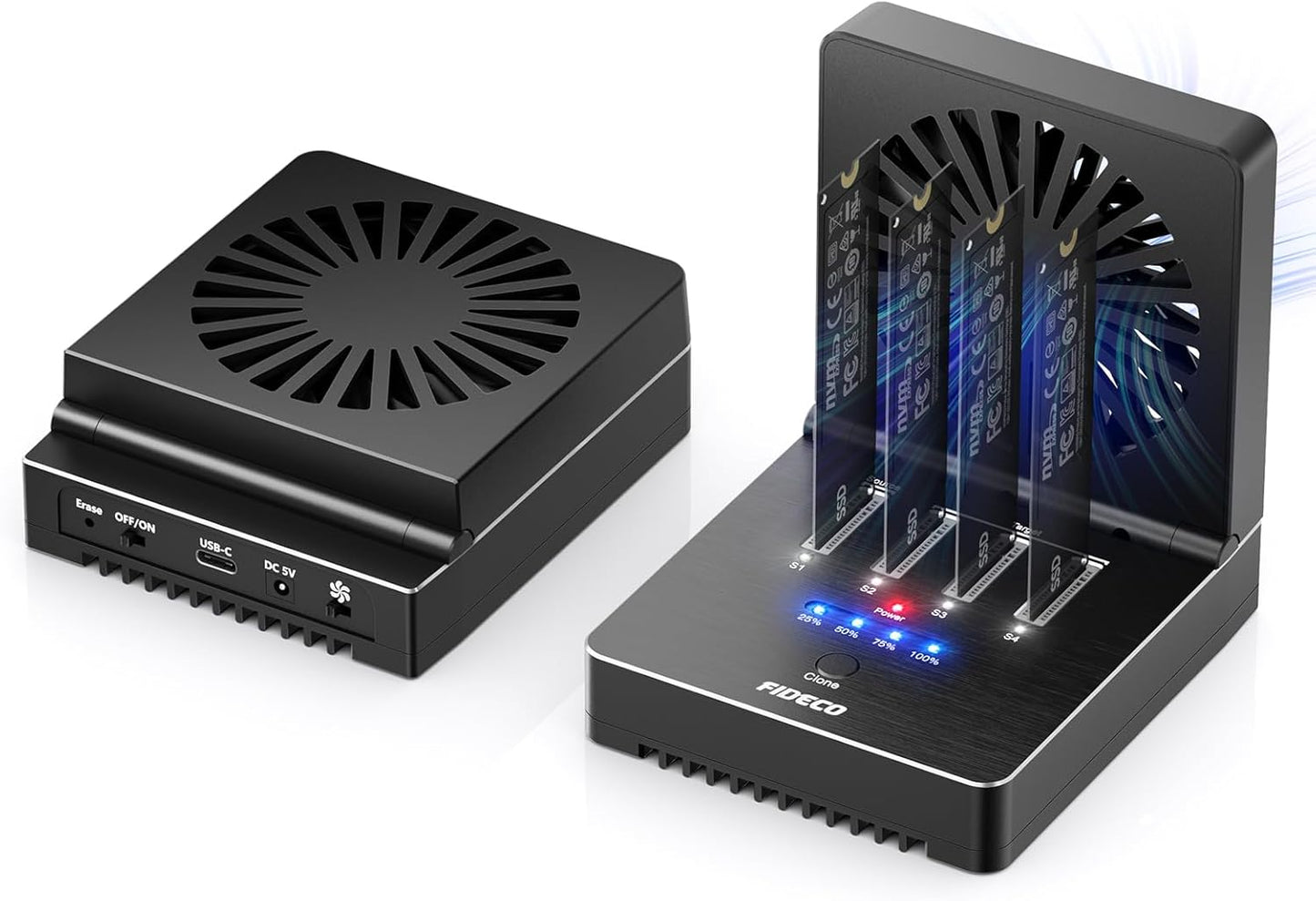
In this review the FIDECO M.2 NVMe Cloner Dock is evaluated as a practical tool for technicians, data managers, and power users who need fast, batch NVMe handling without a PC. The single biggest reason to buy is its combination of high throughput and offline features: it supports simultaneous read/write on four M.2 NVMe SSDs, offers 1-to-1/1-to-2/1-to-3 offline cloning and a one-button offline data eraser, all while using a foldable cooling fan to maintain drive temperatures. For anyone who regularly duplicates or sanitize drives, it removes the need to hook multiple drives to a computer.
Key Features
- M.2 size compatibility: Supports 2230, 2242, 2260, 2280 and 22110 SSDs so one dock fits different NVMe form factors without adapters.
- High transfer bandwidth: Uses the USB4-standard lanes delivering 4x 10Gbps and 2x 20Gbps theoretical channels to speed up read/write tasks across four drives.
- Offline cloning: Offers 1-to-1, 1-to-2 and 1-to-3 offline clone modes so you can duplicate a source SSD to multiple targets without a host computer.
- Offline data eraser: One-button erase lets you securely wipe up to four SSDs from the dock itself, useful for privacy and decommissioning drives.
- Active cooling: A foldable cooling fan helps keep NVMe drives cooler under load, which assists reliability and prolongs lifespan.
- Cross-platform plug and play: Works with Windows, Mac OS and Linux with no driver required for basic docking functions.
Who It's For
This device is aimed at IT technicians, refurbishers, and enthusiasts who frequently clone or sanitize NVMe drives and want a compact, offline workflow. It is especially useful when you need to duplicate one source to multiple target drives quickly or when data privacy requires physical erasure without connecting to a PC.
Users who only need occasional single-drive backups or who require SATA compatibility should look elsewhere, since this unit is tailored to PCIe NVMe M.2 form factors and offline cloning rather than general-purpose single-drive docking with broad interface variety.
Pros & Cons
Pros
- Supports multiple M.2 sizes so a single dock covers common NVMe form factors.
- High theoretical throughput with USB4-standard lanes for faster simultaneous transfers.
- Convenient offline cloning and one-button offline data erasing improve workflow and privacy protection.
- Foldable cooling fan provides active cooling to help maintain drive health during heavy use.
Cons
- Real-world speeds depend on SSDs and mode used; 1-to-2/1-to-3 clone speeds are lower than single-target cloning.
- New SSDs must be initialized on a computer before use, adding an extra step for some workflows.
Specifications
| Supported SSD type | M.2 PCIe NVMe (M-Key or M+B Key) |
| Supported sizes | 2230 / 2242 / 2260 / 2280 / 22110 |
| Interface speed | USB4 standard: 4x 10Gbps, 2x 20Gbps |
| Clone modes | 1-to-1, 1-to-2, 1-to-3 offline clone |
| Offline erase | One-button data eraser for up to 4 SSDs |
| Cooling | Foldable cooling fan |
| Compatibility | Windows, Mac OS, Linux (plug and play) |
Our Verdict
The FIDECO M.2 NVMe Cloner Dock is a strong value for technicians and small labs that need offline cloning, batch erasure and active cooling in a single compact unit. Its multi-size M.2 support and high-bandwidth design make repetitive duplication tasks faster and simpler, though users should expect real-world clone speeds to vary with drive models and multi-target jobs to be slower than single-target cloning. For dedicated NVMe cloning and secure erase without a PC, it is a practical buy.
Frequently Asked Questions
Can I clone one source to three targets at full speed?
The dock supports 1-to-3 offline cloning, but the maximum theoretical speed for 1-to-3 is lower (10Gbps mode) than single-target clone bandwidth.
Do I need drivers to use the dock with my computer?
No drivers are required for basic plug-and-play compatibility with Windows, Mac OS and Linux.
How do I erase drives without a PC?
Use a sim pin to long-press the Erase button until all four blue lights are on; the dock will perform offline erase on inserted SSDs.
Editor's Take
The FIDECO M.2 NVMe Cloner Dock is a practical, cost-effective tool for technicians and small labs needing offline 1-to-many cloning, secure erase and active cooling; it saves time on batch NVMe tasks though multi-target speeds depend on drive models.

Recently viewed
Recently viewed products will appear here as customers browse the store.