

Smart Board 65 Interactive Display 4K UHD - Classroom and Conference
Smart Board 65 Interactive Display 4K UHD - Classroom and Conference
Price subject to change. Tap below for current.
Couldn't load pickup availability
In this review of the Smart Board 65 Interactive Display, the bottom line is simple: it is a feature-rich 65 in interactive whiteboard built for classrooms and meeting rooms that need a large, integrated touchscreen with conferencing tools. The review finds the standout advantage is the complete all-in-one design - a 4K UHD 20-point touch screen running Android 13 with an octa-core processor and a built-in auto-framing camera - which removes the need for multiple add-on devices for basic lessons and remote meetings.
Key Features
- 65-in 4K touch screen: The 4K UHD display delivers sharp text and images for presentations and media, making content easier to read from the back of a room.
- Octa-core Android 13 system: An octa-core processor paired with 8GB RAM and 128GB storage provides smoother app performance and the ability to install productivity apps directly on the board.
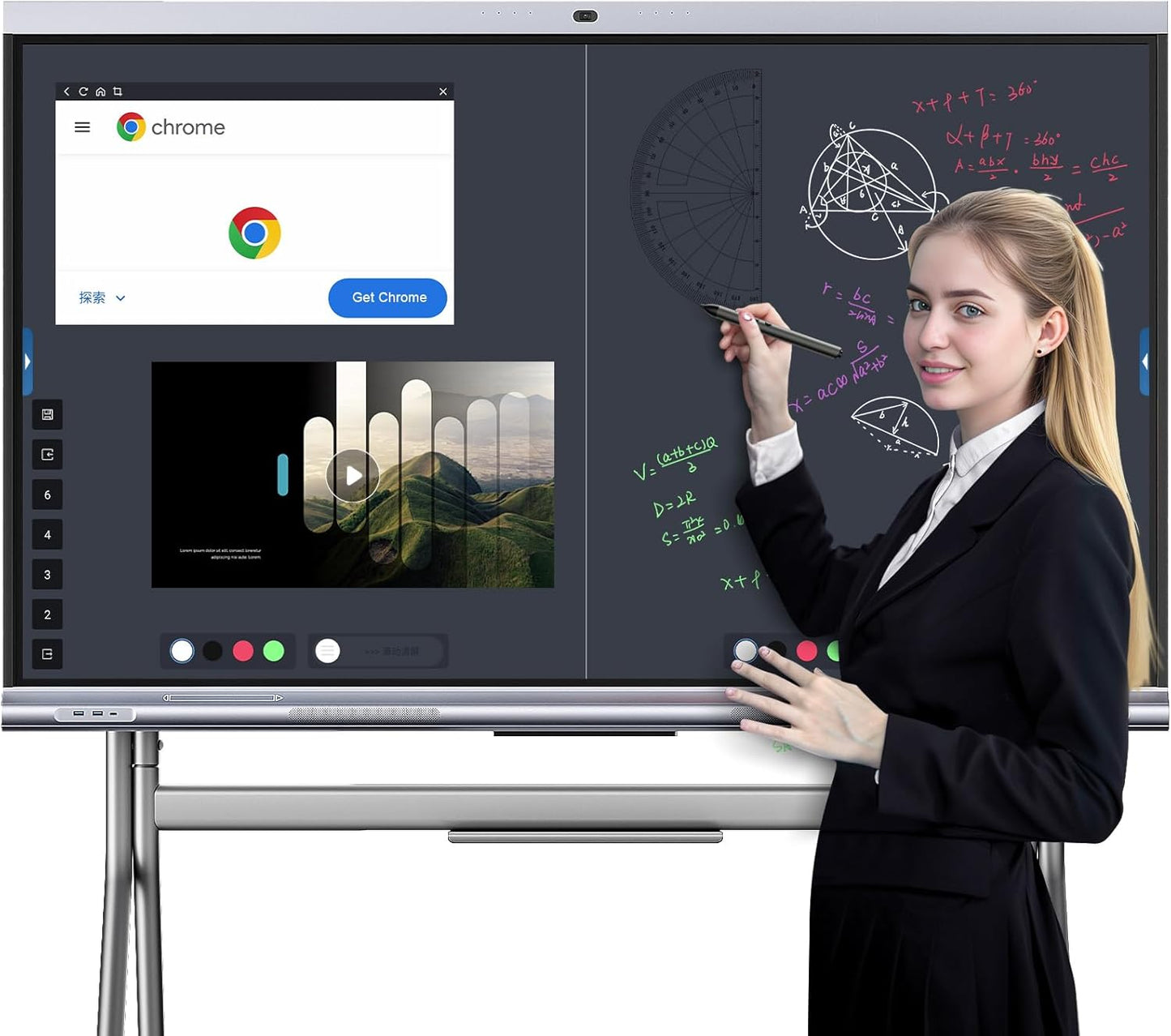
- 20-point multi-touch and S-Write: Multi-touch responsiveness with the S-Write annotation tools enables collaborative note taking, graphic recognition, and quick erasing with a palm gesture.
- Integrated conferencing hardware: A high-resolution auto-framing camera, 8-array microphones, and two 20W speakers let the board handle video calls without separate AV equipment.
- Wireless screen sharing: Built-in AirPlay, Miracast, and Chromecast support make it straightforward to mirror phones, tablets, and laptops for group review.
- Durable construction and warranty: An aluminum alloy body and 7H tempered glass combine with manufacturer support and a warranty card for long-term classroom or office use.
Who It's For
The Smart Board 65 is best for schools, higher-education classrooms, and medium to large meeting rooms where a single, integrated display simplifies teaching or remote collaboration. Educators who rely on in-class annotation tools, split-screen lessons, and built-in apps will find the S-Write features and Android app ecosystem particularly useful.
It is also a good fit for small offices and studios that want to run presentation or design apps directly on the screen. Organizations that need a lightweight portable solution or very small meeting displays should look elsewhere, since this product is a fixed, wall-mount 65 in installation and is intended as a permanent room fixture.
Pros & Cons
Pros
- Comprehensive all-in-one hardware with camera, microphones, and speakers reduces extra AV gear needs.
- Responsive 20-point touch and S-Write tools improve collaboration and lesson creation.
- Android 13 and ample storage allow installation of desktop-class apps for specialized workflows.
- Sturdy build with tempered glass and included wall mount supports heavy daily use.
Cons
- At 65 in and wall-mounted, it is not portable and requires a dedicated space and installation.
- Power users may still prefer a separate PC when running highly specialized or resource-heavy software.
Specifications
| Screen size | 65 in |
| Resolution | 4K UHD |
| Processor and memory | Octa-core CPU with 8GB RAM and 128GB storage |
| Touch points | 20-point multi-touch |
| Camera and audio | Auto-framing 4800MP camera, 8-array mics, two 20W speakers |
| Operating system | Android 13 |
| Included accessories | Wall mount, 2 magnetic stylus, remote, instructions, warranty card |
Our Verdict
The Smart Board 65 Interactive Display is a compelling all-in-one solution for classrooms and conference rooms that need a large, reliable touchscreen with built-in conferencing and annotation tools. It represents good value when you factor in the integrated camera, microphones, speakers, and the flexibility of Android 13 to run educational and productivity apps without extra hardware.
Frequently Asked Questions
Does the board support wireless screen mirroring?
The board supports AirPlay, Miracast, and Chromecast for wireless mirroring from phones and laptops.
Can teachers annotate and save lesson notes?
Yes, the S-Write tools allow annotation, graphic recognition, table insertion, and saving or exporting of notes and screenshots.
Is a wall mount included?
Yes, a wall mount is included in the package along with stylus pens and a remote control.
Editor's Take
The Smart Board 65 is a full-featured, wall-mounted 4K interactive display ideal for classrooms and meeting rooms, offering built-in conferencing hardware and robust annotation tools for strong value.

Recently viewed
Recently viewed products will appear here as customers browse the store.