

GEM10 3x M.2 NVMe Mini PC Ryzen 7 6800H - Compact 4K Power
GEM10 3x M.2 NVMe Mini PC Ryzen 7 6800H - Compact 4K Power
Price subject to change. Tap below for current.
Couldn't load pickup availability
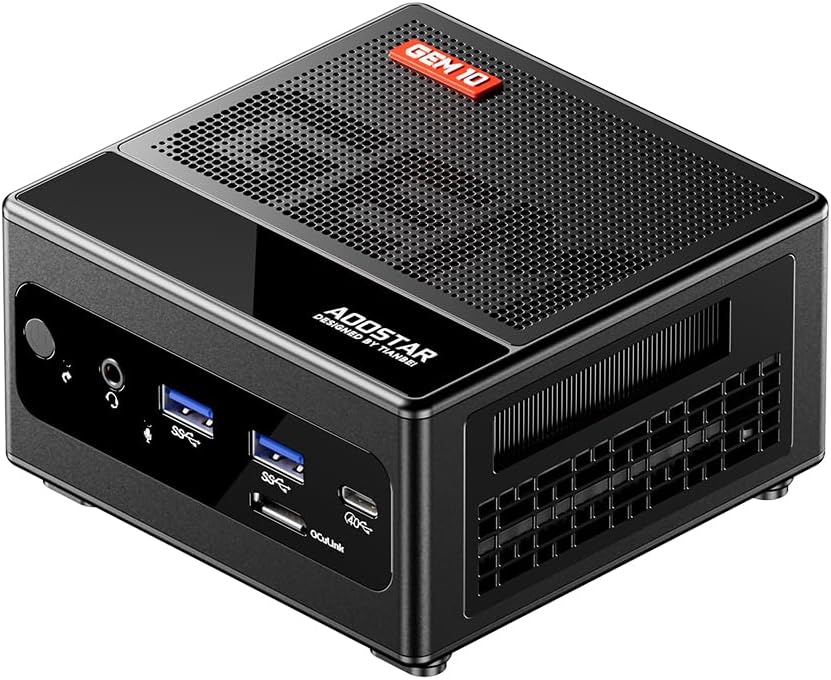
Our review of the GEM10 mini PC finds it best suited for power users who need compact but expandable performance. The standout reason to buy is its combination of an 8C/16T AMD Ryzen 7 6800H with built-in Radeon 680M graphics and three M.2 NVMe slots, which together deliver laptop-class CPU performance with desktop-grade storage flexibility in a tiny chassis. For anyone building a small workstation, media box, or all-flash NAS, this unit balances speed, ports, and cooling without taking up a full desktop footprint.
Key Features
- AMD Ryzen 7 6800H: Delivers eight cores and sixteen threads with boost up to 4.70GHz for smooth multitasking and gaming.
- Radeon 680M graphics: Integrated 12-core GPU at 2200MHz that handles everyday gaming and GPU-accelerated editing without a discrete card.
- Three M.2 NVMe slots: Triple PCIe 4.0 x4 bays let you configure massive fast storage or set up RAID 0/1/5 for speed or redundancy.
- OCuLink external GPU support: A 64 Gbps OCuLink port enables connection to high-performance external GPUs with minimal loss for GPUs under high-end tiers.
- Rich connectivity: Dual 2.5Gbps LAN, WiFi 6, Bluetooth 5.2, USB4, multiple USB3.2 Gen2 ports and dual HDMI 2.1 allow three 4K displays and fast networking.
Who It's For
The GEM10 is ideal for content creators, small home lab users, and gamers who want a compact system that can host multiple NVMe drives for capacity or redundancy. Its strong CPU and integrated graphics suit video editing, programming, web development, and modern gaming at moderate settings.
Those who need a fanless system, an internal full-size GPU, or a turnkey preinstalled SSD should look elsewhere; the GEM10 ships without SSD and is targeted at buyers who plan custom NVMe storage and may use an external GPU via OCuLink.
Pros & Cons
Pros
- Excellent performance per cubic inch from the Ryzen 7 6800H and fast LPDDR5 memory support.
- Exceptional storage flexibility with three M.2 2280 NVMe bays and RAID support for speed or data protection.
- Extensive I/O including dual 2.5G LAN, WiFi 6, USB4 and dual HDMI 2.1 for multi-4K display setups.
- OCuLink port allows high-bandwidth external GPU connectivity without using M.2 slots.
Cons
- No SSD included, so initial setup requires purchasing NVMe drives separately.
- OCuLink does not support hot-swapping, which limits convenience for some external GPU workflows.
Specifications
| Processor | AMD Ryzen 7 6800H (8C/16T, up to 4.70GHz) |
| Graphics | Integrated AMD Radeon 680M (12-core, 2200MHz) |
| Memory | 32GB LPDDR5 6400MHz (installed) |
| Storage | 3 x M.2 2280 NVMe slots (PCIe 4.0 x4), no SSD included |
| Networking | Dual 2.5Gbps LAN, WiFi 6, Bluetooth 5.2 |
| External I/O | OCuLink 64Gbps, USB4 x1, USB3.2 Gen2 x4, HDMI 2.1 x2 |
| Certifications | CE, EMC, FCC, RoHS |
Our Verdict
The GEM10 is a strong choice for users who want a compact, high-performance mini PC with serious NVMe expansion and modern I/O. It offers excellent value for power users who plan to add their own drives and may use external GPUs; the main trade-offs are the lack of a preinstalled SSD and non-hot-swappable OCuLink. For small workstations, home NAS builds, or a space-saving gaming rig, it delivers versatile performance and connectivity.
Frequently Asked Questions
Does the GEM10 include an internal SSD?
No, the unit ships without SSDs so you will need to buy M.2 NVMe drives to populate the three 2280 slots.
Can I connect an external GPU?
Yes, the OCuLink port supports external GPUs at up to 64 Gbps, but it does not support hot-swapping.
How many displays can it run and at what resolution?
The system supports three displays, including up to 4K output via dual HDMI 2.1 plus USB4-enabled display output.
Editor's Take
The GEM10 is a compact, high-performance mini PC ideal for power users who want Ryzen 7 6800H CPU performance, three M.2 NVMe slots for RAID or capacity, and extensive I/O; it is great value if you plan to add your own SSDs and possibly an external GPU.

Recently viewed
Recently viewed products will appear here as customers browse the store.