

Graphic Drawing Tablet 10x6.25 in - 8192 Pressure, Battery-Free Pen
Graphic Drawing Tablet 10x6.25 in - 8192 Pressure, Battery-Free Pen
Price subject to change. Tap below for current.
Couldn't load pickup availability
In this review of the Graphic Drawing Tablet 10x6.25 in, the bottom line is simple: it is a solid, budget-friendly drawing surface aimed at beginners and hobbyists who want reliable pen performance and helpful shortcut customization. The tablet pairs a large active area with an 8192-pressure, battery-free pen and 60-degree tilt support, which gives noticeably responsive line control for sketching, photo editing, and class instruction. Setup is straightforward and the dozen programmable keys plus multimedia shortcuts speed common tasks, making it a strong entry-level tool for anyone moving from mouse to stylus.
Key Features
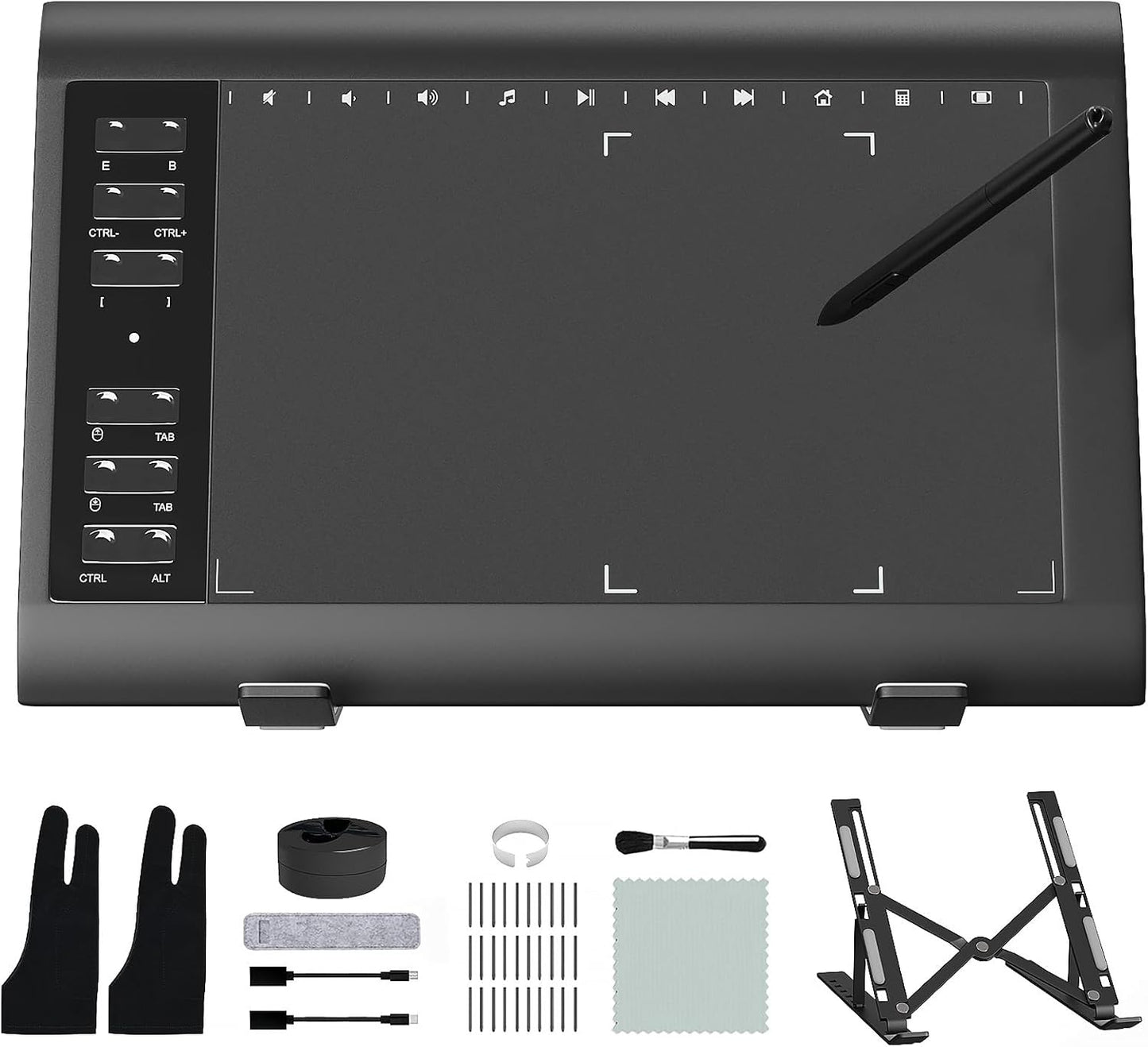
- Wide compatibility: Works with Windows, Mac OS and Android devices (not iPhone, iPad or Chromebook), so it plugs into most laptops and desktop setups used for art and office tasks.
- High pressure sensitivity: 8192 levels of pressure give fine control over line thickness and opacity for natural-feeling strokes when drawing or retouching photos.
- Battery-free pen with tilt: The included stylus needs no charging, offers 60-degree tilt recognition for angled brush effects and comes with 30 replacement nibs for long-term use.
- Customizable shortcuts: Twelve hardware shortcut keys plus ten soft multimedia keys let users assign favorite commands to speed workflows across creative apps and Microsoft Office.
- User-friendly setup: Install the driver from the official site and connect to a computer or compatible Android device to start creating, which is convenient for new digital artists.
Who It's For
The tablet is best for beginners, students and hobbyists who want a dedicated drawing surface with a responsive pen and programmable keys without a steep learning curve. It is also useful for educators and photo editors who need a compact graphics pad for basic illustration, annotation or retouching work.
Those who should look elsewhere include professionals who require display-integrated tablets or specialized color-calibrated screens, and iPad or Chromebook users, since the device is not compatible with those platforms.
Pros & Cons
Pros
- High 8192 pressure sensitivity delivers nuanced line control for sketching and shading.
- Battery-free pen with tilt support feels natural and avoids downtime for charging.
- Extensive shortcut keys and multimedia controls speed common actions in apps.
- Wide OS and software compatibility covers major creative programs and Android devices.
Cons
- Requires connection to a computer or Android device and is not compatible with iPhone, iPad or Chromebooks.
- No built-in display, so you must look at your monitor while drawing which may not suit all workflows.
Specifications
| Active area | 10 x 6.25 in |
| Pressure sensitivity | 8192 levels |
| Pen | Battery-free stylus with 60deg tilt, 30 replacement nibs |
| Shortcut keys | 12 customizable keys + 10 soft multimedia keys |
| Compatibility | Windows XP - 11+, Mac OS 10.7.0+, Android 5.0+ (not iPhone/iPad/Chromebook) |
| Included accessories | Stand and replacement nibs |
Our Verdict
The Graphic Drawing Tablet 10x6.25 in is a practical, value-oriented option for beginners and casual creators who want strong pen performance and programmable shortcuts without a display. Its 8192 pressure levels, tilt-aware battery-free pen and wide software support make it a dependable choice for sketching, teaching and photo editing, though professionals seeking a screen or iPad users will want a different solution.
Frequently Asked Questions
Is this tablet compatible with iPads?
No. The tablet is compatible with Windows, Mac OS and Android devices but not iPhone or iPad.
Does the pen need charging?
No. The supplied stylus is battery-free and does not require charging; it also includes 30 replacement nibs.
Which software works with this tablet?
It works with major creative apps such as Photoshop, SAI, FlipaClip, Medibang, Adobe Illustrator and Lightroom, and supports Microsoft Office functions.
Editor's Take
A strong entry-level graphics tablet, the 10x6.25 in model pairs 8192 pressure sensitivity and a battery-free tilt pen with programmable shortcuts, making it an excellent, value-focused choice for beginners and casual creators.

Recently viewed
Recently viewed products will appear here as customers browse the store.