

HDMI Displayport KVM Switch for Dual Monitor 2 Computers
HDMI Displayport KVM Switch for Dual Monitor 2 Computers
Price subject to change. Tap below for current.
Couldn't load pickup availability
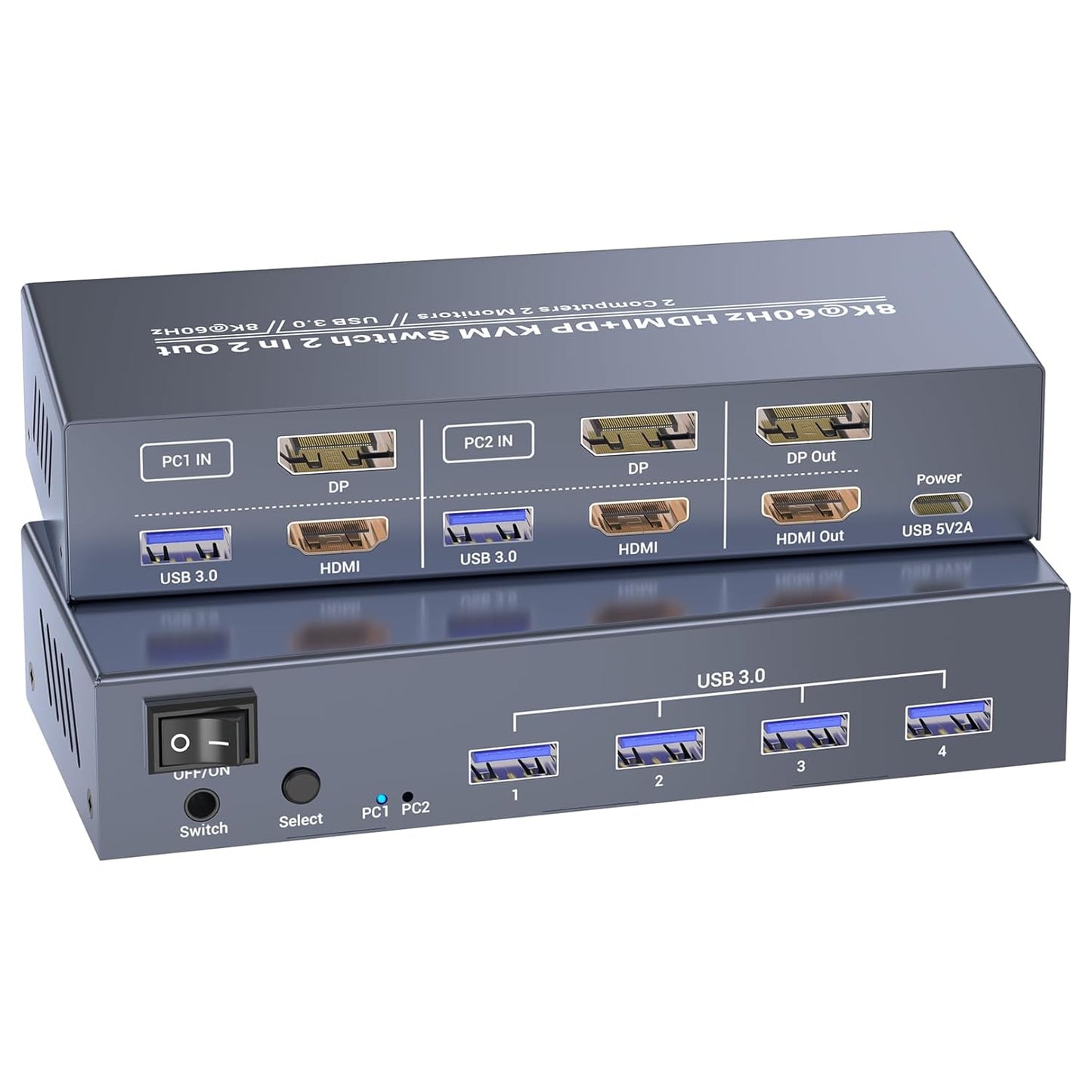
In this review the HDMI Displayport KVM Switch for Dual Monitor 2 Computers is examined for professionals and power users who need to control two PCs with a single set of peripherals. The bottom line: this KVM is for anyone who has two machines with one HDMI and one DisplayPort output each and wants a clean dual-monitor setup without constant cable swapping. The reviewer found setup straightforward when both systems and monitors support the stated resolutions, and the device delivers the key benefit of switching control of two computers with one keyboard, mouse, and two displays.
Key Features
- Dual-input per computer: Each computer uses one HDMI and one DisplayPort input so you can manage two systems with two monitors and a single set of peripherals.
- High-resolution support: Native support for 8K@60Hz input and output provides very sharp video when connected hardware and cables also support 8K.
- Backward compatibility: The switch also supports lower resolutions including 4K@60Hz and standard HD formats so legacy monitors still work without issues.
- USB 3.0 connectivity: Four front USB 3.0 ports and included USB 3.0 cables allow fast peripheral and storage access when the switch is connected with the supplied USB cables.
- Two switching methods: Toggle between computers using the push button on the unit or the included external controller for flexible workflow control.
Who It's For
This KVM is best for content creators, developers, and advanced home office users who run two desktop computers or laptops and require a persistent dual-monitor configuration. It suits anyone who needs high-resolution output for editing, design, or gaming and who can meet the hardware requirements of one HDMI and one DisplayPort per computer.
Users who should look elsewhere include people with only single-output systems, or those who rely on hotkey switching or wireless-only peripherals without a wired USB connection, as hotkey switching is not supported and the USB 3.0 ports require the included USB cables to function.
Pros & Cons
Pros
- Supports surprisingly high 8K@60Hz and modern refresh rates for a dual-monitor KVM.
- USB 3.0 ports provide fast peripheral and storage access when properly connected with supplied cables.
- External controller and front push button make switching quick and obvious.
Cons
- Requires both computers to have one HDMI and one DisplayPort output each, which limits compatibility with single-output machines.
- Hotkey switching is not supported, so users who prefer keyboard-only switching will be disappointed.
Specifications
| Product type | Dual-monitor HDMI/DisplayPort KVM switch |
| Ports per computer | 1 HDMI input and 1 DisplayPort input |
| Maximum resolution | 8K@60Hz (backward compatible with 4K@60Hz, 4K@30Hz) |
| USB | 4 USB 3.0 front ports; two 1.2 m USB 3.0 cables included |
| Switching methods | Front push button and included external controller |
| Compatibility | Computers, laptops, and monitors with HDMI and DisplayPort connectors |
Our Verdict
This HDMI DisplayPort KVM switch is a practical, well-equipped solution for users who run two systems and need persistent dual-monitor control with high-resolution output. It offers excellent value when both computers and displays support the required HDMI and DP outputs, and the USB 3.0 ports and external controller make it a flexible choice for professionals who prioritize performance and tidy workspaces.
Frequently Asked Questions
Do both computers need a DisplayPort and HDMI output?
Yes. The switch requires each computer to have one HDMI and one DisplayPort output to supply two monitors from each system.
Will the USB ports work without the supplied cables?
No. The USB 3.0 ports on the KVM will only function if the computers are connected to the switch using the included USB 3.0 cables.
Is hotkey switching available?
No. Switching is done via the front push button or the included external controller; hotkey switching is not supported.
Editor's Take
This dual-monitor HDMI DisplayPort KVM is a strong choice for users with two systems that each have HDMI and DisplayPort outputs; it offers 8K@60Hz support, USB 3.0 connectivity, and convenient physical switching for tidy multi-PC workflows.

Recently viewed
Recently viewed products will appear here as customers browse the store.