

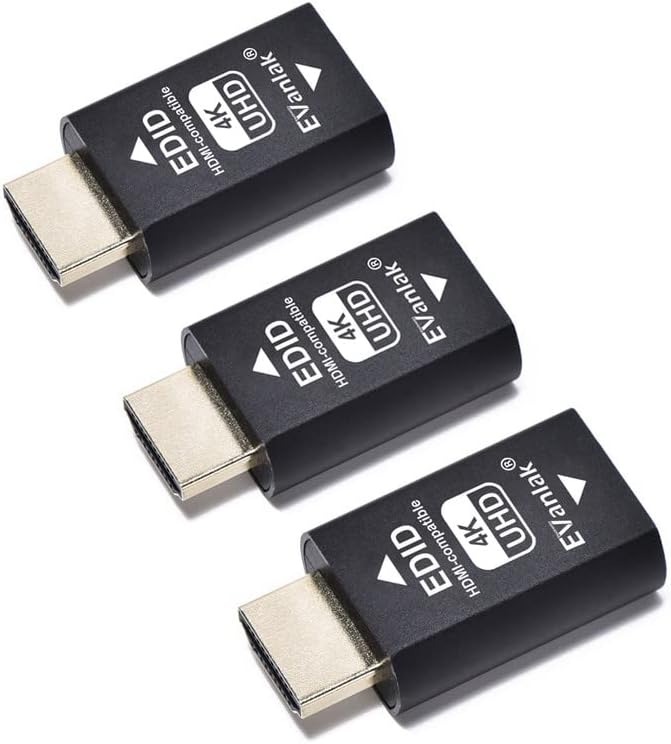
Hdmi Edid Emulator Passthrough Eliminated Emulator Adapter 3rd
Hdmi Edid Emulator Passthrough Eliminated Emulator Adapter 3rd
Price subject to change. Tap below for current.
Couldn't load pickup availability
Our review of this Hdmi Edid Emulator Passthrough Eliminated Emulator Adapter finds it most useful for users who need a stable multi-display setup and reliable EDID preservation. The single biggest reason to buy is that it prevents a computer from rearranging desktops or losing display settings when a TV or monitor powers off or is unplugged, so the system keeps the same resolution and refresh rate. It is aimed at AV integrators, home theater builders, and professionals who need a persistent virtual display for remote access or multi-monitor rigs.
Key Features
- Bi-directional EDID: preserves display information whether connected male or female so the source keeps consistent output even if a screen is turned off.
- Wide pixel format support: supports YCbCr 4:4:4, 4:2:2, 4:2:0 and RGB so it can match color and chroma formats required by many displays and players.
- 4K at high refresh: works with 3840x2160@60Hz and other 4K modes so it can maintain high-resolution output for compatible displays.
- Audio passthrough: carries audio up to 2.1 channel to keep AV systems consistent when emulating a display connection.
- Virtual monitor capability: can act as a virtual monitor so a laptop or PC does not rearrange desktops when displays are disconnected or turned off.
- Works with Mac and common adapters: compatible with Thunderbolt to HDMI adapters, switches, extenders, receivers and splitters for flexible integration.
Who It's For
This adapter is best for AV professionals, digital signage installers and anyone running a multi-monitor workstation who needs to avoid automatic desktop rearrangement when displays drop or are powered down. It also suits users who remote into a laptop and require a fixed display resolution when the lid is closed or when switching between output devices.
It is less appropriate for users whose primary concern is absolute color accuracy or the finest screen quality for professional color grading; some customer reports indicate mixed results on color and occasional flicker with certain sources or cables, so highly color-critical workflows should test compatibility first.
Pros & Cons
Pros
- Prevents PC desktop reflow by emulating a persistent EDID, keeping displays in sync.
- Broad pixel format and refresh support, including common 4K modes up to 3840x2160@60Hz.
- Good compatibility and solid build quality reported across consoles, PCs and Mac Thunderbolt adapters.
- Works with a variety of extenders, splitters and receivers for flexible setups.
Cons
- Some customers report flickering or mixed resolution performance with certain sources, so compatibility testing is advised.
- Not targeted at professional color-critical work where absolute color accuracy is mandatory.
Specifications
| Function | Bi-directional EDID emulator and passthrough |
| Pixel formats | YCbCr 4:4:4, 4:2:2, 4:2:0, RGB |
| Maximum resolution | 4K 3840x2160@60Hz (also supports 4096x2160 modes) |
| Audio | Up to 2.1 channel |
| Compatibility | Works with Mac Thunderbolt to HDMI, switches, extenders, AV receivers, splitters |
| Use case | Virtual monitor, multi-display sync, remote access |
Our Verdict
The Hdmi Edid Emulator Passthrough Adapter is a practical, good-value tool for anyone who needs to maintain stable display settings across power cycles and device swaps. It reliably preserves EDID and supports a wide range of pixel formats and 4K modes, making it a strong choice for AV installers, remote workers and multi-monitor setups, provided users verify compatibility with their specific sources to avoid occasional flicker reports.
Frequently Asked Questions
Will this stop my PC from rearranging monitors when a display turns off?
Yes. The EDID emulator preserves the display handshake so the PC keeps the same desktop layout when a screen is turned off or unplugged.
Does it work with Mac Thunderbolt to HDMI adapters?
Yes. It is compatible with Mac setups using Thunderbolt to HDMI adapters and is designed to work with common switches and extenders.
Can it deliver full 4K at 60Hz?
It supports 3840x2160@60Hz and other 4K modes, but results can vary with source hardware and cables, so test your configuration if exact performance is critical.
Editor's Take
The adapter preserves EDID to keep displays stable through power cycles and device swaps, making it a practical, good-value tool for AV setups, remote access and multi-monitor rigs when compatibility is confirmed.

Recently viewed
Recently viewed products will appear here as customers browse the store.