

HDMI KVM Switch 2 Monitors 2 Computers 4K@60Hz - Dual Display KVM
HDMI KVM Switch 2 Monitors 2 Computers 4K@60Hz - Dual Display KVM
Price subject to change. Tap below for current.
Couldn't load pickup availability
In this review of the HDMI KVM Switch 2 Monitors 2 Computers 4K@60Hz, the bottom line is simple: this unit is for users who need to control two computers with a single keyboard, mouse and two displays while keeping USB peripherals shared and responsive. It stands out because it supports dual-monitor setups at up to 4K@60Hz and includes USB 3.0 sharing, which makes it a practical choice for creative professionals, power users and multi-system workstations. Setup is straightforward when both systems and monitors use compatible HDMI and USB 3.0 connections.
Key Features
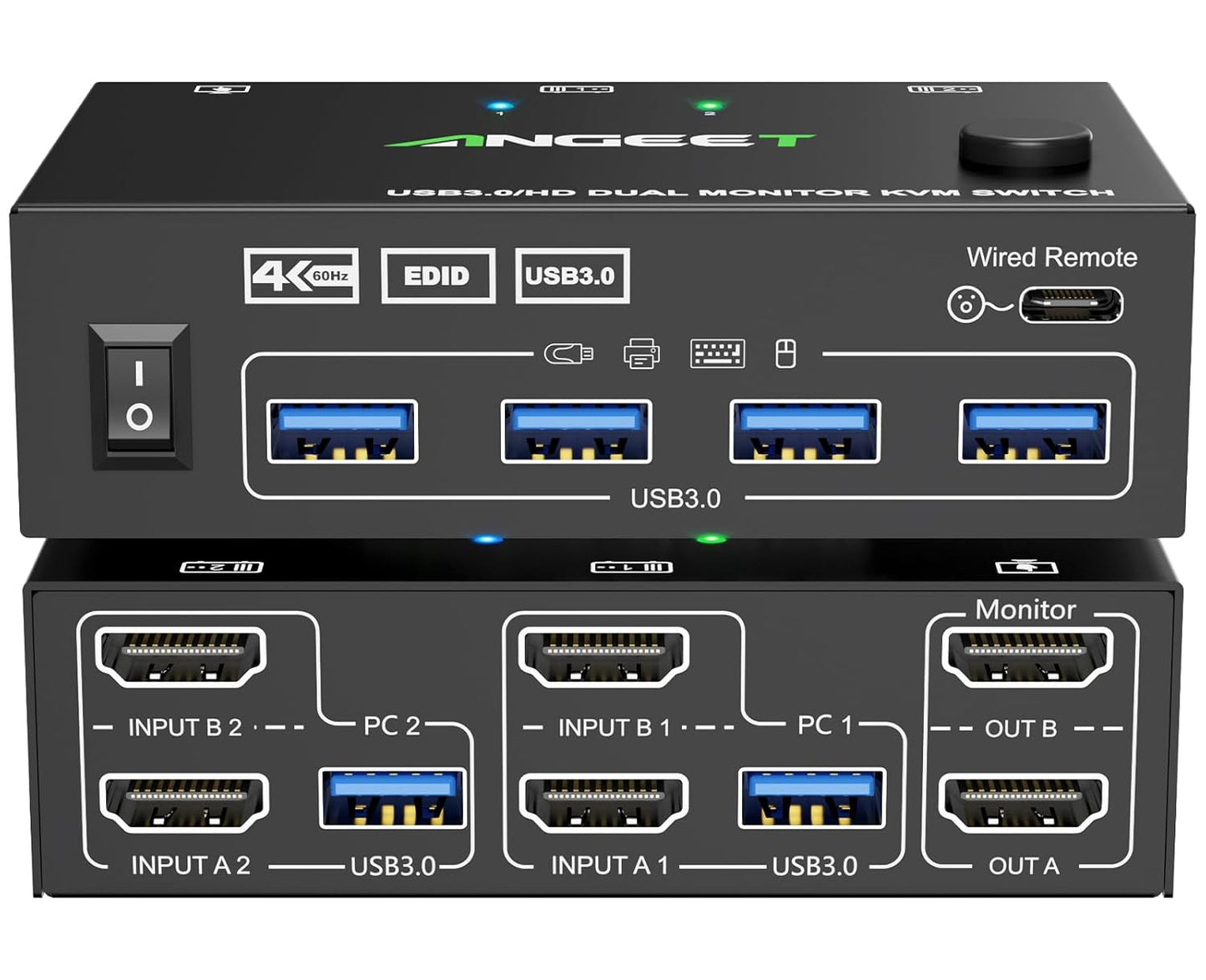
- Dual Monitor Support: Lets you control two computers with one keyboard and mouse while driving two displays in either copy or extended mode for flexible desktop layouts.
- 4K@60Hz Video: Delivers high-resolution output up to 4K@60Hz when both the computer and monitor support that resolution and you use 4K HDMI cables.
- USB 3.0 Ports: Four USB 3.0 ports provide up to 5 Gbps transfer speeds for shared devices like webcams, external drives, and wired input devices.
- EDID Simulation: Stores and simulates monitor EDID so display resolution and window placement remain stable when switching between computers.
- Wired Remote and LED Indicators: Includes a 1.5 m wired remote for quick switching and front LEDs that indicate the active computer for easier workflow management.
- Driver-Free Compatibility: Works without drivers across Windows, Mac OS, Linux and Chrome OS, and supports desktops, laptops and TV boxes.
Who It's For
This KVM switch suits users who run two systems concurrently and need full dual-monitor support, such as video editors who keep one machine for rendering and another for editing, developers maintaining separate environments, and home office setups combining a desktop and a laptop. The USB 3.0 ports make it attractive for users who frequently share high-speed USB peripherals between machines.
It is not ideal for setups that cannot provide two HDMI connections per computer or where cables must exceed recommended lengths; each computer requires two HDMI cables plus a USB 3.0 cable to fully utilize both displays and the shared USB devices. Users needing longer cable runs or single-cable Thunderbolt/USB-C switching should look elsewhere.
Pros & Cons
Pros
- Supports true dual-monitor operation with copy and extended modes for flexible workflows.
- High-quality video up to 4K@60Hz and backward compatibility with 2K@144Hz and 1080p.
- Four USB 3.0 ports provide fast sharing of peripherals and accessories.
- EDID simulation helps maintain resolution and window positions when switching.
Cons
- Requires two HDMI cables and one USB 3.0 cable per computer, which increases cable clutter and may complicate setups.
- Some users report intermittent issues with one computer input or monitors not staying active, so results may vary by system and cables used.
Specifications
| Product Type | Dual monitor HDMI KVM switch |
| Maximum Resolution | 4K@60Hz (downward compatible) |
| USB Ports | 4 x USB 3.0 (up to 5 Gbps) |
| EDID | EDID simulation and storage |
| Switching | Front panel button and 1.5 m wired remote |
| Compatibility | Windows, Mac OS, Linux, Chrome OS |
| Package | KVM unit, 2 x USB 3.0 cables, wired remote, user manual |
Our Verdict
The HDMI KVM Switch 2 Monitors 2 Computers 4K@60Hz is a strong value for anyone who needs reliable dual-display switching plus fast USB sharing. Its 4K@60Hz support and USB 3.0 ports make it a fit for creative and multi-system professionals, provided each computer can supply two HDMI outputs and you keep cable runs short. It balances performance and convenience for most dual-system desk setups.
Frequently Asked Questions
Do I need special cables to get 4K@60Hz?
Yes. Both the computers and monitors must support 4K@60Hz and you should use quality 4K-capable HDMI cables, ideally keeping lengths under 1.5 m.
Can I share USB devices at full USB 3.0 speed?
Yes, the four USB ports are USB 3.0 and support up to 5 Gbps, though actual speed depends on the connected device and host.
How do I switch between computers?
You can press the front panel button or use the included wired remote; LEDs indicate the active computer.
Editor's Take
This dual-monitor HDMI KVM switch delivers good value for users who need 4K@60Hz video, EDID simulation and four USB 3.0 ports to share peripherals between two computers, provided each system offers two HDMI outputs and cable runs remain short.

Recently viewed
Recently viewed products will appear here as customers browse the store.