

HDMI KVM Switch 3 Computers 2 Monitors - Dual 4K60Hz Control
HDMI KVM Switch 3 Computers 2 Monitors - Dual 4K60Hz Control
Price subject to change. Tap below for current.
Couldn't load pickup availability
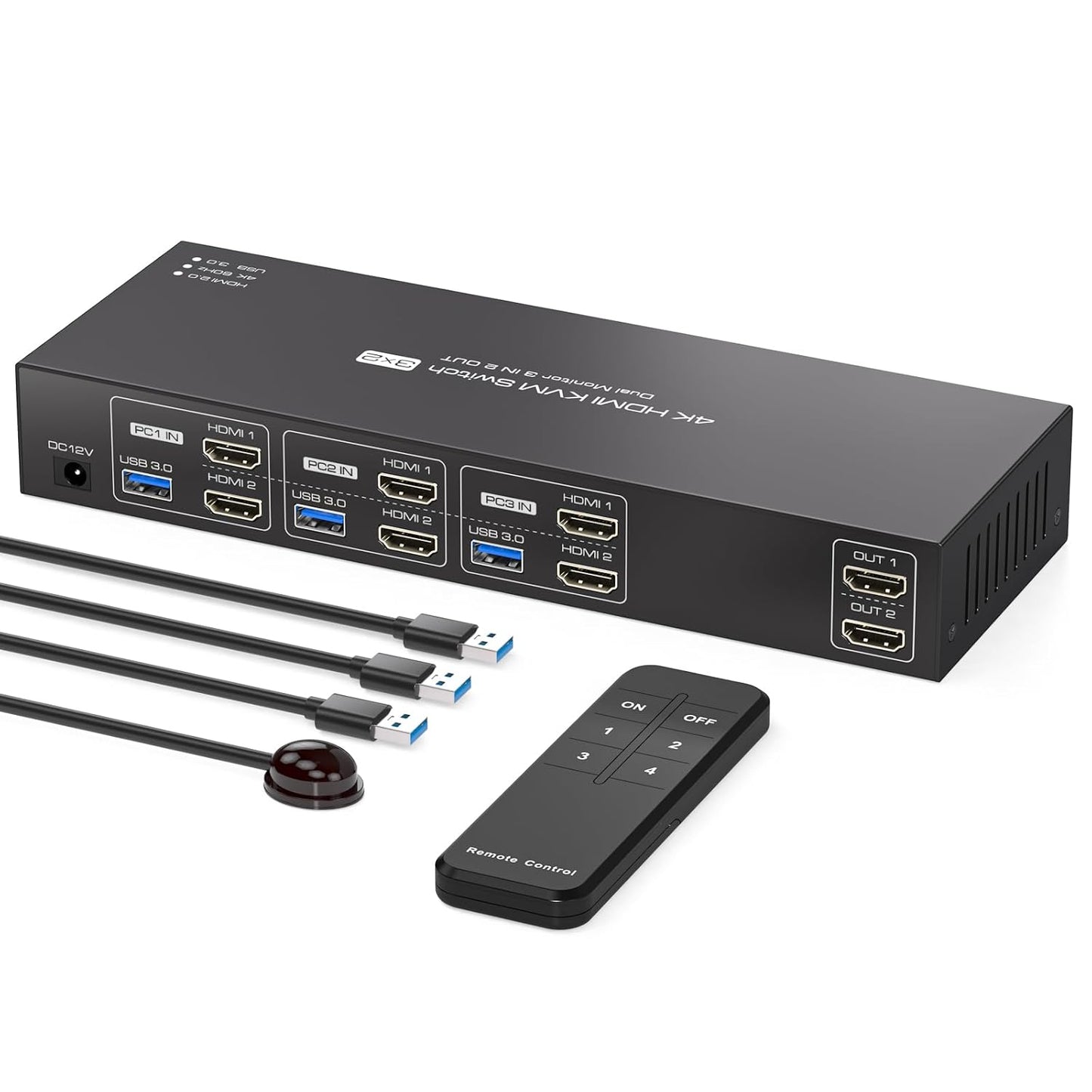
Our review of this HDMI KVM Switch finds it best suited for users who need to operate three computers with one keyboard and mouse across two monitors; the single biggest reason to buy is the ability to share dual displays and four USB 3.0 devices while maintaining up to 4K@60Hz video output. Setup is straightforward for a desk or rack environment and the included external 12V/1A power helps drive higher-power USB peripherals reliably, so it works well for mixed office, multimedia teaching, or light gaming rigs that require multiple hosts and shared accessories.
Key Features
- Dual monitor support: Lets users switch three computers across two HDMI outputs in Extended or Duplicate display modes to suit multitasking or mirroring needs.
- Ultra HD video: Supports 4K@60Hz and 2K@120Hz compatibility so images remain sharp and color-rich when connected hardware and cables also support those resolutions.
- USB 3.0 hub: Four USB 3.0 ports provide up to 5 Gbps data transfer for fast external drives, printers, or other devices while remaining backward compatible with USB 2.0/1.1 peripherals.
- Two switching methods: Hardware front-panel buttons or a remote switch let you keep the KVM unit out of the way and still change active hosts quickly.
- Stable power delivery: The included 12V/1A external power adapter helps supply enough current for higher-power USB devices without strange disconnects under load.
Who It's For
This KVM is aimed at professionals, educators, and power users who regularly work with multiple desktops or laptops and need to share two monitors and USB peripherals without rewiring. It is useful in conference rooms, multimedia classrooms, small studios, or home offices where switching between three hosts is common.
Users who require built-in hotkey switching or who need the KVM to carry audio or network signals should look elsewhere, since hotkeys are not supported and the unit focuses on HDMI video and USB data only. Also confirm your computers, monitors, and HDMI cables all support 4K before expecting full 4K@60Hz performance.
Pros & Cons
Pros
- Reliable dual-monitor switching for three hosts with both Extended and Duplicate display modes.
- High-speed USB 3.0 ports that speed up data transfer for external drives and peripherals.
- Supports high resolutions up to 4K@60Hz when system components are compatible.
Cons
- Does not support keyboard hotkey switching, so users must use buttons or the remote to change hosts.
Specifications
| Product type | KVM switch (2 monitors, 3 computers) |
| Video outputs | 2 HDMI (supports Extended and Duplicate) |
| Max resolution | 4K@60Hz (also supports 2K@120Hz) |
| USB ports | 4 x USB 3.0 (up to 5 Gbps, backward compatible) |
| Power | External 12V/1A adapter |
| Switching | Front-panel buttons and remote switching (no hotkeys) |
Our Verdict
The HDMI KVM Switch 3 Computers 2 Monitors is a solid choice for users who must control three machines across two displays while sharing fast USB 3.0 peripherals; it delivers good value when your workflow benefits from dual monitor multitasking and you need reliable powered USB ports. Confirm 4K support across your cables and monitors first, and accept hardware or remote switching in place of hotkey control.
Frequently Asked Questions
Can this KVM deliver true 4K@60Hz?
Yes, it supports 4K@60Hz, but the connected computers, HDMI cables, and monitors must also support 4K@60Hz for that performance.
Do the USB ports provide high-speed transfers?
Yes, the four USB ports are USB 3.0 with up to 5 Gbps transfer rates and are backward compatible with older USB devices.
Can I use keyboard hotkeys to switch computers?
No, hotkey switching is not supported; switching is done via front-panel buttons or the remote control.
Editor's Take
This HDMI KVM Switch is a practical solution for controlling three computers across two monitors while sharing four USB 3.0 devices; it supports 4K@60Hz and offers reliable powered USB ports, but lacks keyboard hotkey switching.

Recently viewed
Recently viewed products will appear here as customers browse the store.