

HDMI KVM Switch 4 Computers 4K@60Hz 2K@120Hz - 4 Port KVM with EDID
HDMI KVM Switch 4 Computers 4K@60Hz 2K@120Hz - 4 Port KVM with EDID
Price subject to change. Tap below for current.
Couldn't load pickup availability
Our review of this 4 port HDMI KVM switch finds it best suited for users who need to control multiple computers from a single desk setup without constantly reconnecting cables. The biggest reason to buy is the unit's combination of EDID simulation that preserves display settings when switching and support for high resolutions up to 4K@60Hz or 2560x1440@120Hz, which keeps windows and video stable across four machines. Setup is plug-and-play, and the included wired remote and LED indicators make daily switching straightforward.
Key Features
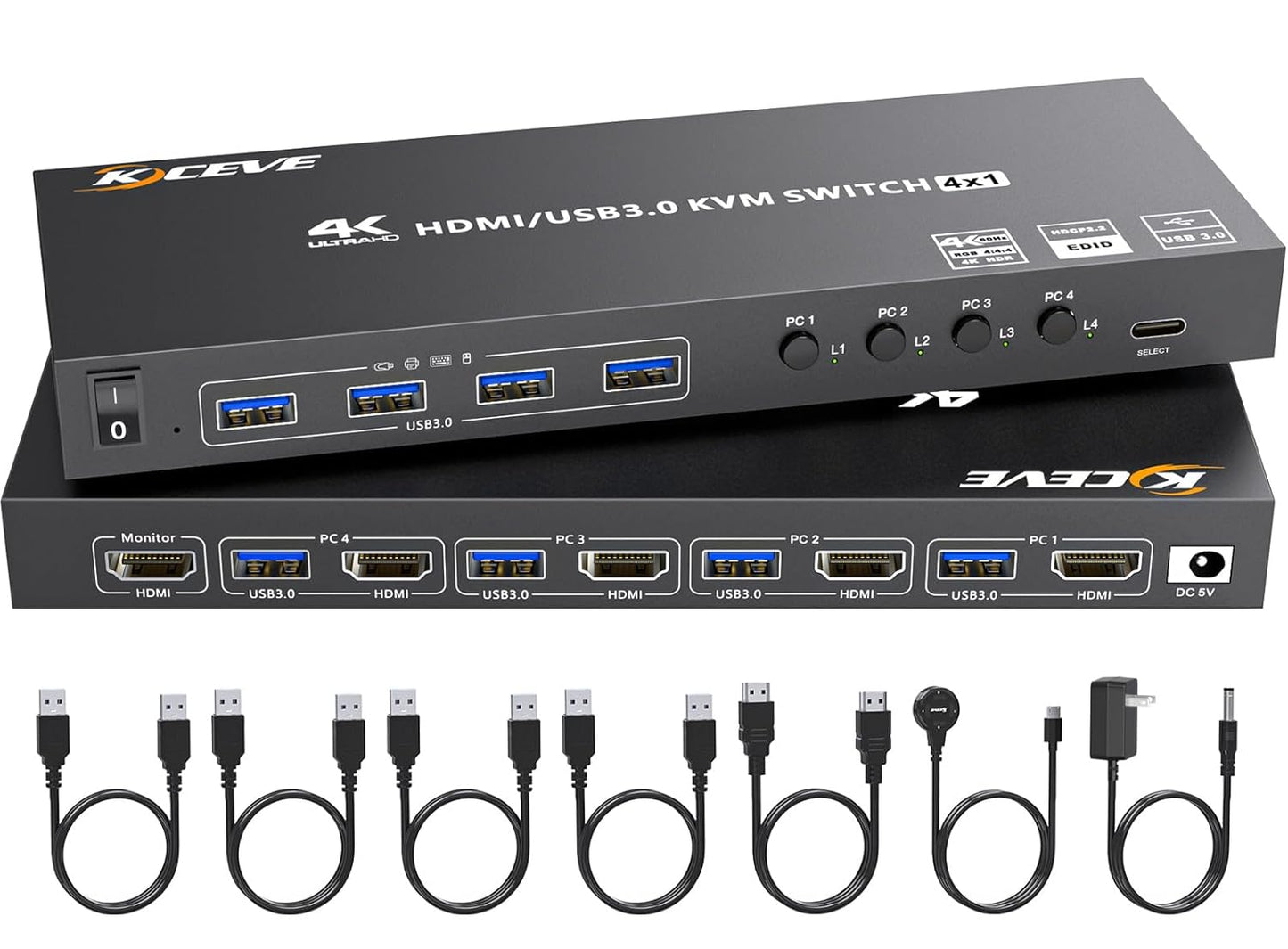
- 4 Port HDMI KVM: Lets one monitor, one wired or wireless keyboard and mouse control four computers, simplifying multiPC workflows.
- EDID simulation: Stores the monitor resolution and refresh rate so windows and display arrangements stay consistent when changing between computers.
- Ultra HD support: Handles up to 4K@60Hz and 2560x1440@120Hz so it works with highresolution and ultrawide displays when paired with compatible machines and cables.
- USB 3.0 device sharing: Four USB 3.0 ports allow sharing of keyboard, mouse, printer or external drives with faster 5 Gbps transfers than USB 2.0.
- Included accessories: Ships with four USB 3.0 cables, one HDMI 2.0 cable, a wired remote and a 12V power adapter for immediate use and stable device recognition.
Who It's For
This KVM is aimed at home office users, content creators, or small meeting rooms that need to switch between multiple PCs, laptops or media devices without losing monitor settings. The high resolution support and EDID feature make it a good fit when image fidelity and window placement matter.
Those who should look elsewhere include users who need wireless KVM switching or require display resolutions beyond 4K@60Hz. Also, if signal consistency is critical under every configuration, be aware some users have reported mixed signal quality in specific setups and may prefer testing with their exact monitors and cables first.
Pros & Cons
Pros
- Preserves display settings via EDID simulation, reducing the need to rearrange windows after switching.
- Supports high resolutions including 4K@60Hz and 2560x1440@120Hz for smooth visuals.
- Includes wired remote, USB 3.0 cables and power adapter for easy plug-and-play setup.
- USB 3.0 ports enable fast sharing of peripherals and external drives at up to 5 Gbps.
Cons
- Some users report mixed signal quality or flicker depending on monitor and cable combinations.
- No wireless switching option is provided; switching is via panel button or the included wired remote.
Specifications
| Product type | 4 Port HDMI KVM Switch |
| Video support | Up to 4K@60Hz, 2560x1440@120Hz |
| USB ports | 4 x USB 3.0 ports (up to 5 Gbps) |
| EDID | Display EDID simulation and storage |
| Included cables | 4 x USB 3.0 cables, 1 x HDMI 2.0 cable |
| Accessories | Wired remote, 12V power adapter, user manual |
| Compatibility | Windows, Mac OS, Linux, Chrome OS; HDMI sources like PC, laptop, game consoles |
Our Verdict
For users who switch between multiple computers and need consistent display behavior, this 4 port HDMI KVM is a practical and costeffective choice. Its EDID simulation and support for 4K@60Hz make it especially useful where window placement and video fidelity matter, while the included cables and wired remote simplify setup. Be mindful of cable and monitor pairings to avoid potential signal issues.
Frequently Asked Questions
Does it support 4K at 60 Hz?
Yes, it supports up to 4K@60Hz when used with compatible computers and HDMI 2.0 cables.
Can I share USB drives and printers?
Yes, the four USB 3.0 ports allow sharing of keyboards, mice, printers and external drives at up to 5 Gbps.
Is any driver installation required?
No, the unit is plug-and-play and driver-free for Windows, Mac OS, Linux and Chrome OS.
Editor's Take
This 4 port HDMI KVM switch is a practical choice for multiPC desks, offering EDID simulation and 4K@60Hz support to preserve display settings and share USB 3.0 devices easily.

Recently viewed
Recently viewed products will appear here as customers browse the store.