

iPad Pro USB C Hub Stand 9-in-1 Adapter - Foldable 4K60Hz Dock
iPad Pro USB C Hub Stand 9-in-1 Adapter - Foldable 4K60Hz Dock
Price subject to change. Tap below for current.
Couldn't load pickup availability
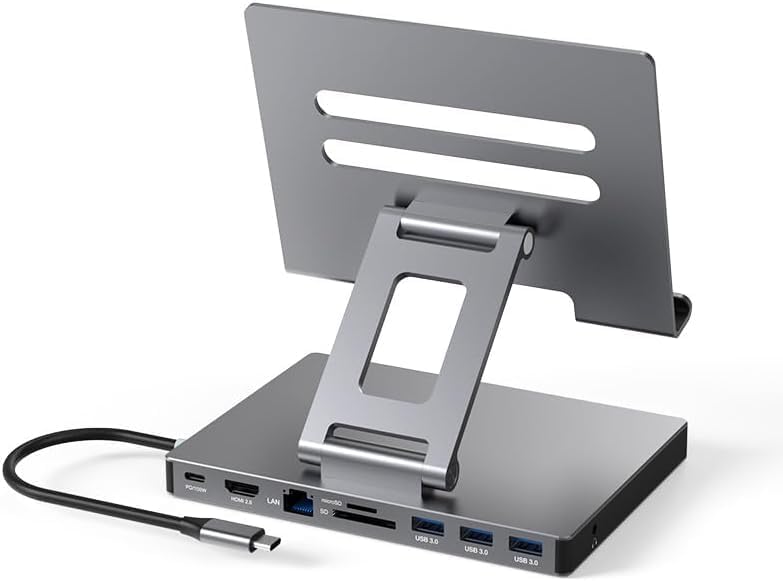
In this review of the iPad Pro USB C Hub Stand, the bottom line is simple: it is a compact, foldable docking station aimed at iPad Pro and other USB-C device users who need more ports without carrying a separate dongle bundle. The reviewer found it especially useful for users who want a single clip-style hub that adds a 4K@60Hz HDMI output, a wired Gigabit Ethernet port, SD and microSD card access, three USB 3.0 ports and passthrough charging all in one foldable unit. If your workflow includes external displays, wired networking and frequent file transfers from cards or thumb drives, this adapter saves space and reduces cable clutter.
Key Features
- 9-in-1 connectivity: Combines HDMI, Gigabit Ethernet, SD/TF card readers, three USB 3.0 ports, PD charging and a 3.5 mm audio jack so a single adapter covers most desktop needs.
- 4K@60Hz HDMI output: Lets you mirror or extend to an external display at high resolution and refresh rate when the display supports HDMI 2.0.
- Gigabit Ethernet: Provides a stable wired network connection for faster, more reliable transfers than Wi-Fi in congested environments.
- High-speed data ports: Three USB 3.0 ports and card readers offer up to 5 Gbps transfer speeds for flash drives, external drives and SD cards.
- PD passthrough while using ports: The USB-C PD port lets you charge the host device while using HDMI, USB and card reader functions simultaneously.
- Folding clip design: The foldable form factor clips to the device and folds flat for portability, making it easy to carry with a tablet or laptop.
Who It's For
This hub is best for iPad Pro and other USB-C tablet users who need a compact docking solution for on-the-go work, presentations or a lightweight desktop setup. Creators who transfer photos and video from SD or microSD cards, remote workers who require wired Ethernet, and anyone who connects an external monitor and accessories will find the mix of ports useful.
It is less suited to users with legacy Lightning-only iPads, older tablets without USB-C, or those who require audio jacks supporting non-CTIA standards; the 3.5 mm jack follows the American CTIA wiring. Also, users who expect device-specific software integration should verify their OS version (iPadOS 13.1 or later for file access) before relying on all features.
Pros & Cons
Pros
- Wide port selection in a single compact clip-style adapter reduces the need for separate dongles.
- Supports high-resolution 4K@60Hz video and simultaneous PD charging for productive desktop use.
- Fast USB 3.0 and SD/TF card access for quick file transfers and media offload.
- Foldable design is convenient for travel and storage.
Cons
- 3.5 mm jack follows CTIA standard only, which may not match all older headsets.
- Some non-Apple chargers can charge but may cause issues when multiple functions are connected, so the original charger is recommended.
Specifications
| Product type | 9-in-1 USB-C docking station |
| Video output | HDMI 4K@60Hz (requires HDMI 2.0 display) |
| Network | RJ45 Gigabit Ethernet |
| Data ports | 3 x USB 3.0 (5 Gbps), SD and TF card readers |
| Audio | 3.5 mm female headphone jack (CTIA) |
| Power | USB-C PD passthrough |
| Design | Foldable clip-style, portable |
Our Verdict
The iPad Pro USB C Hub Stand is a practical, value-oriented dock for iPad Pro and other USB-C devices that need desktop-style connectivity in a portable package. It excels at adding a 4K display output, reliable wired networking and fast file transfers while still allowing passthrough charging, making it a smart buy for mobile professionals and photographers who want to simplify their accessory loadout.
Frequently Asked Questions
Will this work with older iPads?
Devices without a USB-C port (for example older Lightning iPads) are not supported; it is intended for USB-C devices like iPad Pro and recent tablets.
Can I use the HDMI at 4K60Hz and charge at the same time?
Yes, the PD port supports passthrough so HDMI and USB 3.0 ports can be used while the host is charging, provided your charger is compatible.
How do I access files on an SD card?
Use the Files app on iPadOS 13.1 or later to browse and transfer content from SD or microSD cards connected through the reader.
Editor's Take
A compact, foldable 9-in-1 USB-C dock that adds 4K@60Hz HDMI, Gigabit Ethernet, fast USB 3.0 ports and SD/TF card access while allowing PD passthrough, making it a strong choice for mobile professionals and creators.

Recently viewed
Recently viewed products will appear here as customers browse the store.