

iVANKY FusionDock 1 12-in-2 Docking Station - Dual 4K Monitor Ready
iVANKY FusionDock 1 12-in-2 Docking Station - Dual 4K Monitor Ready
Price subject to change. Tap below for current.
Couldn't load pickup availability
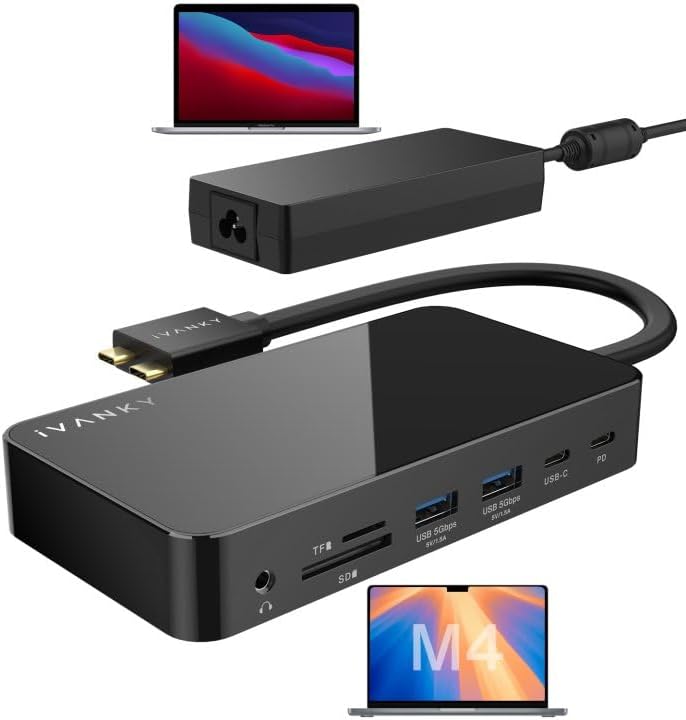
In this review of the iVANKY FusionDock 1, the bottom line is simple: this dock is for MacBook and laptop users who need multiple high-resolution displays, plenty of USB connectivity, and reliable charging in a single, plug-and-play hub. The FusionDock 1 stands out because it supports dual 4K@60Hz on compatible MacBook Pro models and recent Mac chips while delivering up to 96W laptop charging from a 150W adapter, making it a practical central hub for a compact desktop setup. Setup is straightforward and most users report quick recognition and steady performance.
Key Features
- Dual 4K@60Hz displays: When used with supported MacBook Pro models and certain Intel and Pro/Max chips, it can drive two 4K displays at 60Hz for crisp, fluid desktop work.
- 150W power adapter: The included adapter supplies full-speed charging to laptops up to 96W and offers PD to USB-C devices up to 18W so peripherals stay powered alongside the host.
- 5Gbps USB data: Four USB 3.0 ports provide up to 5Gbps transfers for external drives and accessories, simplifying file work and backups.
- Gigabit Ethernet: A built-in RJ45 port supports 1000Mb/s Ethernet for stable wired network connections in home or office environments.
- SD/TF card slots: The card readers accept SD and TF media with transfer rates up to about 104Mb/s, useful for photographers and content creators moving files.
- Plug and play: No extra software is required for most supported macOS models, so the dock integrates quickly into existing workflows.
Who It's For
The FusionDock 1 is best for MacBook Pro owners who need dual external displays at high refresh rates, content creators moving large files, and professionals who want fewer adapters and a single charging/data hub. Users with 15 in and 16 in MacBook Pro models, Pro/Max MacBook chips, or the 2024 M4 series will see the fullest display performance.
Those who should look elsewhere include owners of base M1/M2/M3 MacBooks that inherently do not support dual external displays, and users who need display switching beyond the dock's available ports; a dedicated multi-monitor solution or USB-C monitor hub may be preferable in those cases.
Pros & Cons
Pros
- Supports dual 4K@60Hz on compatible MacBook models for high-resolution multi-monitor setups.
- Robust 150W adapter enabling up to 96W laptop charging plus PD to USB-C devices.
- Multiple 5Gbps USB 3.0 ports and Gigabit Ethernet provide fast data and stable network connectivity.
- Plug-and-play operation makes it easy to add to an existing workstation without drivers.
Cons
- Inherent M1/M2/M3 chip limitations prevent dual external displays on some MacBooks, so not all users get full multi-monitor support.
- Some customers reported intermittent HDMI connection issues on specific ports, suggesting occasional port-specific instability.
Specifications
| Product type | 12-in-2 docking station |
| Display output | Dual 4K@60Hz (on supported models) |
| Power adapter | 150W total, up to 96W laptop charging |
| USB ports | 4 x USB 3.0 (up to 5Gbps) |
| Card readers | SD/TF slots (up to ~104Mb/s) |
| Network | RJ45 Gigabit Ethernet (1000Mb/s) |
| Compatibility note | M1/M2/M3 chips have limitations for dual displays |
Our Verdict
The iVANKY FusionDock 1 is a practical, well-equipped dock for users who need high-resolution external displays, fast USB connectivity, and reliable charging in a single unit. It delivers strong value for owners of compatible MacBook Pro and recent chip models, while offering sensible fallback performance for other laptops. Despite a few reports of port-specific HDMI issues and the known chip limitations on some MacBooks, it is a worthwhile hub that reduces cable clutter and centralizes desktop peripherals.
Frequently Asked Questions
Will this dock charge my laptop?
The dock ships with a 150W adapter and can charge laptops up to 96W, while also supplying PD to USB-C devices up to 18W.
Can I run two 4K monitors at 60Hz?
Yes, dual 4K@60Hz is supported on compatible 15 in and 16 in MacBook Pro models, MacBook Pro with Pro/Max chips, the 2024 M4 series, and certain Intel models; base M1/M2/M3 Macs have display limitations.
Does it require drivers?
No drivers are generally required; the dock is plug-and-play for most supported macOS systems.
Editor's Take
The iVANKY FusionDock 1 is a practical dock that delivers dual 4K@60Hz on supported MacBook models, fast USB transfers, and up to 96W charging, making it a good-value hub despite some chip-related display limits.

Recently viewed
Recently viewed products will appear here as customers browse the store.