

iVANKY 14-in-1 FusionDock Pro 1+ for MacBook and Mac mini - Triple 4K
iVANKY 14-in-1 FusionDock Pro 1+ for MacBook and Mac mini - Triple 4K
Price subject to change. Tap below for current.
Couldn't load pickup availability
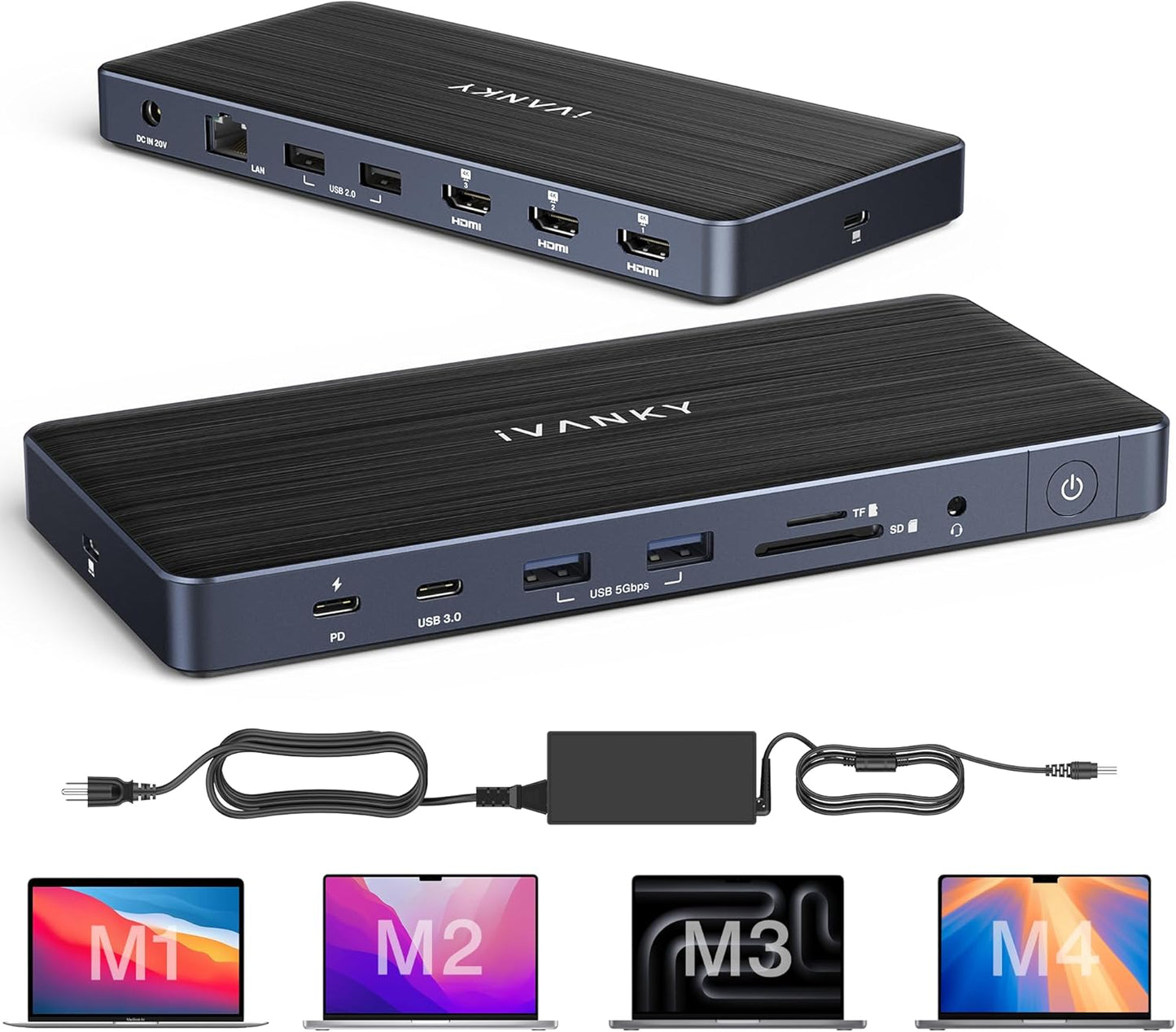
In this review of the iVANKY FusionDock Pro 1+ the bottom line is simple: it is aimed at power users who need a compact hub that delivers multiple 4K displays, high-speed wired networking and fast data ports. The dock stands out for its ability to drive three 4K@60Hz monitors when the proper DisplayLink driver is installed, and it bundles a 180W power adapter that supports laptop charging up to 100W. For anyone using recent M1/M2/M3/M4 Mac hardware or a Mac mini and who needs many ports in a single footprint, this dock is a serious contender.
Key Features
- Triple 4K@60Hz: All three HDMI ports support 4K@60Hz with the correct driver installed, letting you extend your desktop across multiple monitors.
- High-speed data: Multiple 10Gbps USB-C and USB-A ports let you move large files quickly and connect fast external drives.
- Wired networking: The RJ45 port provides a stable 2.5GbE connection for low-latency wired networking and faster transfers than standard gigabit.
- SD/TF 4.0 card reader: The SD and TF slots support up to about 312MB/s for fast photo and video offload from cameras and cards.
- Power delivery: The included 180W adapter supports up to 100W laptop charging via the upstream USB-C and up to 20W on the PD port for other devices.
- DisplayLink driver note: macOS 15 users should install DisplayLink driver version 1.11 (Oct 8, 2024) to ensure full functionality of HDMI 2 and 3.
Who It's For
The FusionDock Pro 1+ suits creative professionals, developers and power users who need multiple external displays, fast wired networking and high-throughput USB ports in a single docking station. It is particularly useful for Mac mini users and MacBooks that have a full-function USB-C port and can run the DisplayLink driver.
Users who rely solely on native GPU-driven multi-monitor setups without DisplayLink, or those who do not want to install additional drivers, should consider a simpler dock or a manufacturer solution designed specifically for the Mac model. Basic users who only need a single monitor and a couple of peripherals may find this feature set excessive.
Pros & Cons
Pros
- Robust triple-monitor support at 4K@60Hz after installing the correct DisplayLink driver.
- Multiple high-speed 10Gbps ports and a fast SD/TF card slot for rapid data transfers.
- 2.5GbE wired networking provides a more stable and faster connection than standard gigabit.
- Generous power delivery from the included 180W adapter charges laptops up to 100W.
Cons
- Some users report mixed functionality on certain MacBook models; driver installation is required for full feature access.
- Triple HDMI outputs depend on correct DisplayLink driver compatibility with the host OS.
Specifications
| Product type | 14-in-1 DisplayLink docking station |
| Video outputs | 3x HDMI supporting up to 4K@60Hz (with driver) |
| USB ports | 1x 10Gbps USB-C PD20W, 1x 10Gbps USB-C 7.5W, 4x 10Gbps USB-A 3.2 |
| Network | RJ45 2.5GbE |
| Card reader | SD/TF 4.0 up to ~312MB/s |
| Power adapter | Included 180W; laptop charging up to 100W |
| Compatibility note | Supports M1/M2/M3/M4 MacBooks and Mac mini with full-function USB-C; macOS 15 requires DisplayLink driver 1.11 |
Our Verdict
The iVANKY FusionDock Pro 1+ is a strong choice for users who need multiple 4K displays, fast data lanes and improved wired networking in a single dock. It delivers good value when used with the required DisplayLink driver and a compatible Mac, but casual users who dislike driver installs or who have simpler needs may prefer a more modest dock.
Frequently Asked Questions
Do I need a driver for triple monitors?
Yes. Install the DisplayLink driver (version 1.11 recommended for macOS 15) for HDMI 2 and 3 and full triple-monitor support.
How much power can the dock deliver to my laptop?
The included 180W adapter allows the upstream USB-C to supply laptop charging up to 100W.
What network speed does the dock provide?
The dock provides a 2.5GbE RJ45 connection for faster wired networking than standard gigabit.
Editor's Take
The iVANKY FusionDock Pro 1+ is a capable 14-in-1 dock for users who need triple 4K displays, fast 10Gbps ports and 2.5GbE networking; it offers strong value when used with the required DisplayLink driver.

Recently viewed
Recently viewed products will appear here as customers browse the store.