

iVANKY 14-in-1 FusionDock Pro - Triple 4K@60Hz Docking Station
iVANKY 14-in-1 FusionDock Pro - Triple 4K@60Hz Docking Station
Price subject to change. Tap below for current.
Couldn't load pickup availability
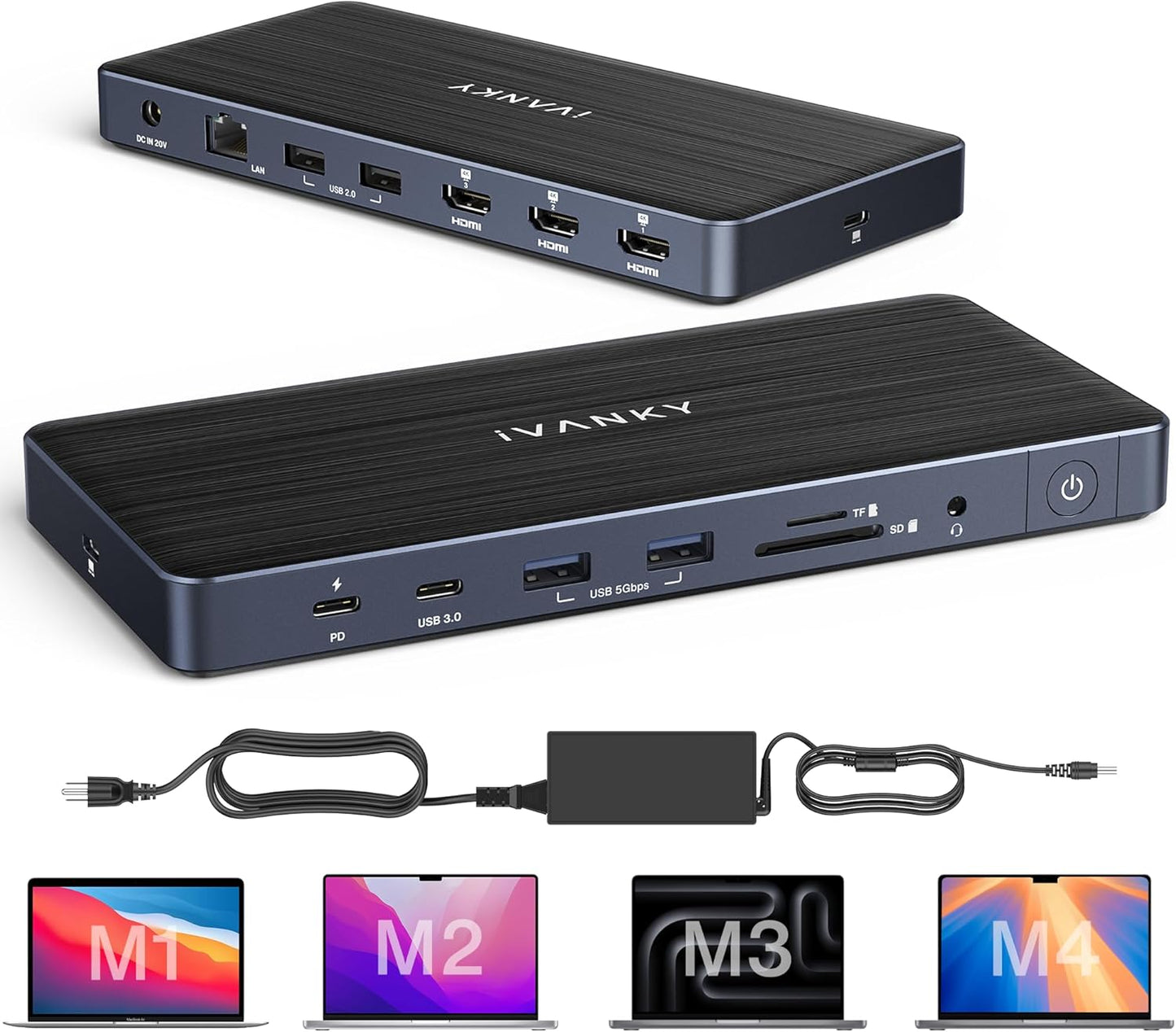
Our review of the iVANKY FusionDock Pro finds it well suited to MacBook users who need a compact hub that truly expands display and port options. The main reason to consider this dock is its ability to drive three external monitors at up to 4K@60Hz each once the required DisplayLink driver is installed, making it compelling for creative workflows and multitasking on M1/M2/M3/M4 MacBooks with a full-function USB-C port. Setup is generally straightforward, and the included 150W power adapter provides strong charging support for a laptop and peripherals.
Key Features
- Triple 4K Display Support: All three HDMI ports can output up to 4K@60Hz after installing the proper DisplayLink driver, letting users run three monitors for expanded desktop space.
- DisplayLink Driver Requirement: The dock requires the correct DisplayLink driver (version 1.11 or later for macOS 15) so HDMI 2 and 3 function properly and deliver consistent multi-monitor output.
- Power Delivery and Adapter: The included 150W power adapter supports up to 96W PD to charge compatible laptops while also powering USB-C devices at up to 20W from a secondary PD port.
- High-Speed Data Ports: Multiple high-speed ports include two 5Gbps USB-A, two additional USB-A ports, one 5Gbps USB-C and card readers to handle fast transfers and many peripherals.
- Wired Network and Storage Access: Built-in Gigabit RJ45 provides stable 1Gbps Ethernet and SD/TF slots read cards up to their listed speeds for photo and video workflows.
Who It's For
The FusionDock Pro is aimed at MacBook owners who need to connect multiple external displays and a variety of peripherals without carrying several adapters; it is particularly useful for designers, video editors, and power users who want a tidy single-cable setup. The dock is also attractive for those who value fast wired Ethernet and card reader access alongside ample USB ports.
Users who should look elsewhere include those unwilling or unable to install the DisplayLink driver (for example in tightly controlled corporate environments) and people who require certified native GPU passthrough on every macOS version without any driver dependency. Also, a small number of customers reported inconsistent functionality on some Mac models, so buyers of very new hardware should verify compatibility first.
Pros & Cons
Pros
- Drives three external monitors at up to 4K@60Hz each after driver installation.
- Includes a powerful 150W adapter that supports laptop charging up to 96W and PD for devices.
- Well rounded I/O with high-speed USB ports, dual card readers, and gigabit Ethernet for stable wired networking.
- Easy physical setup and generally straightforward configuration for most MacBook users.
Cons
- Requires the correct DisplayLink driver for full functionality; HDMI 2 and 3 will not work without it, which can be a barrier for some users.
- Some customers reported mixed functionality on certain MacBook models, so compatibility is not guaranteed for every setup.
Specifications
| Product Type | 14-in-1 docking station |
| Display Outputs | 3 x HDMI 2.0, up to 4K@60Hz each |
| Power Adapter | 150W included, up to 96W PD to laptop |
| USB Ports | 1 USB-C 5Gbps PD20W, 1 USB-C 7.5W 5Gbps, 2 x 5Gbps USB-A, 2 x 480Mbps USB-A |
| Card Slots | SD and TF card reader (up to 104MB/s) |
| Ethernet | RJ45 Gigabit Ethernet (1Gbps) |
| Driver Requirement | DisplayLink driver (version 1.11 for macOS 15 or later recommended) |
Our Verdict
The iVANKY FusionDock Pro is a strong choice for MacBook users who need multi-monitor support and a full complement of ports in a single hub. It delivers excellent display performance and solid charging capability when the required DisplayLink driver is used, making it good value for creatives and professionals who prioritize desktop expansion and wired networking.
Frequently Asked Questions
Do I need a driver to use all features?
Yes. Install the corresponding DisplayLink driver before use; HDMI 2 and 3 only function when the proper driver is installed.
Will this charge my MacBook?
Yes. The included 150W adapter supports up to 96W PD to charge compatible laptops via the upstream USB-C port.
Can I convert HDMI to VGA or DVI?
Yes. The HDMI ports can be converted to VGA or DVI with appropriate adapters or cables.
Editor's Take
The iVANKY FusionDock Pro is a capable 14-in-1 dock for MacBook users who need triple 4K displays, solid PD charging and extensive I/O; it is good value when the required DisplayLink driver is installed.

Recently viewed
Recently viewed products will appear here as customers browse the store.