

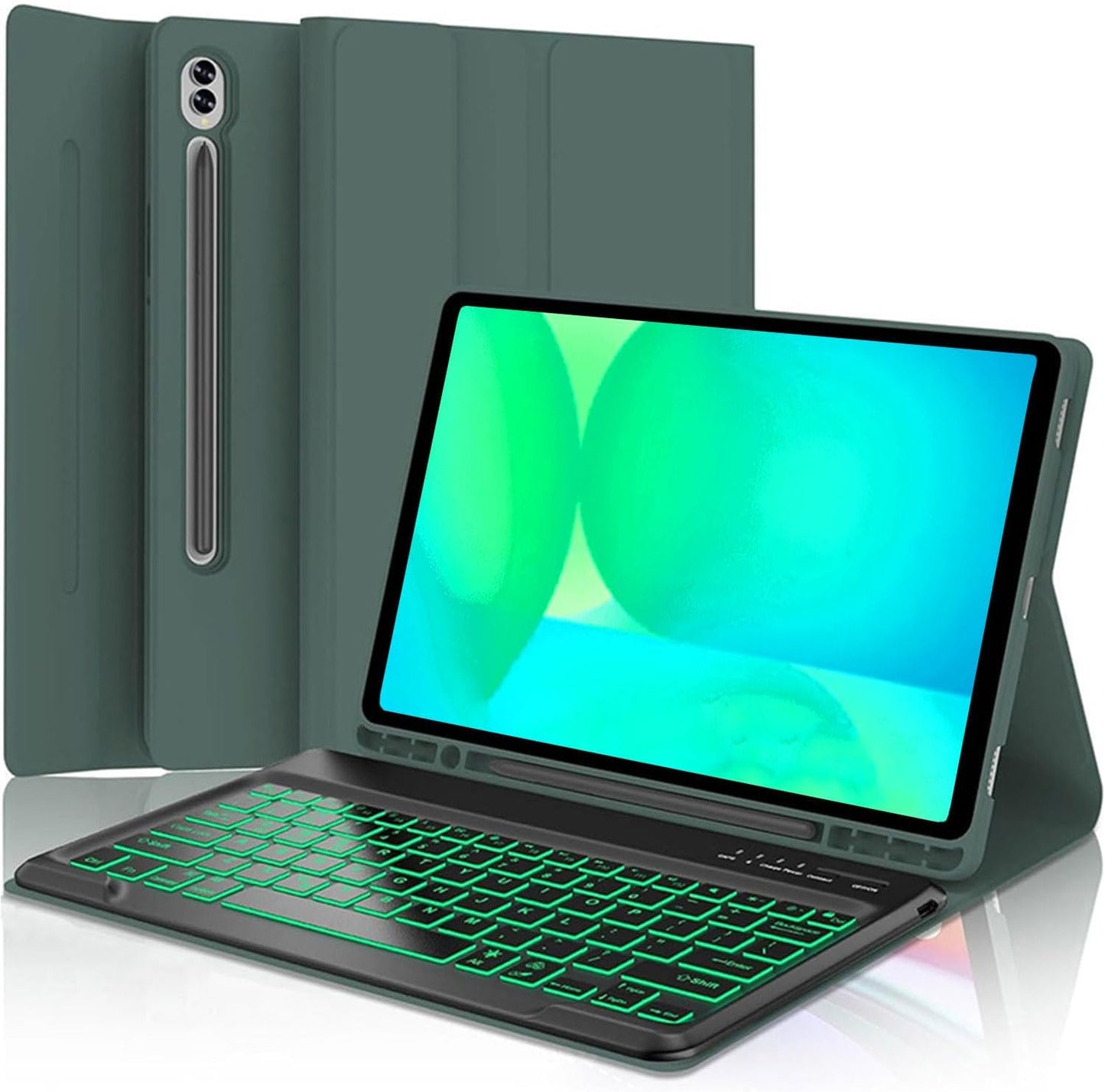
Keyboard Case for Samsung Galaxy Tab S10+ 13.1in - Detachable
Keyboard Case for Samsung Galaxy Tab S10+ 13.1in - Detachable
Price subject to change. Tap below for current.
Couldn't load pickup availability
Our review of the Keyboard Case for Samsung Galaxy Tab S10+ 13.1in finds it best suited to mobile professionals and students who want a laptop-style typing experience on the Tab S10 fe plus. The single biggest reason to buy is the combination of a rigid polycarbonate shell and a magnetically detachable Bluetooth keyboard that converts the tablet into a practical productivity device while still allowing S Pen magnetic and wireless charging when the keyboard is attached. This review focuses on build, typing feel, battery life and real-world fit with the Tab S10 fe plus model.
Key Features
- Secure fit: A premium polycarbonate shell locks the tablet in place and helps absorb drops and bumps for reliable protection.
- Detachable keyboard: The slim 7mm Bluetooth keyboard is magnetic and detachable so it can be removed for tablet-only use and reattached to act as part of the stand.
- Typing experience: Laptop-style ABS keys with a spring mechanism provide tactile feedback and are rated for long life to help speed up typing compared with the on-screen keyboard.
- S Pen support: The cover supports the all-new S Pen magnetic attachment and allows wireless charging while the keyboard case is turned on.
- Protective materials: Durable silicone soft cover and anti-slip rubber-lined interior reduce collision damage and keep the tablet steady in the case.
- Battery and charging: Built-in 400mAh battery (2x200mAh) charges via Type-C and offers long standby and long working time with backlight off.
Who It's For
This product is ideal for someone who owns the Samsung Galaxy Tab S10+ 13.1in (check model SM-X620/X626B) and needs a compact keyboard solution for email, document editing or light spreadsheet work. The removable keyboard and adjustable stand make it a useful option for people who move between desk and couch and want S Pen use without removing a protective cover.
It is less suitable for users who expect flawless compatibility across multiple tablet models or a permanently attached keyboard. Some customers report the keyboard falling out of the case or weak magnets, so those who require an unshakeable mechanical attachment or have unusual case-fit demands should verify the tablet model and consider a factory-integrated keyboard design.
Pros & Cons
Pros
- Sturdy polycarbonate shell and silicone-lined interior provide solid protection against drops and slips.
- True laptop-style keys with spring mechanisms give a tactile, faster typing experience than on-screen typing.
- Magnetic removable keyboard and adjustable stand increase flexibility for different viewing angles and use cases.
- Supports S Pen magnetic attachment and wireless charging while the keyboard is active.
Cons
- Reported compatibility issues: a few users experienced the keyboard falling out or weak magnets, so model fit should be double-checked before purchase.
- Some mixed reports on keyboard functionality, including rare dead keys, so occasional defects are possible.
Specifications
| Compatible Model | Samsung Galaxy Tab S10+ 13.1in (SM-X620/X626B) |
| Battery Capacity | 400mAh (2x200mAh) |
| Charging | Type-C USB 5V, 3-4 hours |
| Working Time (backlit) | About 100 hours |
| Standby Time | >100 days |
| Materials | PU leather cover, silicone soft cover, polycarbonate shell, ABS keys |
Our Verdict
The Keyboard Case for Samsung Galaxy Tab S10+ 13.1in is a strong value for owners of the exact Tab S10 fe plus model who want a protective case and a detachable, laptop-like keyboard. It balances protection, a satisfying typing feel and S Pen support, but buyers should confirm model compatibility and inspect the keyboard magnet and key function on arrival since a minority of users have seen fit and function issues.
Frequently Asked Questions
Will this case fit any 13.1in tablet?
It is designed specifically for the Samsung Galaxy Tab S10+ 13.1in (SM-X620/X626B); check your model before buying.
How do you pair the keyboard?
Turn on the keyboard, press FN+C to enter pairing mode, then select Bluetooth Keyboard 3.0 in the tablet's Bluetooth settings.
Does it support S Pen charging?
Yes, the case supports magnetic S Pen attachment and allows wireless charging of the S Pen while the keyboard case is turned on.
Editor's Take
A practical, good-value detachable keyboard case for the Samsung Galaxy Tab S10+ 13.1in that delivers laptop-style typing and solid protection; verify model fit and inspect the keyboard on arrival due to some fit and function reports.

Recently viewed
Recently viewed products will appear here as customers browse the store.