

KICKDOT Wireless Phone Controller for iPhone and Android - Precise
KICKDOT Wireless Phone Controller for iPhone and Android - Precise
Price subject to change. Tap below for current.
Couldn't load pickup availability
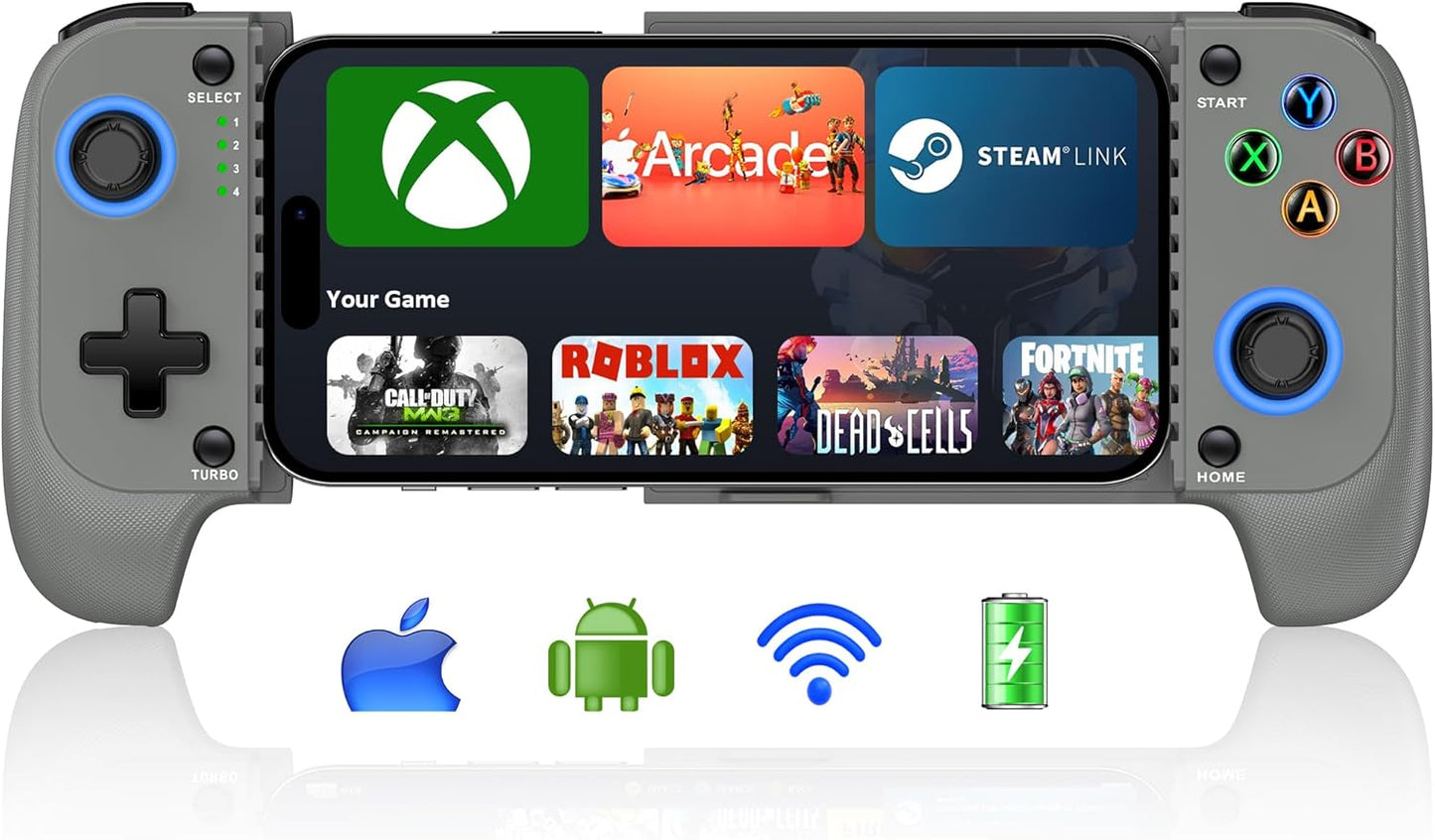
In this review we test the KICKDOT Wireless Phone Controller to see who will benefit most from its mobile-first design. The bottom line: this controller is aimed at cloud gamers and mobile shooters who want a precise, portable controller with no joystick drift and long battery life; its Hall effect joystick and Bluetooth pairing that identifies as Xbox Wireless Controller make it a dependable choice for playing Xbox Game Pass, Steam Link, GeForce NOW, Apple Arcade and popular mobile titles. Expect solid value, a few setup quirks, and a design that fits phones with cases.
Key Features
- Hall effect joystick: provides ultra precise control with no drift and no deadzone for competitive mobile shooters and racing games.
- Wide service support: works with iPhone and Android and supports major cloud gaming services like Xbox Game Pass, Steam Link and GeForce NOW for console-style play on the go.
- Long battery life: built-in 600mAh rechargeable battery delivers over 8 hours of play and fully charges in about 2-3 hours to reduce interruptions.
- Adjustable turbo: selectable turbo at 5, 12 or 20 shots/s helps automate rapid-fire actions and can improve comfort in action games.
- Stretchable, case-friendly design: supports phones roughly 10-17.5cm wide with a non-slip rubber grip so you usually do not need to remove the phone case.
- Reset and troubleshooting tips: included reset hole and a clear pairing routine help resolve common connection issues without warranty service.
Who It's For
The KICKDOT controller is best for mobile gamers who use cloud gaming services or play fast-paced titles like Call of Duty, Roblox and Fortnite and need a responsive, drift-free joystick. It is also a good match for players who frequently use their phone with a protective case because the stretchable mount accepts a wide range of phone sizes.
Players who expect plug-and-play simplicity with every device should note the controller pairs as Xbox Wireless Controller and requires following the pairing steps exactly; anyone wanting a wired-only solution or full console-certified certification may want to consider alternate controllers.
Pros & Cons
Pros
- Hall effect joystick reduces drift and deadzone for precise aiming.
- Long battery life and quick recharge minimize downtime during extended sessions.
- Adjustable turbo and dual vibration add comfort and immersion for action games.
- Supports major cloud services and works with both iPhone and Android devices.
Cons
- Pairing requires following specific steps and the controller identifies as Xbox Wireless Controller, which can be confusing initially.
- Build quality impressions are mixed among users, so some may find the feel less premium than higher-end models.
Specifications
| Brand | KICKDOT |
| Compatibility | iPhone and Android (cloud services and mobile games) |
| Joystick type | Hall effect (no drift, no deadzone) |
| Battery | Built-in 600mAh rechargeable (8+ hours) |
| Charging | USB-C cable included, 2-3 hour full charge |
| Phone size | Stretchable mount 10-17.5cm (case friendly) |
| Extras | Adjustable TURBO, dual vibration, reset hole, user manual |
Our Verdict
The KICKDOT Wireless Phone Controller is a strong value for mobile and cloud gamers who need accurate controls and long battery life without removing their phone case. It delivers precise Hall effect stick control, useful turbo modes and broad service compatibility, though the Bluetooth pairing step and varied build impressions mean buyers should be prepared to follow the setup guide. Overall it offers competitive functionality and value for its price point.
Frequently Asked Questions
How do I pair the controller with my phone?
Open Bluetooth on your phone, long press the HOME button for 3 seconds until the 4th LED flashes quickly, then select the device named Xbox Wireless Controller.
What if the joystick seems off or the controller won't connect?
Use a needle to press the RESET hole on the back, restart the controller, and retry the pairing steps; this resolves most nonquality issues.
How long does the battery last and how fast does it charge?
The internal 600mAh battery provides over 8 hours of play and typically fully charges in 2-3 hours with the included USB-C cable.
Editor's Take
The KICKDOT Wireless Phone Controller delivers precise Hall effect joystick control, long battery life and broad cloud gaming support, making it a strong value for mobile and cloud gamers who accept a slightly fiddly Bluetooth pairing step.

Recently viewed
Recently viewed products will appear here as customers browse the store.