

KINESIS Advantage360 Split Ergonomic Keyboard - Comfortable
KINESIS Advantage360 Split Ergonomic Keyboard - Comfortable
Price subject to change. Tap below for current.
Couldn't load pickup availability
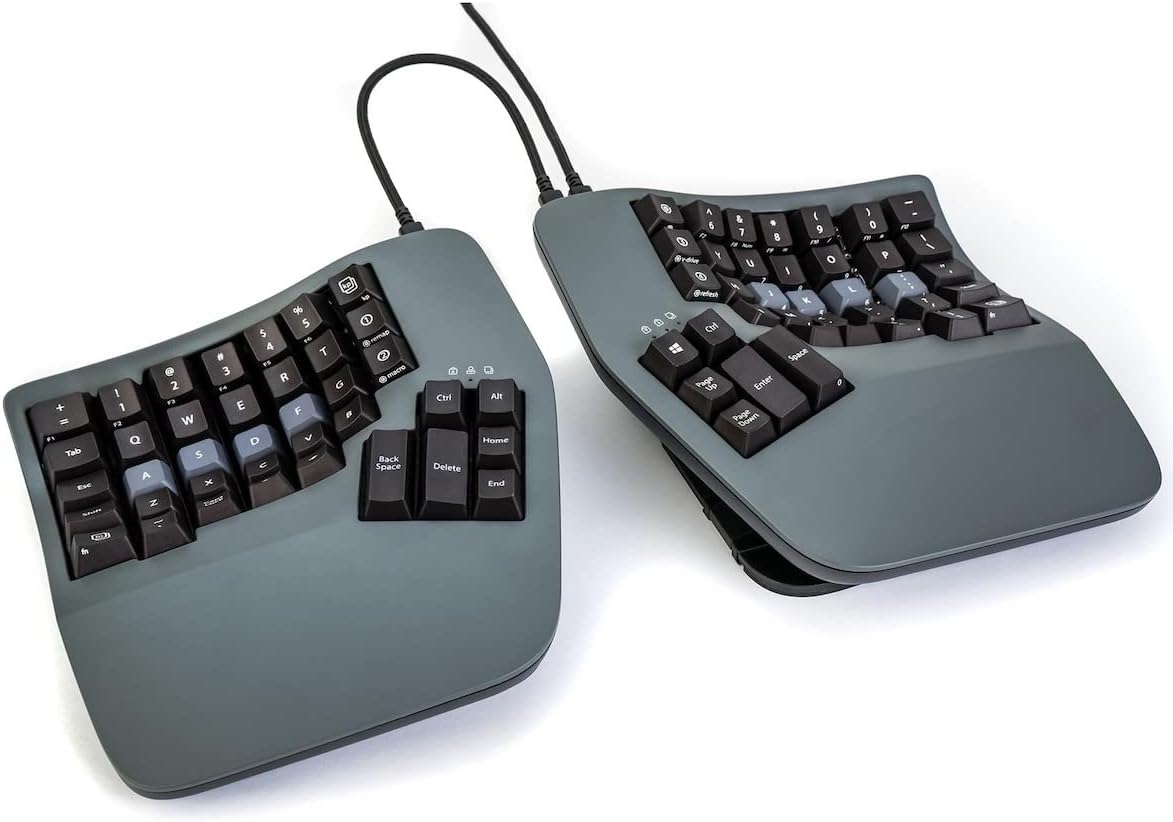
In this review of the KINESIS Advantage360 split ergonomic keyboard, the bottom line is simple: it is aimed at serious typists, programmers, and anyone prioritizing long-term comfort over a traditional layout. The keyboard's patented contoured shape, integrated palm supports and adjustable tenting make its primary strength comfort and reduced strain during extended sessions. The combination of mechanical Gateron Brown switches and PBT keycaps delivers a tactile, durable typing experience while the SmartSet programming engine makes customization practical for power users.
Key Features
- Contoured ergonomic shape: Split key wells, concave layout and thumb keys reduce reach and encourage a more natural hand position for prolonged comfort.
- Adjustable tenting: Three tenting heights and separation up to 10in allow users to tune the keyboard angle and distance for their body type.
- Mechanical switches: Gateron Brown tactile switches offer a low activation force and reliable durability for heavy daily typing.
- PBT keycaps: New PBT caps resist shine and improve key feel, sound and long-term appearance compared with thinner materials.
- Onboard programming: SmartSet lets users reconfigure profiles, build macros and save settings to the keyboard's 8MB v-Drive without needing constant software.
- Cross-platform plug-and-play: Works with Windows, macOS, Linux and Chrome via USB-C with included cables and a bridge connector for fixed setups.
Who It's For
The Advantage360 is best for programmers, writers and office professionals who spend hours typing and want a proven ergonomic design to reduce fatigue. Its programmable layers and profile storage are also attractive to power users who customize shortcuts and macros for productivity workflows.
It is less suitable for someone who needs wireless freedom or an instant drop-in replacement for a standard layout; there is a learning curve to the orthogonal, contoured design and the product's Bluetooth implementation has received reports of intermittent connectivity.
Pros & Cons
Pros
- Well-built contoured design that promotes comfort during long typing sessions.
- Gateron Brown mechanical switches and PBT keycaps provide a premium, durable typing feel.
- Extensive onboard customization through SmartSet and 8MB v-Drive for profile storage.
- Adjustable tenting and a 10in split range let users find a highly personalized fit.
Cons
- Reported Bluetooth connectivity problems on some units mean wired USB-C is the more reliable option.
- The orthogonal layout and thumb-key placement require time to adjust for users switching from standard keyboards.
Specifications
| Brand | KINESIS |
| Model | Advantage360 (KB360-GBR) |
| Switches | Gateron Brown mechanical, 50M presses |
| Keycaps | PBT keycaps, new and improved |
| Connectivity | USB-C wired (braided USB-C to USB-C and USB-C to USB-A included); Bluetooth issues reported |
| Tenting and split | 3 adjustable tenting heights; split up to 10in with included cable |
| Onboard storage | 8MB v-Drive with SmartSet programming and 9 profiles |
Our Verdict
The Advantage360 is a high-value choice for users who prioritize ergonomics and customization over immediate familiarity. Its contoured shape, mechanical switches and PBT keycaps make it durable and comfortable, while SmartSet and onboard storage suit advanced workflows. Choose wired mode for reliability; those needing flawless wireless performance or no learning curve should consider alternatives.
Frequently Asked Questions
Does this keyboard support macOS and Windows?
Yes, it is plug-and-play with Windows 7-11, macOS, Linux and Chrome using the included USB-C cables.
Can I customize key layouts and macros?
Yes, onboard SmartSet programming and the SmartSet App for Windows/Mac let you reconfigure profiles, layers and macros and save them to the keyboard's 8MB v-Drive.
Is the keyboard reliable wirelessly?
Some customers report Bluetooth connectivity problems, so wired USB-C is the more reliable connection for consistent pairing.
Editor's Take
The Advantage360 is ideal for heavy typists and programmers who want a durable, highly customizable ergonomic keyboard; wired use is recommended due to reported Bluetooth issues.

Recently viewed
Recently viewed products will appear here as customers browse the store.