

KVM Docking Station 4K60Hz HDMI & 4K120Hz DP - Dual Monitor KVM Switch
KVM Docking Station 4K60Hz HDMI & 4K120Hz DP - Dual Monitor KVM Switch
Price subject to change. Tap below for current.
Couldn't load pickup availability
In this review the DGYBDFC KVM Docking Station is evaluated as a compact dual-monitor solution for users who need to share two displays and multiple peripherals between a laptop and a desktop. The single biggest reason to buy is its ability to drive one HDMI display up to 4K60Hz and one DisplayPort up to 4K120Hz while sharing high-speed data ports and card readers, which greatly reduces cable clutter for a mixed work/personal setup. It is best suited to machines with Thunderbolt 3/4/5 or USB-C Alt Mode that support video output and MST where expanded displays are required.
Key Features
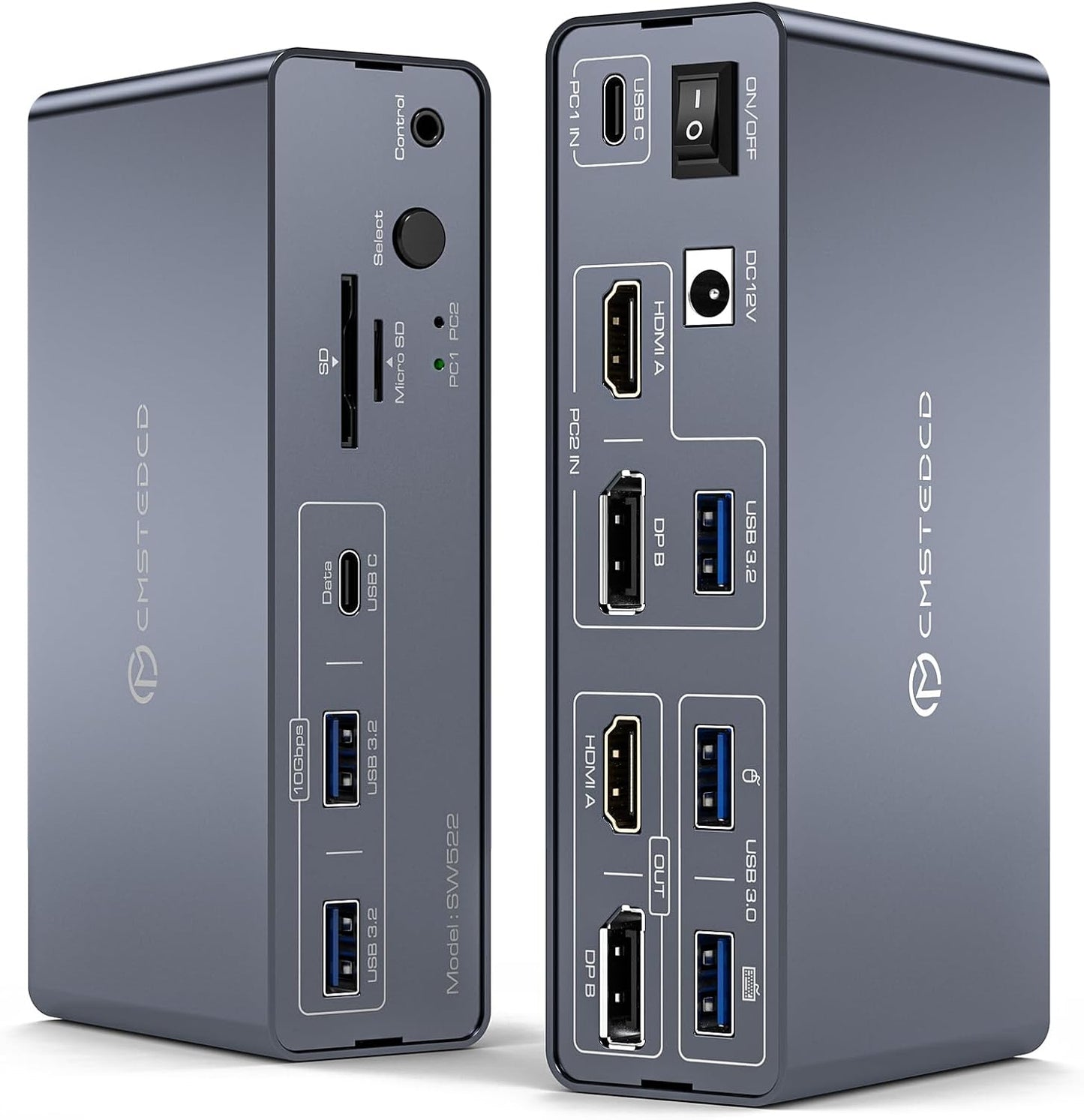
- Dual high-resolution video: Outputs one HDMI at up to 4K60Hz and one DisplayPort at up to 4K120Hz to support sharp imaging for productivity or creative work.
- Two-computer KVM switching: Lets two computers share the same two monitors and USB peripherals with an on-unit Select button and included external controller for tidy switching.
- Multiple high-speed ports: Offers two USB 3.0 ports plus three 10Gbps USB 3.2 ports (two USB-A and one USB-C) for fast data transfers to drives and printers.
- Card reader convenience: Built-in SD and microSD slots make offloading photos or files from cameras straightforward without extra adapters.
- Desktop input option: Desktop PCs can connect using USB + HDMI + DP to the dedicated PC2 input to integrate with the switch for seamless sharing.
- Protection-minded design: The USB-C computer input does not provide PD charging to protect the switch power circuitry.
Who It's For
The docking KVM is aimed at professionals and power users who run a laptop with Thunderbolt 3/4/5 and a separate desktop and want to share two monitors and a suite of peripherals without constantly unplugging cables. It is especially useful for designers, editors, or developers who need high refresh rates on a DP monitor and a reliable USB hub and card reader on their desk.
Users who rely on macOS laptops for extended multi-monitor expansion should look elsewhere or accept limitations: macOS does not support MST for extended displays through this switch, so Macs will only mirror on both monitors. Also, if you need laptop charging through the dock, this model does not supply PD charging from the USB-C input.
Pros & Cons
Pros
- Supports high-resolution outputs including 4K120Hz on DisplayPort for smooth motion on a primary display.
- Comprehensive port selection with multiple 10Gbps USB 3.2 connections and SD/microSD slots for fast data workflows.
- Clean switching with a hardware select button and included external controller to streamline two-computer setups.
Cons
- MacOS devices cannot use expanded dual-monitor mode through the switch and are limited to duplicate display mode.
- The USB-C input does not provide PD charging, so laptops will need their own power adapter.
Specifications
| Video outputs | 1x HDMI (up to 4K60Hz), 1x DisplayPort (up to 4K120Hz) |
| Computer inputs | USB-C (Thunderbolt 3/4/5 required) for laptop; USB-A+HDMI+DP for desktop |
| USB ports | 2x USB 3.0 + 2x USB-A 10Gbps + 1x USB-C 10Gbps (data only) |
| Card slots | 1x SD, 1x microSD |
| Included accessories | USB-A 3.0 cable, USB-C to C cable, external controller kit, DC 12V power supply |
| Power | Requires DC 12V power; USB-C input has no PD charging |
Our Verdict
The DGYBDFC KVM Docking Station is a practical, value-oriented solution for users who need to share two high-resolution monitors and a range of peripherals between a laptop and desktop. It excels when both hosts support the required video standards (Thunderbolt 3/4/5 on laptops) and when MST is available for expanded displays; avoid it only if you need PD charging or macOS extended-display support. For mixed Windows/desktop workflows it streamlines connections and saves desk space.
Frequently Asked Questions
Will this dock charge my laptop?
No. The USB-C input to the switch does not provide PD charging; laptops must use their own power adapter.
Can I extend two different images on both monitors with a MacBook?
No. macOS does not support MST for extended displays through this switch, so MacBooks will mirror displays only.
What does a desktop need to connect to PC2 IN?
The desktop should connect using USB + HDMI + DisplayPort to the PC2 IN trio to be recognized by the KVM and share both monitors.
Editor's Take
The DGYBDFC KVM Docking Station is a practical dual-monitor KVM that shares two high-resolution displays and multiple high-speed ports between a laptop and desktop; ideal for Windows/TB3 workflows but limited by no PD charging and macOS inability to extend displays.

Recently viewed
Recently viewed products will appear here as customers browse the store.