

KVM Docking Station with USB C KVM Switch 2 Monitors - 4K60Hz Dual
KVM Docking Station with USB C KVM Switch 2 Monitors - 4K60Hz Dual
Price subject to change. Tap below for current.
Couldn't load pickup availability
In this review the KVM Docking Station with USB C KVM Switch is regarded as a practical tool for users who need to control two computers with one keyboard and mouse while sharing dual displays. The biggest reason to buy is its ability to deliver smooth 4K60Hz video to two monitors and preserve display layout with EDID emulation, which simplifies switching between work and personal machines. It is especially useful where a compact, plug-and-play solution is needed, though buyers must note the device does not provide PD power and has specific USB-C requirements.
Key Features
- Dual Computer Control: Switch control between two computers while using a single set of keyboard and mouse to streamline a multi-workstation setup.
- Dual Monitor Support: Outputs to two monitors in either extended mode or mirrored mode to match different workflow needs and presentation setups.
- 4K60Hz with EDID Emulation: Maintains high resolution and avoids icon rearrangement when switching by emulating monitor EDID for consistent display behavior.
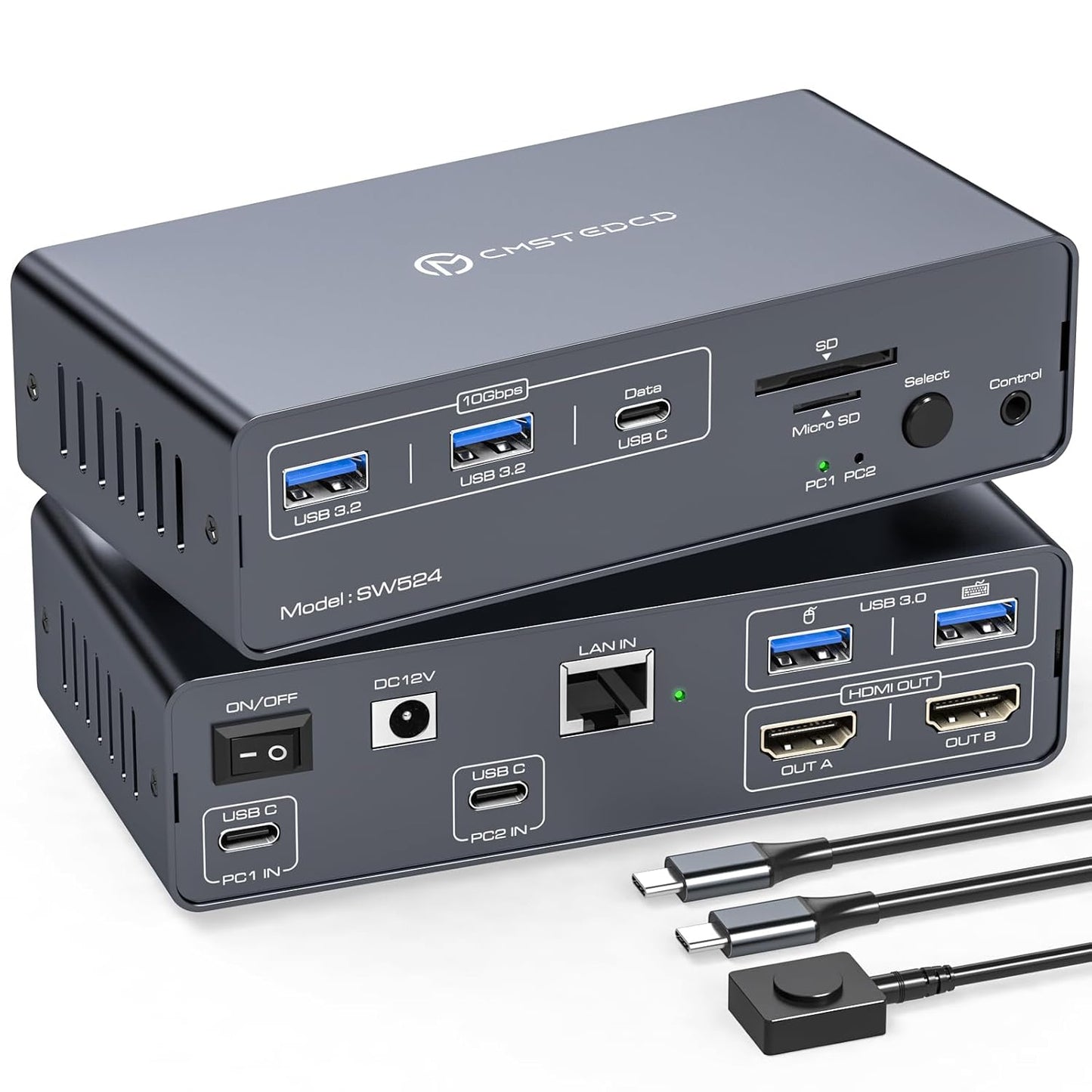
- 12-in-1 Connectivity: Includes Ethernet up to 1 Gbps, multiple USB 3.2 and USB-C data ports, plus SD and microSD slots for convenient peripheral and file access.
- Easy Switching: Offers a front select button and a desktop controller for switching without needing keyboard hotkeys, and supports plug-and-play installation with no drivers required.
- Portable Design: Small size and included accessories, such as a desktop controller and USB-C cable, make it suitable for travel or compact workspaces.
Who It's For
The docking station is best for professionals, remote workers, and IT users who operate two computers and need to share two monitors with a single set of peripherals. It particularly suits setups where maintaining display resolution and layout after switching is important, such as trading desks, creative studios, or mixed personal and work machines.
It is not ideal for users who expect the dock to charge laptops via PD power, or for systems whose USB-C ports lack Thunderbolt 3 or higher, since the rear USB-C only supports data and requires Thunderbolt-capable hosts for full video functionality.
Pros & Cons
Pros
- Reliable 4K60Hz output and EDID emulation reduce display reconfiguration after switching.
- Comprehensive port set including 1 Gbps Ethernet and SD/microSD slots for versatile connectivity.
- Simple, driverless installation and physical desktop controller make switching straightforward.
- Compact and portable design with necessary cables and a DC12V adapter included for out-of-office use.
Cons
- Does not support PD power delivery, so the DC12V adapter is required and it will not charge or power laptops.
- Rear USB-C only supports data and the host USB-C must support Thunderbolt 3 or above for video, limiting compatibility with some laptops.
Specifications
| Product Type | KVM Docking Station with USB C KVM Switch |
| Display Support | Dual monitors, up to 4K60Hz |
| EDID | Dual mode EDID emulation (dock/mirror) |
| Ethernet | Up to 1 Gbps |
| USB Ports | USB 3.2 and USB-C data ports |
| Card Slots | SD and microSD |
| Included Accessories | DC12V power adapter, USB-C to USB-C cable, desktop controller, manual |
Our Verdict
The KVM Docking Station is a strong value for users who need dependable dual-monitor switching between two computers with preserved display layout and high-resolution output. It is compact, easy to install, and packed with useful ports, but buyers should ensure their laptop USB-C supports Thunderbolt 3 or better and accept that the dock will not provide laptop charging. For the right environment it simplifies multi-computer workflows and saves desk space.
Frequently Asked Questions
Does the dock charge a laptop?
The unit does not support PD power delivery; it cannot charge or power a laptop and requires the included DC12V adapter for normal use.
Can the back USB-C carry video?
No, the rear USB-C port only supports data transfer; video over USB-C requires a Thunderbolt 3 or higher host connection.
How do you switch computers?
Switching is done with the front select button or the included desktop controller; keyboard hotkeys are not supported.
Editor's Take
The docking station is a compact, practical solution for controlling two computers with dual 4K60Hz monitors and preserved display layouts; it offers strong connectivity but does not provide laptop charging and requires Thunderbolt 3 or better for USB-C video.

Recently viewed
Recently viewed products will appear here as customers browse the store.