

KVM Switch 2 Monitors 3 Computers 8K/4K - Dual Monitor KVM Switch
KVM Switch 2 Monitors 3 Computers 8K/4K - Dual Monitor KVM Switch
Price subject to change. Tap below for current.
Couldn't load pickup availability
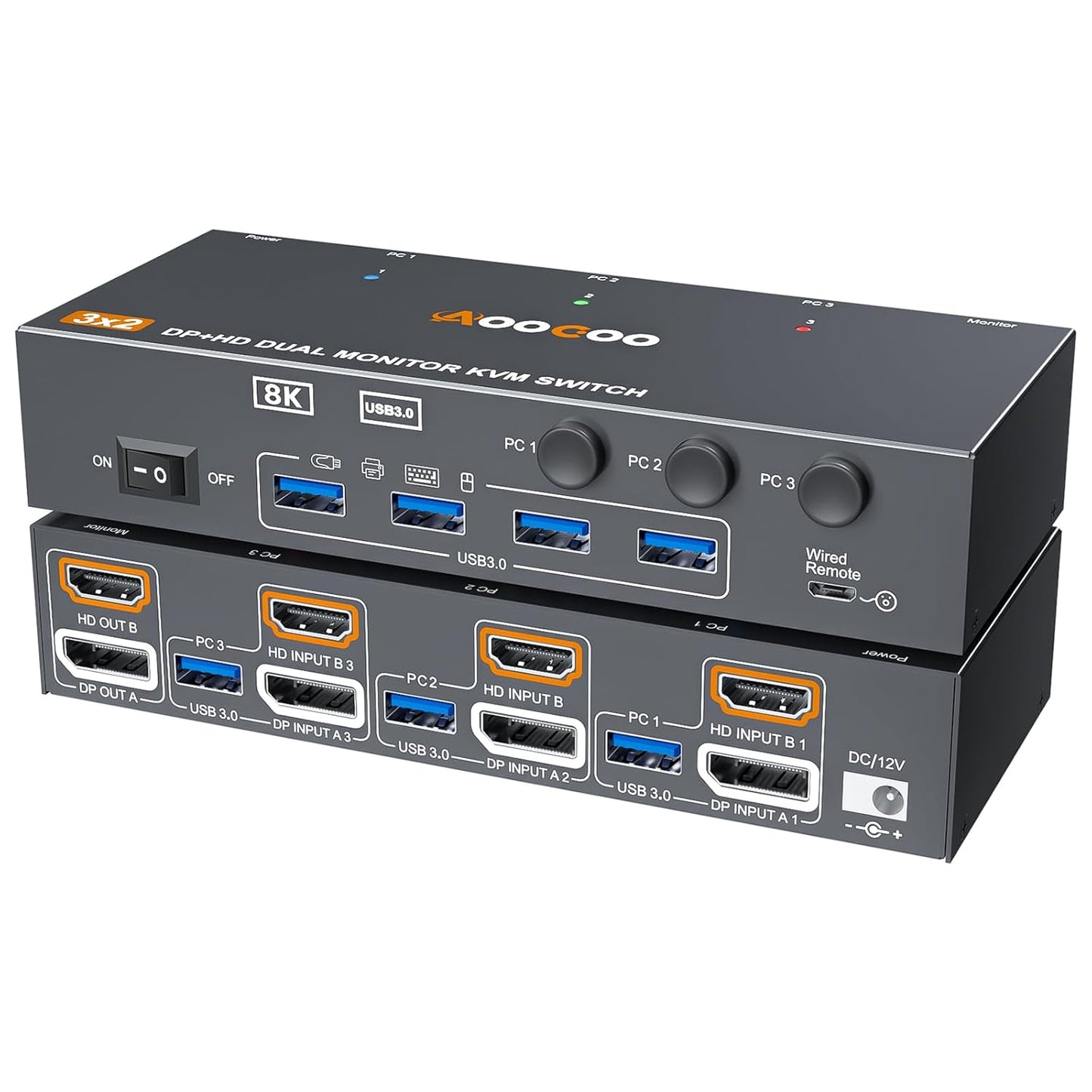
In this review the Dual Monitor KVM Switch is evaluated for users who need to control three computers with one set of peripherals and two monitors. The bottom line: it is best for professionals and power users who need high resolution multi-computer workflows because it supports up to 8K@60Hz and 4K@144Hz across DisplayPort and HDMI while offering four USB 3.0 ports for fast peripheral sharing. The included wired remote and plug-and-play setup make it practical for desktop environments where switching speed and display fidelity matter.
Key Features
- Dual Monitor KVM: Controls three computers with a single keyboard and mouse while driving two monitors in extend or copy display modes for flexible desktop layouts.
- High Resolution Support: Supports up to 8K@60Hz and 4K@144Hz overall, with DP handling up to 8K@30Hz or 4K@144Hz and HDMI up to 8K@60Hz or 4K@120Hz for demanding visual work.
- USB 3.0 Peripheral Sharing: Four USB 3.0 ports allow fast 5Gbps transfers and recognition of keyboards, mice, printers and scanners without slower USB 2.0 bottlenecks.
- Two Switching Methods: Switch between computers using the front-panel button or the included wired remote, with bi-color LEDs showing the active system for clear status.
- Cable and Power Included: Ships with three USB 3.0 cables, a wired controller and a DC12V power adapter to simplify first-time setup.
Who It's For
This switch is aimed at content creators, software developers and workstation users who run multiple PCs simultaneously and need consistent, high-resolution output across two screens. People who use discrete graphics cards should ensure both HDMI and DP connections come from the same GPU for dual display KVM support.
Those with single-monitor setups, legacy VGA or DVI-only systems, or users unwilling to manage HDMI+DP connections per computer should look elsewhere; the device requires both HDMI and DisplayPort on each connected machine and is not recommended for adapters that convert VGA or DVI.
Pros & Cons
Pros
- Supports very high resolutions and refresh rates for demanding visual tasks.
- Four USB 3.0 ports provide fast peripheral sharing and broad device compatibility.
- Includes wired remote and necessary cables for faster setup and convenient switching.
- Driver-free plug-and-play operation simplifies installation on modern systems.
Cons
- Requires both HDMI and DP per computer, which can be limiting if a system lacks one of those outputs.
- DP portion limits 8K to 30Hz, so peak 8K performance depends on which port is used.
Specifications
| Product type | Dual monitor KVM switch (3 in, 2 out) |
| Maximum resolution | Up to 8K@60Hz overall, 4K@144Hz supported |
| Display ports | HDMI and DisplayPort inputs and outputs (HDMI up to 8K@60Hz, DP up to 8K@30Hz) |
| USB ports | 4 x USB 3.0 ports (up to 5Gbps) |
| Switching methods | Front-panel button and wired remote with LED indicators |
| Included items | 3 x USB3.0 cables, wired controller, DC12V power adapter, user manual |
Our Verdict
The Dual Monitor KVM Switch is a strong choice for multi-PC workstations that need high-resolution dual displays and quick peripheral sharing. It offers solid value for content creators and professionals who can meet the dual-cable requirement, thanks to broad USB 3.0 support and included accessories that reduce setup friction.
Frequently Asked Questions
Do I need both HDMI and DP on each computer?
Yes. Dual display KVM operation requires HDMI and DisplayPort connections per computer for extended or duplicated dual-monitor output.
Are USB devices hot-pluggable and supported at USB 3.0 speeds?
Yes. The four USB 3.0 ports support device recognition and data transfer up to 5Gbps when input ports are correctly connected.
Will it work with adapters from VGA or DVI?
No. The unit is not recommended for VGA or DVI conversions; native HDMI and DP ports are required for reliable operation.
Editor's Take
This Dual Monitor KVM Switch is ideal for professionals who need to control three computers with two high-resolution monitors and fast USB 3.0 peripheral sharing; it delivers strong value if each PC has both HDMI and DP outputs.

Recently viewed
Recently viewed products will appear here as customers browse the store.