

KVM Switch 3 Monitors 2 Computers - 4K@120Hz Triple Display KVM
KVM Switch 3 Monitors 2 Computers - 4K@120Hz Triple Display KVM
Price subject to change. Tap below for current.
Couldn't load pickup availability
In this review of the KVM Switch 3 Monitors 2 Computers, the bottom line is simple: this is a practical docking-style KVM for power users who need to share three displays and multiple peripherals between a Thunderbolt 3 laptop and a desktop. It stands out for supporting dual DisplayPort plus one HDMI output with up to 4K@120Hz on the DP channels and 4K@60Hz on HDMI while offering integrated 100W PD charging, so users who want desktop-level multi-monitor workflows without juggling cables will appreciate its combination of video bandwidth and port density.
Key Features
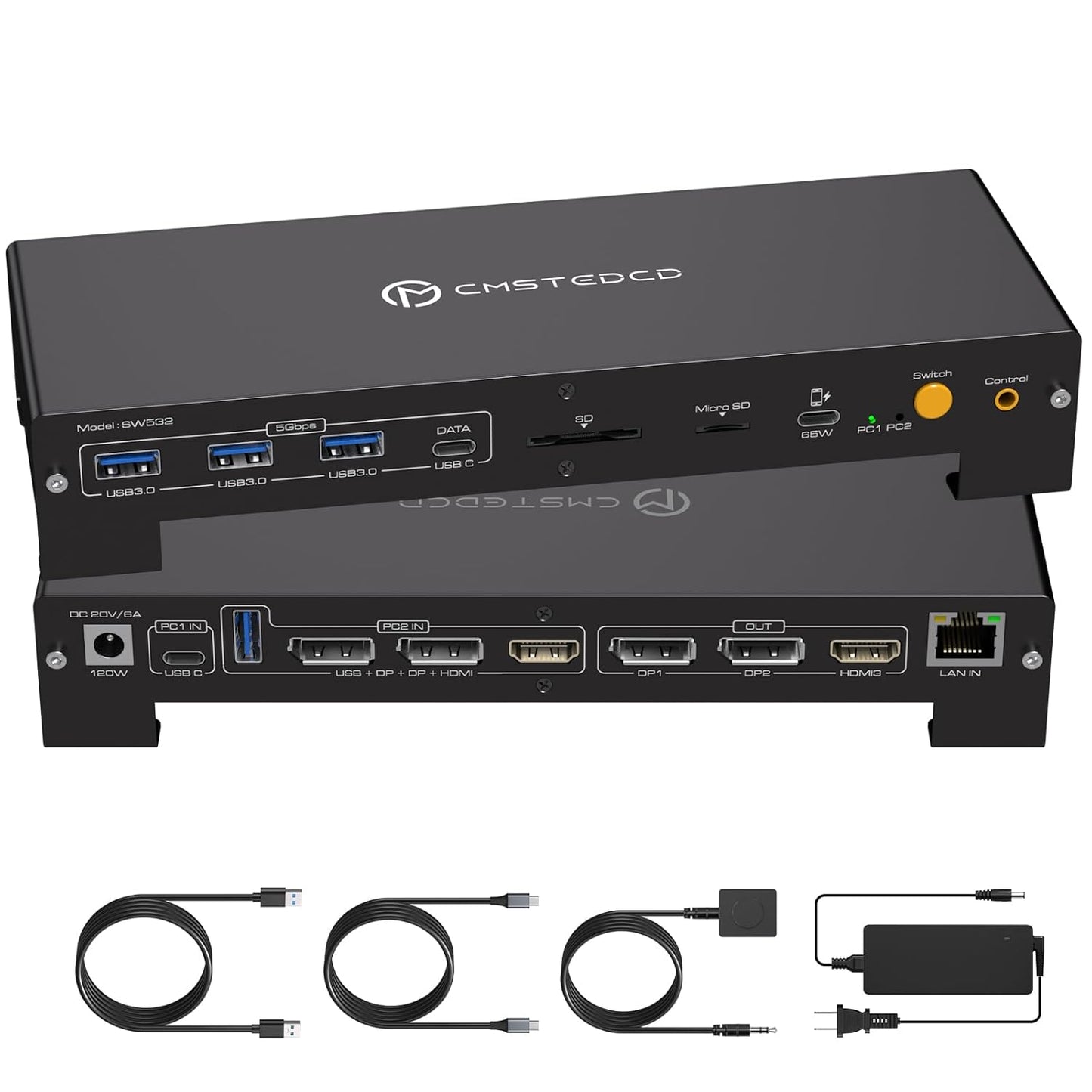
- Triple monitor support: Two DisplayPort outputs and one HDMI output let a laptop and desktop share up to three screens in mirror or extended modes for complex multitasking.
- High refresh 4K: DisplayPort channels support up to 4K@120Hz and the HDMI port supports 4K@60Hz, delivering smoother motion and sharper detail when both the host GPU and cable support those rates.
- Thunderbolt 3/4/5 compatible: The dock requires a Thunderbolt 3 or better USB-C port on the laptop, enabling full bandwidth and display passthrough for supported models.
- 100W PD charging: Built-in power delivery can reverse-charge a connected laptop up to 100W so you often do not need the laptop power brick while docked.
- Multi-port hub: Onboard USB A and C ports, SD and microSD slots, and a 1 Gbps Ethernet jack provide a single connection point for keyboards, mice, storage and wired networking.
- Included accessories: Ships with a 120W power adapter, USB-C and USB-A cables, a desktop controller, adhesive pads and basic documentation for plug-and-play setup.
Who It's For
This KVM dock is aimed at creative professionals, developers, traders and anyone who needs to share a high-resolution multi-monitor setup between a Thunderbolt laptop and a desktop without constantly reconnecting peripherals. The combination of triple monitor support and plentiful USB and card-reader ports makes it useful as a primary workstation hub.
It is not ideal for users whose laptops lack a Thunderbolt 3/4/5 port or whose GPUs do not support three external displays; Mac systems only support mirrored mode for all three screens, so Mac users who need true extended desktop across three monitors should look elsewhere.
Pros & Cons
Pros
- High-bandwidth video with DP up to 4K@120Hz and HDMI up to 4K@60Hz for demanding visual work.
- Built-in 100W PD charging removes the need for a separate laptop charger in most workflows.
- Comprehensive port selection including USB-A, USB-C, SD/microSD and 1 Gbps Ethernet simplifies desk setup.
- Ships with power adapter, cables and a desktop controller for straightforward installation.
Cons
- Requires a Thunderbolt 3/4/5 USB-C port and a GPU that supports triple displays, which limits compatibility with some laptops.
- Macs are limited to mirrored mode only and cannot extend three different screens.
Specifications
| Product type | KVM switch docking station (3 monitors, 2 computers) |
| Display outputs | 2x DisplayPort, 1x HDMI |
| Maximum resolution | DP up to 4K@120Hz, HDMI up to 4K@60Hz |
| Power delivery | 120W adapter supplied, up to 100W PD to laptop |
| Host requirement | Thunderbolt 3/4/5 USB-C port on laptop |
| Network | 1000 Mbps Ethernet (active for selected host) |
| Included accessories | DC20V 120W adapter, USB-C cable, USB-A cable, desktop controller, adhesive pads |
Our Verdict
For users with a compatible Thunderbolt laptop and a desktop that supports triple displays, this KVM switch is a strong value: it merges high refresh 4K display support, ample peripheral ports and 100W charging into a single desk hub. It is especially useful for multi-monitor productivity setups, though those on Mac or with non-Thunderbolt laptops should confirm compatibility before buying.
Frequently Asked Questions
Does it charge a laptop while connected?
Yes, the included 120W adapter provides reverse charging up to 100W to the connected laptop when the device is powered.
Will it extend three monitors on a Mac?
No, Mac OS only supports mirrored mode on all three outputs; true extended triple displays require a compatible Windows or Linux GPU setup.
Can both computers use Ethernet at the same time?
No, the Ethernet port is provided only to the currently active/selected computer and cannot be shared simultaneously.
Editor's Take
This KVM switch is a robust docking solution for Thunderbolt-equipped users who need to share three monitors and multiple peripherals; it pairs high-bandwidth DP 4K@120Hz video with 100W PD charging, but requires a compatible Thunderbolt port and GPUs that support triple displays.

Recently viewed
Recently viewed products will appear here as customers browse the store.