

KVM Switch 4-Port with USB Hub and Audio - Multi-Computer Control
KVM Switch 4-Port with USB Hub and Audio - Multi-Computer Control
Price subject to change. Tap below for current.
Couldn't load pickup availability
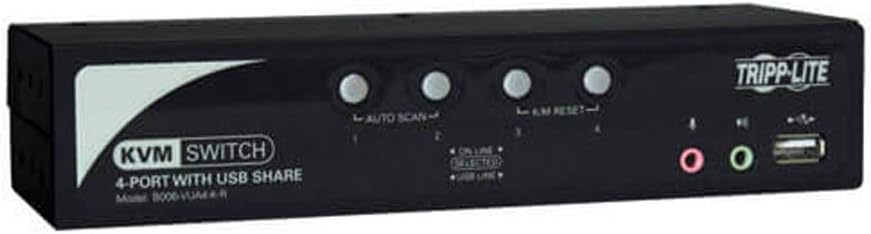
In this review of the 4-port KVM switch, the bottom line is that it is a practical, no-frills solution for anyone who needs to control several desktop computers from a single monitor, keyboard and mouse. It is aimed at small offices, lab benches and IT closets where simplicity and device sharing matter more than high-end video performance. The key reason to buy is its combination of a built-in 2-port USB 2.0 hub, audio switching and included USB + audio cable kits, which let a single operator manage peripherals across up to four systems without extra adapters.
Key Features
- 4-Port control: Switch between up to four USB or PS/2 computers from one console, saving desk space and reducing cable clutter.
- Included cable kits: The package includes two 4 ft. and two 6 ft. USB + audio KVM cable kits so most basic desktop layouts work out of the box.
- 2-Port USB 2.0 hub: Share USB peripherals like a printer or flash drive among connected computers without unplugging devices.
- Audio sharing: Built-in 3.5 mm jacks let speakers and a microphone be switched or used independently from the KVM selection.
- OS compatibility: Works with all major operating systems, making it suitable for mixed Windows, macOS and Linux environments.
- Durable build: Heavy-duty steel housing is designed for desktop use or 19 in rack mounting for a tidy equipment rack.
Who It's For
The switch is a good fit for IT technicians, small office administrators and home labs that need reliable multi-computer control and peripheral sharing without complex setup. Its included cable kits and straightforward switching make it useful where convenience and device sharing are priorities rather than maximum video fidelity.
Users who require pristine video quality for color-critical work, high-resolution gaming, or long single-cable runs should look elsewhere or plan to test their monitor and video settings, since some customers have noticed mixed image quality compared with direct connections.
Pros & Cons
Pros
- Simple, dependable switching between four systems using USB or PS/2.
- Built-in 2-port USB 2.0 hub for sharing printers and peripherals among connected computers.
- Includes four USB + audio cable kits in two lengths, reducing initial setup time.
- Steel housing and optional rack mounting make it physically robust for pro environments.
Cons
- Some users report mixed image quality; video resolution and contrast may be slightly reduced versus a direct connection.
- USB 2.0 hub limits transfer speeds compared with newer USB standards.
Specifications
| Ports | 4 computer KVM ports, built-in 2-port USB 2.0 hub |
| Included cables | (2) 4 ft. and (2) 6 ft. USB + audio KVM cable kits |
| Audio | 3.5 mm speaker and microphone jacks, switchable |
| Compatibility | Compatible with all major operating systems; supports USB or PS/2 computers |
| Mounting | Desktop use or 19 in rack mount capable |
| Construction | Heavy-duty steel housing |
| Warranty | 3-year limited warranty (note: source also lists an alternate 1 year limited warranty) |
Our Verdict
This KVM switch is a sensible value for small teams and IT professionals who need dependable multi-computer control and peripheral sharing without fuss. The included cable kits, audio switching and integrated USB hub make day-to-day use convenient, though those prioritizing the absolute best video fidelity or faster USB speeds should evaluate alternatives. For most office and lab setups it delivers reliable function and solid build at a reasonable tradeoff.
Frequently Asked Questions
Can I share a USB printer between computers?
Yes; the built-in 2-port USB 2.0 hub lets USB peripherals like a printer be shared among computers connected with USB KVM cables.
Does it support PS/2 computers?
It supports PS/2 if you use the appropriate PS/2 KVM cable kits as noted in the product information.
Will the audio and keyboard switch together?
KVM console, audio and USB functions can be switched independently, so you can control one computer while listening to audio from another and printing from a third.
Editor's Take
This 4-port KVM switch offers dependable multi-computer control, built-in USB peripheral sharing and audio switching, making it a practical, durable choice for small offices and labs despite modest video fidelity and USB 2.0 speed limits.

Recently viewed
Recently viewed products will appear here as customers browse the store.