

KVM Switches 2 Port 8K@60Hz HDMI KVM - Share USB Devices Easily
KVM Switches 2 Port 8K@60Hz HDMI KVM - Share USB Devices Easily
Price subject to change. Tap below for current.
Couldn't load pickup availability
In this review of the KVM Switches 2 Port 8K@60Hz from GREATHTEK, the bottom line is simple: this unit is for users who need to control two computers from a single monitor and a handful of USB peripherals while keeping a tidy desk. The biggest reason to buy is its support for up to 8K@60Hz video and three USB 3.0 ports, which together let you switch a high-resolution display and fast USB devices between machines without extra power adapters or a permanent USB hub.
Key Features
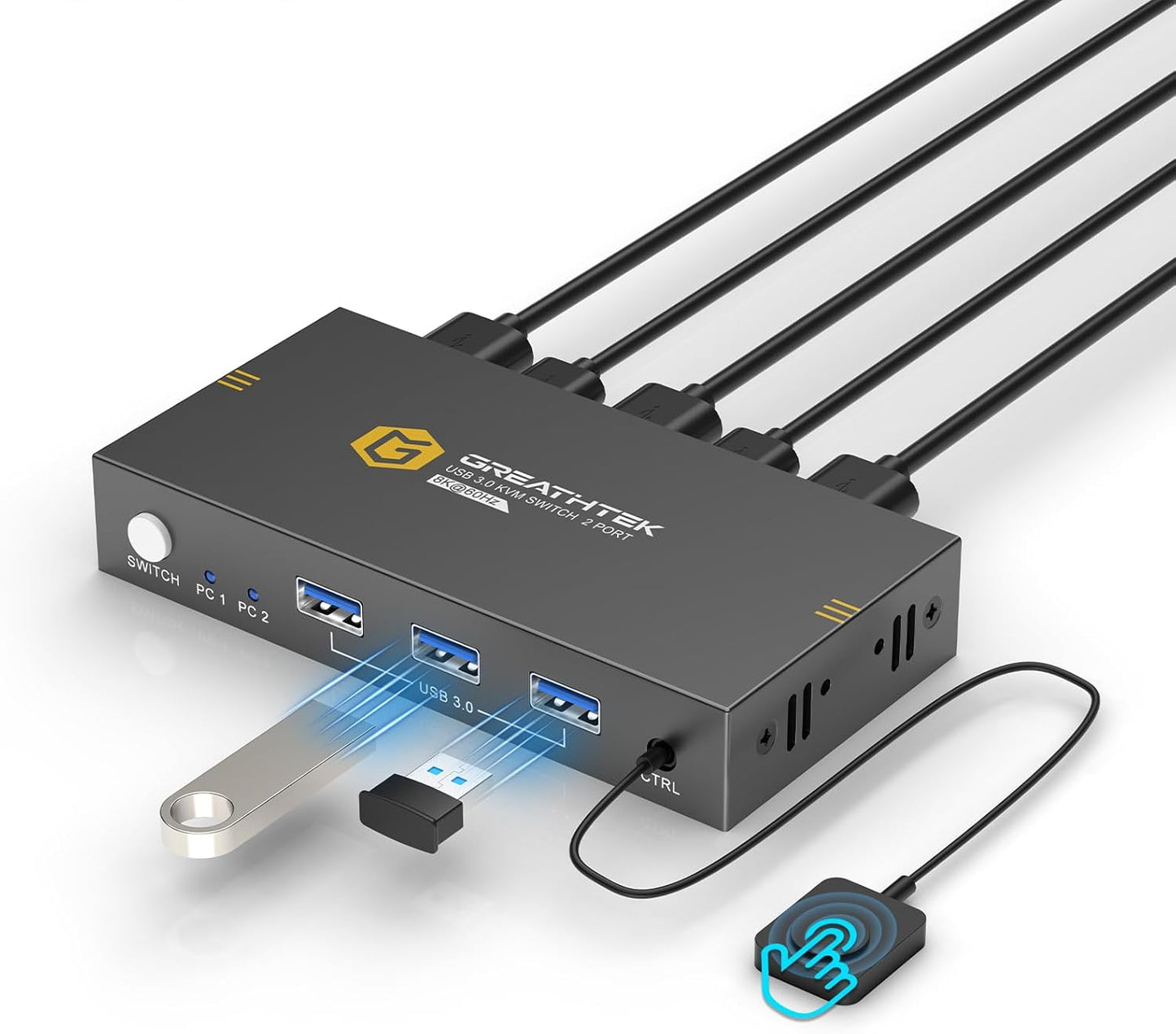
- 8K@60Hz support: Delivers ultra high resolution video up to 8K@60Hz when used with an HDMI 2.0 cable, making it suitable for detailed graphics and large monitors.
- Multiple resolution options: Also compatible with 8K@30Hz, 4K@120Hz, 3D and 1080P so it adapts to different monitor capabilities and content types.
- Three USB 3.0 ports: Lets you connect fast USB devices such as external drives or a printer and switch them between two computers without reconnecting cables.
- Two switching methods: Offers both a wired remote and a front button for quick, flexible switching between the connected computers.
- No external power required: The design operates without a separate power adapter which reduces desk clutter and simplifies setup.
- Plug and play compatibility: Works with Windows, Mac OS, Linux and Chrome OS without drivers, so setup is straightforward for most users.
Who It's For
This KVM switch is aimed at creative professionals, developers, and home office users who use two computers and need a single high-resolution monitor and several USB peripherals. If you run dual workstations, a PC and a laptop, or mix a desktop and a small-form computer, the 8K video support and USB 3.0 ports make it a practical choice.
Users who need guaranteed flawless switching for very specific exotic USB devices or those who require enterprise-grade KVM features like advanced hotkey mapping or networked management should look elsewhere. Also note that to reach the 8K@60Hz promise you must use a compatible HDMI 2.0 cable and monitors that support those modes.
Pros & Cons
Pros
- High-resolution support up to 8K@60Hz for sharp, detailed displays.
- Built-in USB 3.0 hubs reduce the need for extra adapters and ease peripheral sharing.
- Simple plug and play setup across major operating systems without drivers.
- Works without an external power adapter, keeping the desk tidy.
Cons
- Actual performance depends on cable and monitor quality; some customers report mixed results if cables or ports are not HDMI 2.0 capable.
- Functionality and USB behavior vary by device-certain peripherals may not switch perfectly in every setup.
Specifications
| Brand | GREATHTEK |
| Ports | 1 HDMI monitor, 2 computer inputs, 3 USB 3.0 hubs |
| Max Resolution | 8K@60Hz (HDMI 2.0 cable required) |
| Other Resolutions | 8K@30Hz, 4K@120Hz, 3D, 1080P |
| Switching Methods | Wired remote and front button |
| Power | No external power adapter required (bus powered) |
Our Verdict
The GREATHTEK 2 Port 8K@60Hz KVM switch is a strong value for users who need high-resolution video and handy USB sharing between two computers. Its plug and play compatibility, USB 3.0 ports, and lack of a required power adapter make it practical for home offices and creative workstations, though users should ensure HDMI 2.0 cables and compatible monitors to get the best results.
Frequently Asked Questions
Do I need a special cable to get 8K@60Hz?
Yes. Use an HDMI 2.0 cable and an 8K-capable monitor to reach 8K@60Hz.
Will my USB printer and external drive work through the switch?
They often will via the included USB 3.0 hubs, but some peripherals can behave differently when switched; verify in your setup.
Is a power adapter required?
No. The unit is designed to operate without an external power adapter to reduce desk clutter.
Editor's Take
The GREATHTEK 2 Port 8K@60Hz KVM switch is a practical, good-value option for users who need high-resolution video and USB sharing between two computers; ensure HDMI 2.0 cables and compatible monitors for best results.

Recently viewed
Recently viewed products will appear here as customers browse the store.