

Laptop Docking Station 13 in 1 Dual Monitor Triple 4K Display
Laptop Docking Station 13 in 1 Dual Monitor Triple 4K Display
Price subject to change. Tap below for current.
Couldn't load pickup availability
In this review of the Laptop Docking Station 13 in 1, the bottom line is simple: it is best for users who need a single, compact hub to connect multiple displays and a mix of peripherals to a modern laptop. The reviewer found the dock useful for office and home setups where two 4K HDMI outputs plus a DisplayPort are required, and appreciated the combination of fast data ports and PD charging. Setup is generally plug and play, and the dock's main selling point is its breadth of ports and the convenience of consolidating Ethernet, audio, charging and many USB devices through one cable.
Key Features
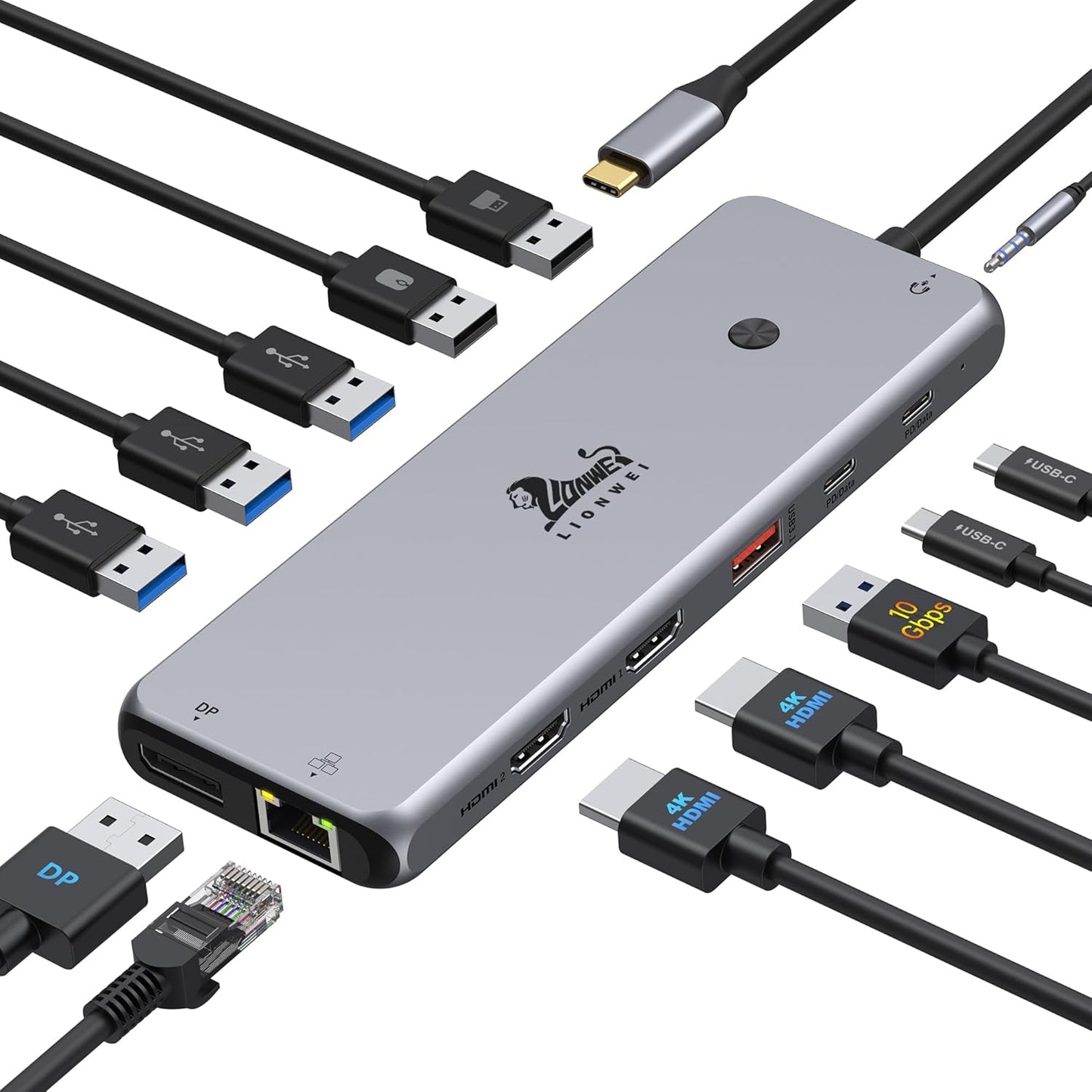
- 13 in 1 connectivity: Combines two 4K HDMI ports, one DisplayPort and a wide selection of USB A and C ports so a laptop can drive multiple monitors and many peripherals from one hub.
- Dual 4K and triple display support: Supports two 4K HDMI outputs and an additional DP output, letting users mirror or extend screens depending on the host OS and hardware.
- Fast data and charging: Two USB-C ports and one USB 3.1 port deliver up to 10Gbps data rates while one USB-C PD path supplies up to 100W for laptop charging (dock uses about 15W itself).
- Wired network and audio: Built-in Gigabit Ethernet reduces wireless lag for large transfers or gaming, and the 3.5mm combo jack handles headphones and microphone needs.
- Plug and play design: No drivers are required for most setups, making it straightforward to add displays and peripherals quickly.
Who It's For
The dock is aimed at professionals and power users who need multiple external displays, a wired Ethernet connection and many USB ports from a single adapter. It works well for people with MacBook, Dell, HP, Lenovo or Surface laptops that need to expand connectivity for workstations, remote work or content review.
It is not the best choice for users who demand full triple-display extend mode on macOS, since macOS only supports SST single-stream for some configurations; Windows machines with MST support are the safest bet for full triple-extended displays. Also, if a protective laptop case blocks USB-C ports, users should remove it to ensure reliable connections.
Pros & Cons
Pros
- Wide port selection gives a single-cable workstation solution for displays, storage, audio and networking.
- High-speed USB-C and USB 3.1 ports provide fast data transfer up to 10Gbps for compatible devices.
- 100W PD charging support lets most laptops charge while connected, with practical convenience for mobile work.
Cons
- Triple-display extend mode depends on the host: Windows with MST works best, while macOS is limited to SST and may not support full extend in every setup.
- Some users report mixed behavior with HDMI ports on certain laptops, so specific laptop and GPU combinations may require troubleshooting.
Specifications
| Product type | USB-C docking station (13 in 1) |
| Video outputs | 2 x 4K HDMI, 1 x DisplayPort |
| USB ports | 2 x USB-C (10Gbps + PD), 1 x USB 3.1 (10Gbps), 3 x USB 3.0, 2 x USB 2.0 |
| Power delivery | Up to 100W PD input (dock consumes ~15W) |
| Network | Gigabit Ethernet port |
| Audio | 3.5mm audio/mic combo jack |
Our Verdict
The Laptop Docking Station 13 in 1 is a practical, cost-effective hub for users who need multiple displays and a broad set of ports without juggling adapters. It delivers strong value with fast data ports, PD charging and Gigabit Ethernet, and is a particularly good match for Windows laptops that support MST. Buyers with strict macOS triple-display needs should verify compatibility before purchase.
Frequently Asked Questions
Can this dock charge my laptop at full power?
It supports up to 100W PD input, but the dock uses about 15W, leaving roughly 85W available for charging the laptop.
Will it run three extended displays on a MacBook?
macOS generally supports SST and may not provide full triple-extended displays; Windows machines with MST support are more likely to run triple-extend mode.
Do I need drivers to use the dock?
The dock is plug and play for most systems, but compatibility can vary with specific laptops and display configurations.
Editor's Take
The Laptop Docking Station 13 in 1 is a practical, value-packed hub that consolidates dual 4K displays, DisplayPort, fast USB-C data and Gigabit Ethernet for streamlined workstations; best for Windows laptops with MST support and users who need many ports in one compact device.

Recently viewed
Recently viewed products will appear here as customers browse the store.