

Laptop Docking Station Dual 4K HDTV Monitor - Compact USB C Dock
Laptop Docking Station Dual 4K HDTV Monitor - Compact USB C Dock
Price subject to change. Tap below for current.
Couldn't load pickup availability
In this review of the Laptop Docking Station Dual 4K HDTV Monitor the reviewer finds a compact, well-built USB C dock best suited for users who need multiple ports and a stable wired network on the go. The single biggest reason to buy is the combination of dual 4K-capable HDMI outputs alongside a gigabit Ethernet and high-speed USB ports, which turns a laptop into a productive workstation. It is particularly useful for creators and remote workers who already have a host device with DP Alt Mode and want reliable data and charging support in one small unit.
Key Features
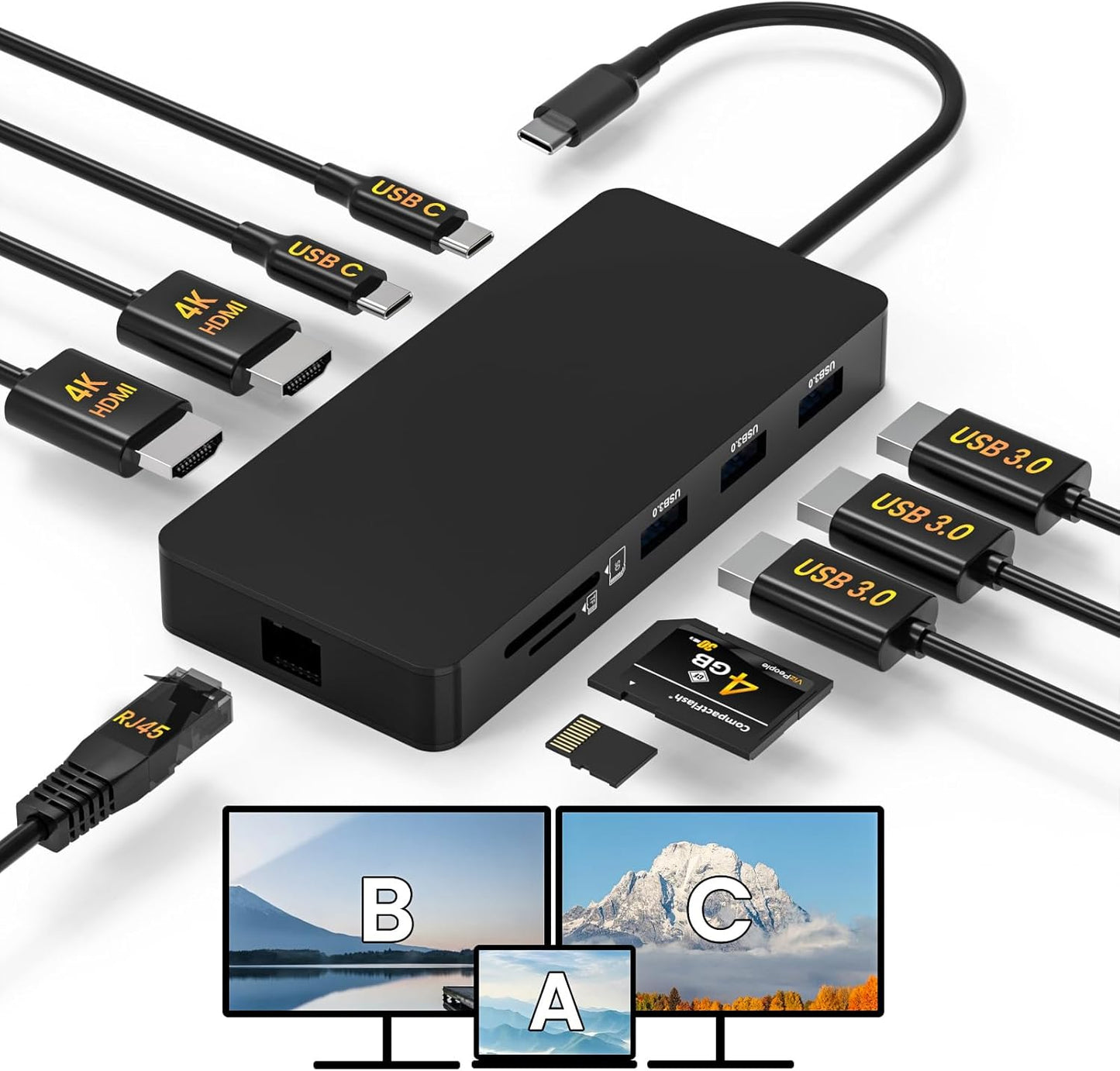
- Dual 4K HDMI: Supports up to 4K@30Hz on a single display and mirror or limited extend modes for two displays when the host allows, so users can drive UHD video and presentations.
- Gigabit Ethernet: The built-in 1000Mbps RJ45 port provides a stable wired connection for meetings, streaming, and large file transfers where Wi-Fi is unreliable.
- High-speed USB ports: Includes multiple 5Gbps USB A ports and a 5Gbps USB C port to transfer large files and connect external drives or peripherals quickly.
- PD Charging: The dock accepts up to 100W PD pass-through (recommended at least 65W adapter) so a laptop can remain charged while using multiple devices.
- SD / Micro SD card reader: Onboard card slots provide convenient media access at up to 104 Mbps for photographers and content creators.
- MacOS behavior note: Does not support MST on MacOS, so Mac users should expect mirror mode or only one extended display depending on system limits.
Who It's For
This docking station is aimed at laptop users who need a compact hub to expand productivity: remote workers who want a wired ethernet connection, creative professionals who transfer large files via USB and SD, and anyone who needs multiple displays and reliable PD charging from one USB C connection. It pairs especially well with Windows laptops and many Type-C devices that explicitly support DP Alt Mode.
Users who need full dual extended displays on MacOS should look elsewhere or accept mirrored displays, because MacOS does not support MST and can only extend one monitor in most cases. Also confirm your laptop's USB C port shows DP capability before buying.
Pros & Cons
Pros
- Combines dual HDMI, gigabit Ethernet, fast USB ports, and SD reader in a compact unit for a tidy workstation.
- Solid build and compact size, praised by customers for ease of use and appearance.
- Full-speed USB 5Gbps ports and reliable 1000Mbps network performance for stable transfers.
Cons
- MacOS limitation: no MST support so dual extended displays are not fully available on Macs.
- Requires a host USB C port that supports DP Alt Mode and a separate PD adapter (not included) for full charging capability.
Specifications
| Video outputs | 2 x HDMI (dual 4K support, single up to 4K@30Hz) |
| Ethernet | 1000Mbps RJ45 |
| USB ports | 3 x 5Gbps USB A, 1 x 5Gbps USB C |
| Power delivery | Up to 100W PD pass-through (use at least 65W adapter) |
| Card reader | SD / Micro SD up to 104 Mbps |
| Compatibility note | Works with Type-C devices; host must support DP Alt Mode; MacOS mirrors only |
Our Verdict
The dock is a practical, good-value accessory for Windows and DP Alt Mode equipped laptops that need extra ports, wired networking, and PD charging in a compact package. It is especially useful for freelancers and home office users who transfer files often and want a tidy desktop setup. Mac users should buy only if mirror mode or a single extended monitor meets their needs.
Frequently Asked Questions
Will this dock charge my laptop?
Yes, it supports PD pass-through up to 100W but you should use at least a 65W power adapter; the adapter and cable are not included.
Can I run two extended monitors on a Mac?
No, MacOS does not support MST, so only mirror mode or one extended monitor is typically available on Mac computers.
Do I need a specific port on my laptop?
Your laptop USB C must support video output (DP Alt Mode); look for a DP logo next to the port or check the manufacturer specs.
Editor's Take
A compact, good-value USB C docking station that combines dual HDMI, gigabit Ethernet, fast USB ports and PD charging; ideal for Windows and DP Alt Mode laptops, but MacOS only supports mirrored or single extended displays.

Recently viewed
Recently viewed products will appear here as customers browse the store.