

Replacement TV Remote for Fire Stick and Smart TV - Voice Remote
Replacement TV Remote for Fire Stick and Smart TV - Voice Remote
Price subject to change. Tap below for current.
Couldn't load pickup availability
In this review the Replacement TV Remote is assessed for people who need a low-cost, functional spare or replacement remote for streaming sticks, cubes and compatible smart TVs. The bottom line: it is a practical substitute when pairing goes smoothly and you want basic voice control and shortcut access without paying for an OEM unit. Setup can be quick, but expect to spend time pairing and troubleshooting if the device or TV generation is not fully compatible.
Key Features
- Broad device compatibility: Works with a variety of streaming devices including TV stick (2nd, 3rd Gen, Lite), TV stick 4K and 4K Max, and TV cube generations for quick control of streaming apps.
- Smart TV support: Compatible with select Insignia, Toshiba, Pioneer and Omni smart TV models that use the 3rd Gen pendant design, allowing use as a TV replacement remote.
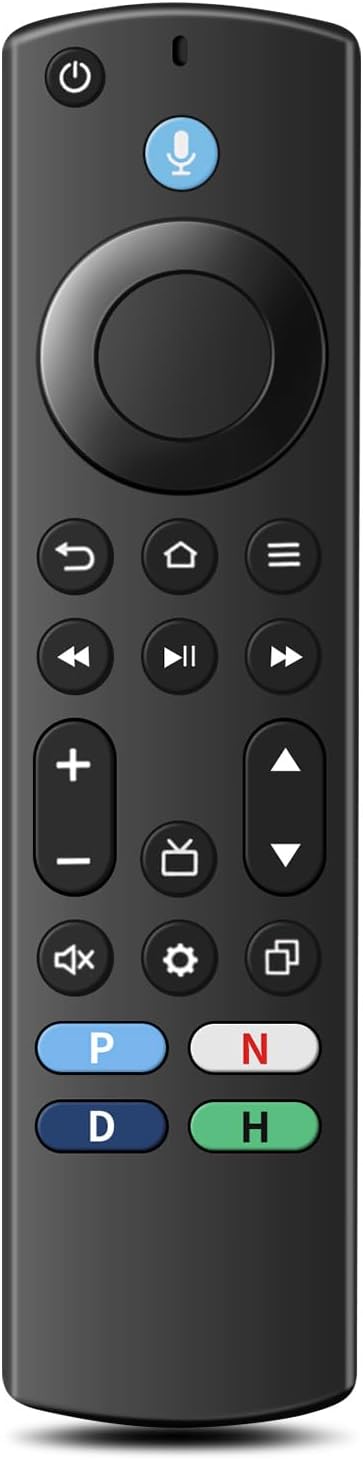
- Voice control: Built-in voice button lets users search, open apps and adjust volume faster than navigating menus manually.
- Four shortcut buttons: Four pre-set app buttons give instant access to popular channels and save time when launching frequently used services.
- Simple setup: The remote auto-matches to many streaming devices and compatible TVs with straightforward pairing steps in the included user manual.
- Pack contents: Ships with one replacement voice remote and a user manual; it requires 2 AAA batteries which are not provided.
Who It's For
This remote is well suited to users who need an affordable replacement for a lost or broken remote for supported streaming sticks, cubes and the listed smart TV series and who are comfortable following pairing instructions. It is a good fit for households that value shortcut buttons and voice search on a budget.
Those who should look elsewhere include owners of first or second generation smart TVs, first generation TV sticks, soundbars or AV receivers, since the remote is not compatible with those devices. If you require guaranteed plug-and-play compatibility across many TV models, an OEM remote may be a safer choice.
Pros & Cons
Pros
- Affordable replacement that covers many recent streaming stick and cube generations.
- Voice control and four pre-set app buttons speed up searching and launching apps.
- Easy to set up when pairing completes successfully, and the manual includes troubleshooting steps.
Cons
- Compatibility is inconsistent for some users and pairing problems are reported, making it less reliable than an OEM remote.
- Requires customers to supply 2 AAA batteries and to remove old remote batteries before pairing to avoid interference.
Specifications
| Brand | Luyeper |
| Compatible devices | TV stick 2nd/3rd Gen/Lite, TV stick 4K/4K Max, TV cube 1st-3rd Gen |
| Smart TV compatibility | Insignia, Toshiba, Pioneer, Omni series (3rd Gen pendant design) |
| Voice control | Yes - voice search and app control |
| Shortcut buttons | 4 pre-set app buttons |
| Power | 2 AAA batteries required (not included) |
| Included | 1 replacement voice remote, 1 user manual |
Our Verdict
The Replacement TV Remote is a value-focused option for users with supported streaming sticks, cubes and compatible 3rd Gen smart TVs who need voice control and quick app shortcuts without paying OEM prices. It is good value when pairing succeeds, but buyers should be prepared for occasional compatibility and pairing workarounds and to supply their own batteries.
Frequently Asked Questions
Do batteries come with the remote?
No, the remote requires 2 AAA batteries which are not included and must be provided by the user.
What if the shortcut or volume buttons do not respond?
Correct pairing is required; if a button behaves incorrectly, try re-pairing or restore factory settings on the remote and match again.
Will it work with my older TV stick or soundbar?
It is not compatible with first generation TV sticks, 1st/2nd Gen smart TVs, soundbars or receivers, so those devices are not supported.
Editor's Take
A budget-friendly replacement for supported streaming sticks, cubes and select smart TVs that offers voice search and shortcut buttons; good value when pairing is successful but compatibility and pairing can be inconsistent.

Recently viewed
Recently viewed products will appear here as customers browse the store.