

MacBook Pro Docking Station 14-in-2 Dual USB C Docking Station - Dual
MacBook Pro Docking Station 14-in-2 Dual USB C Docking Station - Dual
Price subject to change. Tap below for current.
Couldn't load pickup availability
In this review of the MacBook Pro Docking Station the bottom line is simple: it is best for MacBook Pro and MacBook Air users who need to turn a laptop into a multiport desktop with dual 4K displays and fast data lanes. The reviewer found the unit delivers on connectivity and convenience, with an ON-OFF switch to avoid constant cable juggling and a broad set of ports that includes dual 4K@60Hz HDMI, 10Gbps USB-C and USB-A data ports, SD/TF reader slots, Ethernet and 100W PD power pass-through, making it a solid choice for desk setups that demand multiple monitors, card access and high-speed transfers.
Key Features
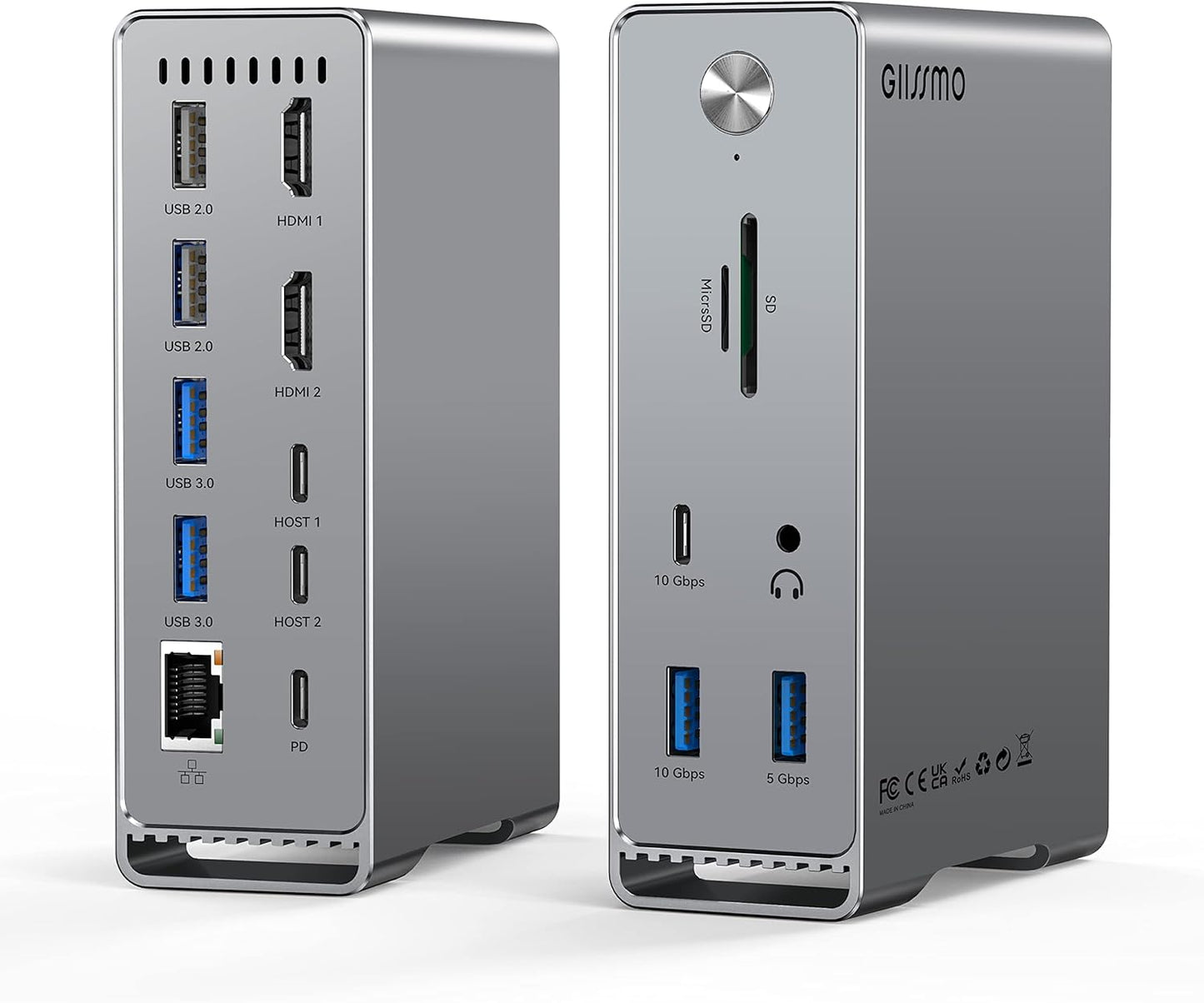
- Dual 4K HDMI: Two HDMI ports support extending to dual 4K@60Hz monitors on DP 1.4 hosts, letting users run two external displays without extra adapters.
- High-speed data ports: Front 10Gbps USB-C and 10Gbps USB-A ports move large files quickly, cutting transfer time for big drive backups.
- Comprehensive connectivity: Multiple USB 3.0 and USB 2.0 ports, SD/TF card slots, 3.5mm audio and RJ45 Ethernet make it easy to attach peripherals in one location.
- Power delivery: Integrated 100W PD lets a laptop stay powered while all peripherals are connected, removing the need for a separate charger on the desk.
- Convenience switch: The physical ON-OFF switch controls the dock power so users can leave cables connected and only enable the hub when needed.
Who It's For
The dock is aimed at professionals and content creators who use modern MacBook Pro and MacBook Air models and need multiple displays and fast storage access at a single workstation. It is especially useful for photographers and videographers who rely on SD/TF card slots and high-speed USB ports to move large media files quickly.
Users with original M1 or M2 single-display-limited Macs, or owners of much older MacBooks made before 2016/2018, should look elsewhere if they require guaranteed dual external display support on those specific systems. Also, anyone needing legacy video outputs other than HDMI will need adapters.
Pros & Cons
Pros
- Wide range of ports consolidates a desk setup and reduces adapter clutter.
- Dual 4K@60Hz HDMI support on compatible Macs enables true multi-monitor workflows.
- Front-facing 10Gbps ports and SD/TF slots speed up media transfers and backups.
- Physical ON-OFF switch and 100W PD add practical usability and power to the setup.
Cons
- Some users report mixed connectivity results with the second HDMI port on certain Macs, so behavior can vary by host GPU/driver.
- Original single-display M1/M2 Macs are limited to one external screen by design.
Specifications
| Product Type | 14-in-2 Dual USB-C Docking Station |
| Video Outputs | 2 x HDMI (up to dual 4K@60Hz on DP 1.4 hosts) |
| High-Speed Ports | 10Gbps USB-C data port and 10Gbps USB-A data port |
| Other Ports | 3 x USB 3.0, 2 x USB 2.0, 3.5mm audio, RJ45 Ethernet, SD/TF slots |
| Power Delivery | 100W PD (87W PD 3.0 port noted for charging) |
| Compatibility Notes | Works with Intel Macs and M1 Pro/Max/Ultra; original M1/M2 limited to single external display |
| Included | Dock, double-ended USB-C to USB-C cable, welcome guide, 24-month warranty |
Our Verdict
The MacBook Pro Docking Station is a practical, cost-effective way to convert recent MacBooks into a full desktop hub with dual 4K displays, fast data ports and Ethernet. It offers genuine value for users who need card readers and high-speed transfers at their desk, though owners of original single-display M1/M2 Macs should temper expectations about dual monitor support. For most modern MacBook Pro and Air users it is a versatile and convenient docking solution.
Frequently Asked Questions
Will this dock run two 4K@60Hz monitors?
Yes, on DP 1.4 capable Macs it supports dual 4K@60Hz; DP 1.2 hosts may be limited to one 4K@60Hz plus one 4K@30Hz.
Does it charge the laptop?
Yes, the dock provides power delivery up to 100W so it can charge a laptop while powering peripherals.
Will it work with original M1 MacBooks?
The product will function but original single-display M1 Macs are limited to one external screen due to hardware limits.
Editor's Take
The MacBook Pro Docking Station is a versatile desktop hub for modern MacBooks, offering dual 4K@60Hz HDMI, fast 10Gbps ports and 100W PD; good value for users needing multiple displays and fast media transfers.

Recently viewed
Recently viewed products will appear here as customers browse the store.