

MICROPACK Digitally Yours Wired Trackpad for Windows - Large USB Pad
MICROPACK Digitally Yours Wired Trackpad for Windows - Large USB Pad
Price subject to change. Tap below for current.
Couldn't load pickup availability
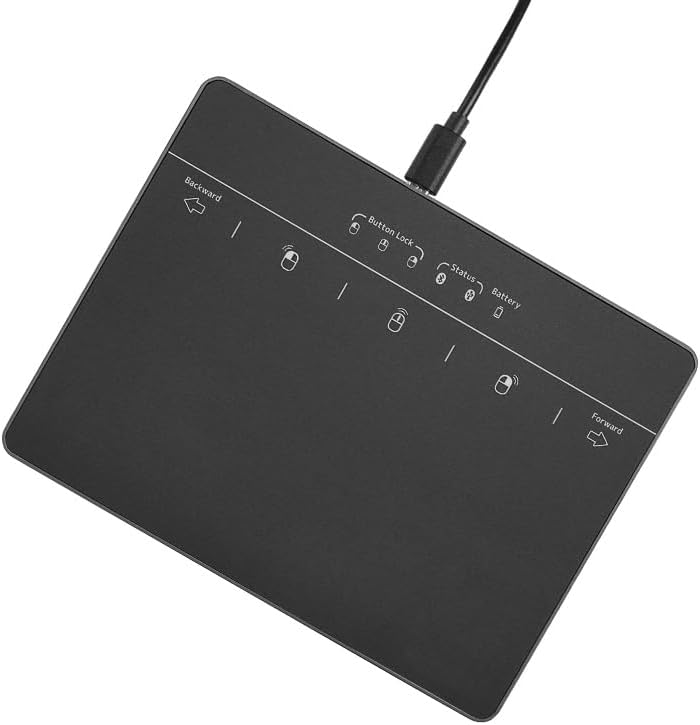
In this review of the MICROPACK Digitally Yours wired trackpad, the bottom line is simple: this is a large, no-fuss external touchpad for Windows users who want a full-size gesture surface without wireless setup. The unit's 5.1in by 3in pad supports up to four-finger multi-touch gestures and connects via USB for plug-and-play use on Windows 7, 10 and 11 systems. For people who prefer physical left and right buttons and reliable, lag-free response over Bluetooth convenience, this trackpad delivers a familiar laptop-style touch experience on a desktop or secondary device.
Key Features
- Full-size touch surface: The 5.1in by 3in pad gives ample room for swiping, selecting and multi-finger gestures so common laptop motions feel natural on a desktop setup.
- Wide Windows compatibility: Designed to work with Windows 7, Windows 10 and Windows 11, it is straightforward to connect to a PC or laptop using the USB wired connection without driver hunting in most cases.
- Lag-free connection: The wired USB link provides responsive tracking for scrolling and zooming with minimal delay compared with some wireless alternatives.
- Efficient multi-touch gestures: Supports up to four-finger gestures on Windows 10 and 11 and allows reassignment of three/four finger clicks for functions like middle-button or Cortana activation.
- Physical left-right buttons: Dedicated click buttons give precise feedback for text selection, dragging files and traditional mouse tasks that rely on distinct left and right clicks.
Who It's For
The MICROPACK trackpad is best for Windows users who want a laptop-style touch experience on a desktop or as a dedicated external pad for a secondary computer. It suits office workers, students and creatives who rely on multi-touch navigation and prefer the tactile certainty of physical buttons.
It is not aimed at Apple users or people who need a Bluetooth, wireless solution; it also won't replace a high-precision external mouse for tasks that require pixel-perfect tracking in professional CAD or gaming environments.
Pros & Cons
Pros
- Large tracking area supports natural multi-finger gestures similar to a laptop trackpad.
- Plug-and-play USB connection with reliable, low-latency response for everyday navigation.
- Customizable three/four finger actions on Windows 10/11 expand productivity options.
- Physical left and right buttons provide accurate clicking and dragging control.
Cons
- Wired USB only and explicitly not compatible with Apple devices, limiting cross-platform use.
- Not intended as a high-precision replacement for gaming mice or specialist input devices.
Specifications
| Brand | MICROPACK Digitally Yours |
| Touchpad size | 5.1in x 3in |
| Connection | USB wired |
| OS compatibility | Windows 7, Windows 10, Windows 11 |
| Multi-touch | Up to 4-finger gestures |
| Buttons | Left and right physical click buttons |
Our Verdict
The MICROPACK wired trackpad is a good-value, practical accessory for Windows users who want a familiar, laptop-style gesture surface with physical buttons and a dependable USB connection. Choose it if you need straightforward multi-touch control on a PC or laptop without dealing with wireless pairing; look elsewhere if you require Bluetooth, Apple compatibility or ultra-high precision for specialized work.
Frequently Asked Questions
Does this trackpad work with macOS?
It is not compatible with Apple devices; the product is built for Windows 7, 10 and 11.
Is a driver needed for multi-touch gestures?
It is plug-and-play for basic use, while gesture customization for three/four finger actions is done through Windows settings on Win10/11.
Can it replace a mouse for daily tasks?
Yes for general navigation, scrolling and gestures, though users needing extreme pointer precision may prefer a dedicated mouse.
Editor's Take
The MICROPACK wired trackpad is a practical, good-value external touchpad for Windows users who want a large multi-touch surface and physical buttons with a reliable USB connection; not suitable for Apple devices or high-precision specialist work.

Recently viewed
Recently viewed products will appear here as customers browse the store.