

Microsoft Surface Pro Keyboard Without Pen Storage - Alcantara, Black
Microsoft Surface Pro Keyboard Without Pen Storage - Alcantara, Black
Price subject to change. Tap below for current.
Couldn't load pickup availability
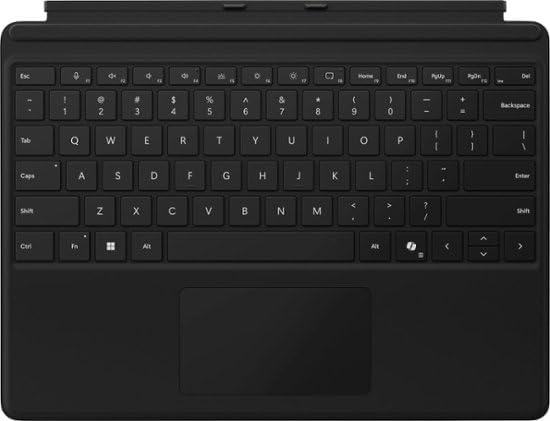
Our review of the Microsoft Surface Pro Keyboard Without Pen Storage finds it is a refined typing accessory for Surface Pro (11th Edition), Pro 9 and Pro 8 owners who want a full keyboard feel in a slim package. The biggest reason to buy is the combination of a full mechanical keyset, backlit keys and a large trackpad that closely matches laptop typing and navigation, while the dedicated Copilot key adds quick access to Windows 11 Copilot features on supported devices.
Key Features
- Instant Copilot: A dedicated Copilot key gives immediate access to supported Windows 11 experiences, speeding common workflows on compatible Surface devices.
- Full keyboard experience: Full mechanical keys, backlighting and optimal key spacing allow fast, fluid typing for extended sessions.
- Large trackpad: The roomy, precise trackpad improves navigation and control compared with smaller detachable keyboards.
- Slim and compact: The keyboard performs like a traditional full-size keyboard while staying thin and easy to carry with the tablet.
- Protective and power saving: The cover closes to protect the screen and conserve battery, or folds back for tablet use.
- Enhanced magnetic stability: Strong magnets let the keyboard click in place and adjust to nearly any kickstand angle for a stable laptop mode.
Who It's For
This accessory is aimed at Surface Pro (11th Edition), Pro 9 and Pro 8 users who value a true laptop-style typing experience without adding bulk, and who want the convenience of a dedicated Copilot key to speed common tasks on supported Windows 11 devices. It suits writers, professionals and students who switch between tablet and laptop modes and need reliable key travel and a backlit layout for low-light work.
Those who require pen storage or need compatibility with other Surface models should look elsewhere, since the keyboard has no pen garage and is only compatible with the three Surface Pro generations listed. Users who prioritize detachable numeric pads or very compact folio designs might also prefer alternative keyboards.
Pros & Cons
Pros
- Comfortable mechanical keyset and backlit keys deliver a near-laptop typing feel.
- Dedicated Copilot key offers instant access to supported Windows 11 features.
- Large trackpad and enhanced magnetic stability make for a reliable laptop experience using the Surface kickstand.
- Slim Alcantara cover protects the screen and helps conserve battery when closed.
Cons
- No pen storage is built in, so users who want integrated pen housing must buy a different keyboard or case.
- Compatibility is limited to Surface Pro (11th Edition), Pro 9 and Pro 8 only.
Specifications
| Compatible devices | Surface Pro (11th Edition), Pro 9, Pro 8 |
| Material | Alcantara fabric |
| Keyset | Full mechanical keyset with backlit keys |
| Special keys | Dedicated Copilot key, microphone mute key, snipping key |
| Trackpad | Large precision trackpad |
| Attachment | Magnetic click-in attachment to Surface kickstand |
| Cover function | Closes to protect screen and conserve battery or folds back for tablet use |
Our Verdict
The Microsoft Surface Pro Keyboard Without Pen Storage is a solid choice for Surface Pro (11th Edition), Pro 9 and Pro 8 owners who want a near-laptop typing experience in a lightweight package. With a full mechanical keyset, backlit keys, a large trackpad and a dedicated Copilot key, it improves productivity while remaining slim and protective, though those who need pen storage or broader compatibility should consider alternatives.
Frequently Asked Questions
Does this keyboard include storage for the Surface Pen?
The keyboard does not include pen storage; users who need a pen garage should choose a different Surface keyboard or case.
Which Surface models are supported?
This keyboard is compatible only with Surface Pro (11th Edition), Pro 9 and Pro 8 when attached to the device kickstand.
Will the Copilot key work on my PC?
The Copilot key works with supported Windows 11 devices; feature availability varies by device and market and may require specific updates or settings.
Editor's Take
A refined keyboard for Surface Pro (11th Edition), Pro 9 and Pro 8 users offering full mechanical keys, backlighting, a large trackpad and a dedicated Copilot key; ideal when pen storage is not required.

Recently viewed
Recently viewed products will appear here as customers browse the store.