

Multimode SC 850nm Gigabit Fiber Media Converter - Auto Sensing
Multimode SC 850nm Gigabit Fiber Media Converter - Auto Sensing
Price subject to change. Tap below for current.
Couldn't load pickup availability
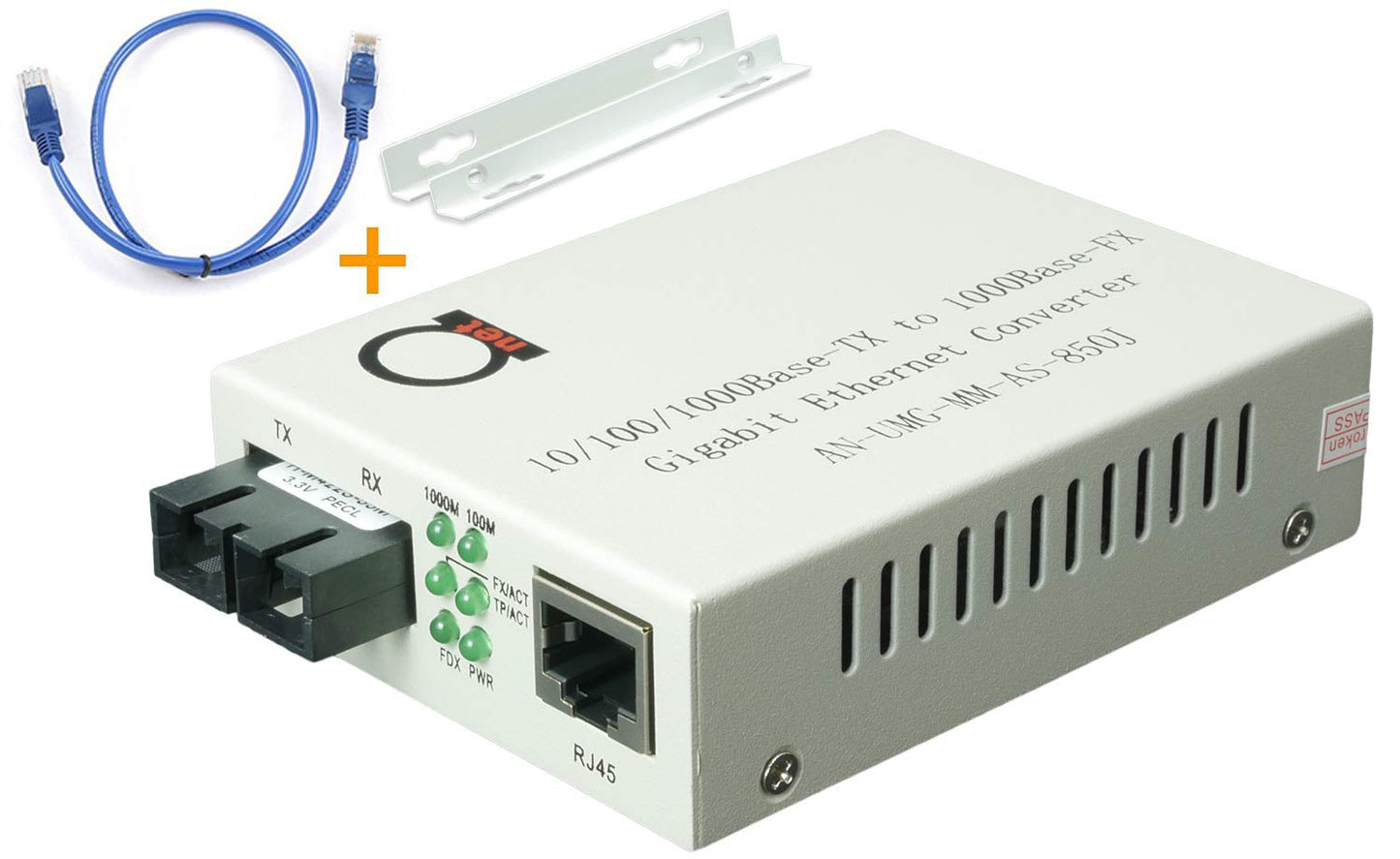
Our review of the Multimode SC 850nm Gigabit Fiber Media Converter finds it best suited for small network upgrades where a simple, reliable fiber-to-copper link is needed. The single biggest reason to buy is its plug-and-play convenience combined with true auto sensing across 10/100/1000 Mbps, which removes the usual negotiating headaches when connecting mixed-speed network equipment. Installers and IT generalists will appreciate that it supports multimode fiber to 550 m and includes a free Cat5e cable so you can get a link running immediately.
Key Features
- Auto Sensing Speed: Automatically adapts between 10/100/1000 Mbps so the converter works with legacy Fast Ethernet and modern Gigabit switches without manual configuration.
- Multimode Fiber Reach: Extends multimode fiber links up to 550 m (0.34 miles) at 850 nm, useful for campus or building-to-building connections within the supported distance.
- Dual Speed Fiber Mode: Configurable by dip switch to choose 1000Base-SX or 100Base-SX for easier interoperation with existing fiber nodes.
- Jumbo Frame and LLF: Supports jumbo frames and low latency features for improved end-to-end TCP performance in throughput-sensitive setups.
- Plug & Play: No driver or complex setup required-simply connect the SC fiber and an RJ45 UTP cable and the link comes up.
- Included Patch Cable: Ships with a 1 m Cat5e UTP cable so a basic test or short run can be completed out of the box.
Who It's For
This converter is ideal for IT technicians, small business owners, and facilities teams who need a straightforward fiber-to-Ethernet bridge without configuring managed optics. It fits installations that use multimode fiber and require reliable Gigabit-capable links up to about 550 m.
It is not intended for single-mode fiber runs or long-haul backbone links beyond the multimode distance limit, nor for environments that demand advanced managed features or optical power monitoring. Enterprises needing centralized management or SFP modularity should consider managed transceivers instead.
Pros & Cons
Pros
- Easy plug-and-play operation removes setup complexity for quick deployments.
- Auto sensing across 10/100/1000 Mbps ensures compatibility with mixed-speed networks.
- Support for jumbo frames and LLF can improve throughput for TCP-heavy traffic.
- Includes a free 1 m Cat5e cable so testing is immediate after unboxing.
Cons
- Designed for multimode fiber only at 850 nm, so it cannot be used on single-mode fiber links.
- It is a simple media converter without advanced management or monitoring features found in higher-end models.
Specifications
| Brand | ADnet |
| Fiber Type | Multimode fiber only |
| Wavelength | 850 nm |
| Connector | SC duplex |
| Max Fiber Distance | 550 m (0.34 miles) |
| Copper Port | UTP RJ45 10/100/1000 Auto Sensing |
| Special Features | Jumbo Frame, LLF, dual speed fiber mode |
Our Verdict
The Multimode SC 850nm Gigabit Fiber Media Converter is a practical, costeffective choice for teams needing a no-frills fiber-to-Ethernet link that just works. Its auto sensing and multimode reach make it good value for campus, branch office, or lab connections where management features are not required.
Frequently Asked Questions
Can this unit be used with single-mode fiber?
No. The converter uses an 850 nm wavelength and is specified for multimode fiber only.
Does it require configuration to switch between 100 Mbps and 1000 Mbps on fiber?
It supports a dip switch to select 100Base-SX or 1000Base-SX, and the RJ45 port auto senses 10/100/1000 Mbps.
Is any cable included in the box?
Yes, a free 1 m Cat5e UTP patch cable is included for immediate testing or short runs.
Editor's Take
This multimode SC 850nm Gigabit Fiber Media Converter is a practical, plug-and-play solution for short campus or branch links; it delivers auto sensing 10/100/1000 connectivity and valuable jumbo frame support at a good value for deployments that do not need advanced management.

Recently viewed
Recently viewed products will appear here as customers browse the store.