

Ooma Provisioned Yealink T34W Wi-Fi IP Business Phone - Reliable
Ooma Provisioned Yealink T34W Wi-Fi IP Business Phone - Reliable
Price subject to change. Tap below for current.
Couldn't load pickup availability
Our review of the Ooma Provisioned Yealink T34W finds it best suited to small and mid-size teams that need a reliable, feature-rich desk phone tied to a cloud service. The single biggest reason to buy is the combination of a bright color display, dual-band Wi-Fi and integrated business telephony features through Ooma Office, which makes setup and remote calling straightforward. This phone is provisioned specifically for use with the Ooma Office platform, so it delivers a streamlined experience for users who plan to adopt that cloud phone service.
Key Features
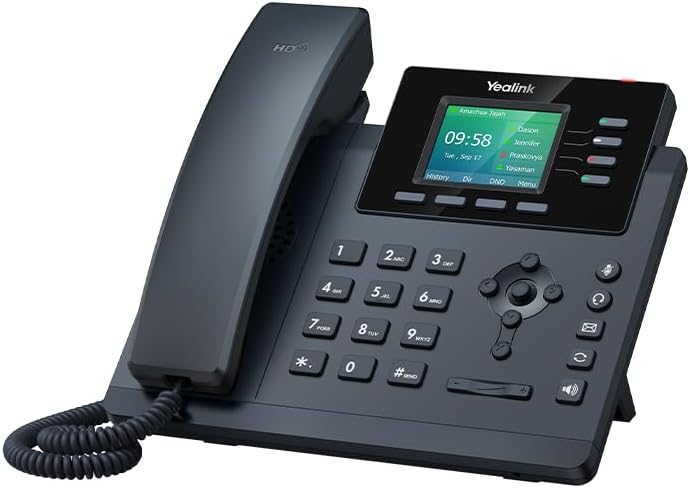
- Large color display: The extra-large 320x240-pixel backlit screen makes menus, caller ID and feature labels easy to read at a glance.
- Wi-Fi and wired connectivity: Dual-band 2.4GHz and 5GHz Wi-Fi plus dual-port Gigabit Ethernet with PoE provides flexible placement and reliable network performance.
- Multi-line capability: Support for up to 4 SIP lines and 5-way audio conferences enables small teams to manage multiple calls without additional hardware.
- HD audio and headset support: High-definition audio and a USB 2.0 port for headsets improve call clarity for frequent callers and receptionists.
- Ooma Office integration: Works only with the Ooma Office cloud service, giving access to virtual receptionist, desktop and mobile apps, and add-on features like videoconferencing.
- Fast activation: A downloadable installation guide and 24/7 support mean businesses can provision and start calling within minutes of unboxing.
Who It's For
The T34W is ideal for businesses already committed to the Ooma Office ecosystem or those evaluating cloud-based VoIP with easy provisioning and a business-grade handset. Remote workers who need to use the Ooma Office desktop and mobile app alongside a reliable desk phone will appreciate the Wi-Fi option and PoE support for flexible placement.
It is not for organizations that want a standalone SIP phone with broad carrier compatibility, since this model works only with the Ooma Office phone service. Companies that require dedicated built-in video or highly customized on-premises PBX features should look at other models or platforms.
Pros & Cons
Pros
- Clear, large color display and HD audio improve usability and call quality.
- Dual-band Wi-Fi plus Gigabit Ethernet and PoE offer flexible deployment options.
- Supports multiple SIP lines and 5-way conferencing for small office collaboration.
- Provisioned for Ooma Office with quick activation and 24/7 support simplifies setup.
Cons
- Only compatible with the Ooma Office cloud service, so it is not a general-purpose SIP handset.
- Does not include built-in video-videoconferencing requires Ooma Office features rather than the phone itself.
Specifications
| Display | 320x240-pixel color backlit screen |
| Lines | Up to 4 SIP lines |
| Audio | High-definition (HD) audio and 5-way conferencing |
| Connectivity | Dual-band 2.4GHz & 5GHz Wi-Fi; dual-port Gigabit Ethernet |
| Power | Integrated Power over Ethernet (PoE) |
| Ports | USB 2.0 port for headset connections |
| Service | Works only with Ooma Office cloud-based VoIP service |
Our Verdict
The Yealink T34W provisioned for Ooma is a practical, cost-effective desk phone for businesses using the Ooma Office platform, delivering a clear display, reliable Wi-Fi and useful multi-line features. It represents good value for teams who need a dependable office handset tightly integrated with cloud telephony, but organizations seeking broad SIP compatibility or built-in video should consider alternatives.
Frequently Asked Questions
Does this phone work with other VoIP providers?
The T34W in this listing is provisioned to work only with the Ooma Office cloud service and will not operate with other providers out of the box.
Can I use the phone without Ethernet?
Yes; the phone supports dual-band 2.4GHz and 5GHz Wi-Fi, so it can be used without a wired Ethernet connection if your network supports it.
How quickly can I set it up?
You can activate your Ooma Office account and start calling within minutes using the downloadable installation guide, with 24/7 phone and chat support available if needed.
Editor's Take
The Yealink T34W provisioned for Ooma Office is a reliable, cost-effective desk phone for businesses using Ooma, offering a large color display, dual-band Wi-Fi, PoE and multi-line features that deliver strong value for cloud-based telephony.

Recently viewed
Recently viewed products will appear here as customers browse the store.