

Pankia Box Physical Click Keyboard Auto Clicker - Hands-Free Clicks
Pankia Box Physical Click Keyboard Auto Clicker - Hands-Free Clicks
Price subject to change. Tap below for current.
Couldn't load pickup availability
In this review of the Pankia Box Physical Click Keyboard Auto Clicker, the bottom line is simple: it is a practical hands-free clicking solution for repetitive keyboard or mouse tasks. The unit is aimed at users who want to automate frequent clicks without software - think repeated keystrokes for browser games or long data-entry sessions - and its biggest selling point is the physical clicking arm that lets you completely release your hands while maintaining adjustable click speeds.
Key Features
- Release Your Hands: The clicking arm sits on a keyboard or mouse and performs repeated presses so the user can step away from the device while tasks continue.
- Adjustable Speed: Three separate ports offer adjustable rates so different tasks can run at tailored click speeds without changing hardware.
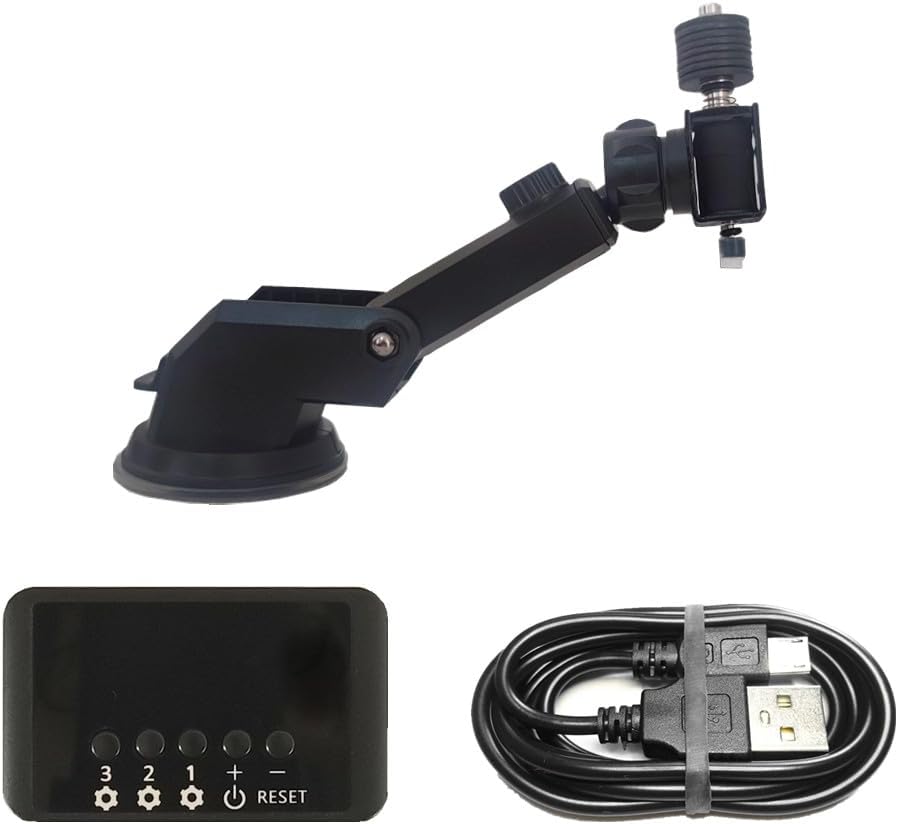
- Clicking Arm Design: The arm includes three adjustable sections that help position it accurately over keys and mouse buttons for reliable actuation.
- Wide Compatibility: It supports both keyboard and mouse use, making it useful across a range of clicking applications and peripherals.
- Simple Power and Controls: The device runs from a USB cable with straightforward port controls so setup is fast and predictable.
- Satisfaction Guarantee: The manufacturer provides customer support aimed at resolving issues and ensuring product quality.
Who It's For
The Pankia Box is best for hobbyist gamers automating repetitive in-game clicks and for users doing long, monotonous input tasks who need a low-cost physical solution. It appeals to people who prefer a hardware approach rather than installing software auto-clickers and to anyone who wants to free their hands for short breaks while a task continues.
This is not for users who need mobile touch-screen automation without buying a separate clicking head, nor for workflows that require extremely fast clicking - the device should not be used above 5 clicks per second on the clicking arm to avoid heat damage and long-term wear.
Pros & Cons
Pros
- Functionality: reliably automates keyboard and mouse clicks so repetitive tasks finish without manual input.
- Value for money: customers note the set is affordable compared with software or custom rigs.
- Ease of setup: simple USB power, three ports with independent speed control and an adjustable arm for alignment.
- Speed options: three preset port ranges give flexibility for different tasks.
Cons
- Limitation on speed: the clicking arm must not exceed 5 clicks per second or it may overheat, limiting very high-frequency use.
- Phone use requires an extra clicking head, so it is not plug-and-play for touch screens.
Specifications
| Model | Pankia Box Physical Click Auto Clicker |
| Ports / Speeds | Port1: 15 clicks/s, Port2: 20 clicks/s, Port3: 25 clicks/s (adjustable) |
| Click Duration Range | 15 to 999 seconds per click setting per port |
| Included Accessories | Clicking Arm, USB Cable, Mouse Fixed Pad |
| Power Requirement | USB 5V 2A or above recommended |
| Compatibility | Keyboard and mouse; optional clicking head needed for phone screens |
Our Verdict
The Pankia Box is a useful, affordable hands-free auto clicker for anyone who needs reliable, low-effort keyboard or mouse clicks. It offers good value thanks to its adjustable speeds and simple setup, but users who need very high-frequency clicking or mobile touch automation should plan for those limitations. Overall, it is a practical buy for hobbyists and repetitive-task users.
Frequently Asked Questions
Can the clicking arm be used on phones?
The clicking arm is designed for keyboards and mice; to click a phone screen you need to fit a separate clicking head sold for touch use.
What power supply is required?
Use a USB power supply rated 5V 2A or higher as recommended to ensure stable operation.
Is there a risk of damaging the arm if used too fast?
Yes, the clicking arm should not be operated above 5 clicks per second to avoid heating and potential damage.
Editor's Take
The Pankia Box is a practical, affordable hands-free auto clicker that automates keyboard and mouse clicks with adjustable speeds and easy USB setup; avoid using the clicking arm above 5 clicks per second.

Recently viewed
Recently viewed products will appear here as customers browse the store.