

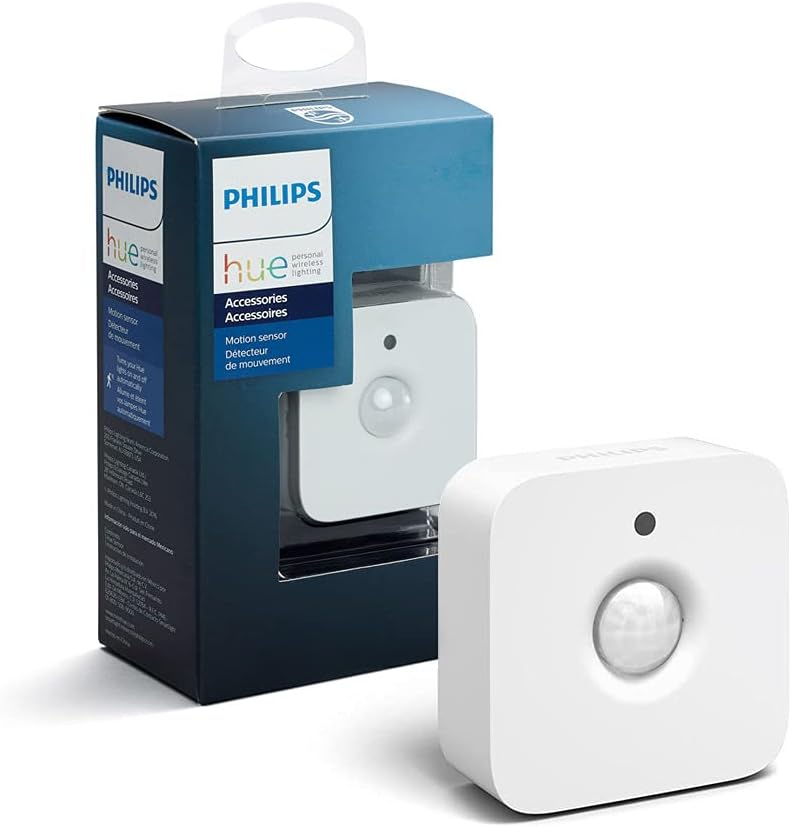
Philips Hue Motion Sensor - Easy, Wireless Motion Lighting
Philips Hue Motion Sensor - Easy, Wireless Motion Lighting
Price subject to change. Tap below for current.
Couldn't load pickup availability
Our review of the Philips Hue Motion Sensor finds it best suited for people who want a simple way to automate Hue lights without running wires. The single biggest reason to buy is how effortlessly it triggers lights based on movement while relying on battery power and a magnetic mount for flexible placement. Setup requires a Hue Bridge, so this review focuses on buyers already invested in the Hue ecosystem who value reliable connectivity and the convenience of personalized motion-triggered lighting scenes.
Key Features
- Wireless battery operation: The sensor runs on two AAA batteries so it can be placed anywhere without needing power outlets or wiring.
- Hue Bridge required: Integrates with the Hue Bridge to enable remote automations and stable control without burdening your Wi-Fi network.
- Motion-triggered lighting: Automatically turns lights on when movement is detected, useful for hallways, stairways and late-night trips.
- Flexible mounting: Can be mounted with a magnetic bracket or a single screw, allowing quick repositioning or wall attachment.
- Customizable behavior: The Hue app lets you tailor the sensor so lights come on bright and cool in the morning and low amber in the evening.
Who It's For
The sensor is ideal for existing Hue users who already own a Hue Bridge and want to add motion-based automation in areas like hallways, closets or stairwells. It is also a good pick for renters or those who prefer a no-drill, no-wire solution thanks to the magnetic mount and battery power.
People who do not own a Hue Bridge, or who expect full motion sensitivity tuning without occasional adjustment, should look elsewhere until they commit to the Hue system; some customers report mixed results with sensitivity and light-level behavior, so those who need absolute consistency for critical areas may want to test placement before relying on it.
Pros & Cons
Pros
- Easy, no-wire installation using two AAA batteries and a magnetic mount.
- Strong connectivity through the Hue Bridge for stable automations and remote control.
- Customizable scenes in the Hue app let you set different color temperatures and brightness by time of day.
- Good battery life reported by many customers, reducing maintenance.
Cons
- Sensitivity and light level behavior receive mixed feedback, so some fine-tuning may be required for consistent activation.
- Requires a Hue Bridge to unlock full functionality, which adds cost for new users.
Specifications
| Included in box | Hue Motion Sensor and two AAA batteries |
| Power source | Battery powered (two AAA) |
| Connectivity requirement | Requires Hue Bridge for automations and remote control |
| Mounting options | Magnetic mount or single screw |
| Primary function | Trigger lights with movement |
| App support | Hue app for personalization and schedules |
Our Verdict
The Philips Hue Motion Sensor is a practical extension for anyone already invested in the Hue ecosystem who wants simple, wireless motion-triggered lighting. It offers easy installation, reliable Bridge-based connectivity and useful app customization; prospective buyers should be prepared to tweak placement for ideal sensitivity and must own a Hue Bridge to access the full feature set.
Frequently Asked Questions
Do I need a hub to use this sensor?
Yes, a Hue Bridge is required to enable automations, remote control and stable connectivity.
What powers the sensor and how long do batteries last?
The sensor uses two AAA batteries; many customers report good battery life, though actual duration depends on usage and settings.
Can I change how lights behave when motion is detected?
Yes, the Hue app lets you customize brightness and color temperature depending on time of day for tailored responses.
Editor's Take
The Philips Hue Motion Sensor is a practical add-on for Hue users seeking easy, wireless motion-triggered lighting with reliable Bridge connectivity and app customization; expect some sensitivity tuning and a required Hue Bridge.

Recently viewed
Recently viewed products will appear here as customers browse the store.